







Question: Complete returnSeconds, returnMinute, and returnHour methods. After completing and running the program, it will display as such Current Time in Milliseconds: 1614267091752 14:43:03 GMT So
Complete returnSeconds, returnMinute, and returnHour methods. After completing and running the program, it will display as such
Current Time in Milliseconds: 1614267091752 14:43:03 GMT
So it is displaying time hh: mm: ss format. If the hour is 4, then hh should display 04 instead of 4. And mm and ss are the same format as the format of hh.
Each method will take milliseconds, and its type is long.
returnSeconds method will return seconds (ss part from hh:mm:ss GMT)
returnMinute will return minutes (mm part from hh:mm:ss GMT)
returnHour will return an hour value. (hh part from hh:mm:ss GMT)
In the main method, Use System.currentTimeMillis() to generate the milliseconds, and each method will take that value.
Then, you will call each method and display the output as the sample runs below.
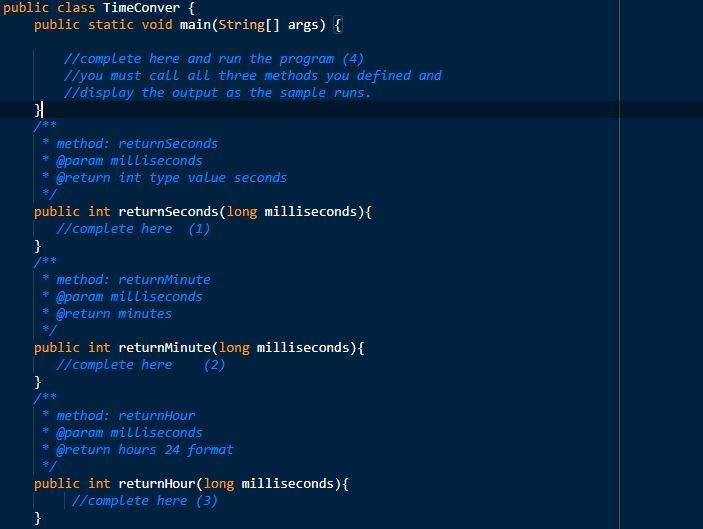
public class TimeConver { public static void main(String[] args) { //complete here and run the program (4) //you must call all three methods you defined and //display the output as the sample runs. * method: returnSeconds * @param milliseconds * @return int type value seconds */ public int returnSeconds(long milliseconds){ // complete here (1) } * method: returnMinute * @param milliseconds * @return minutes public int returnMinute(long milliseconds) { // complete here (2) } * method: returnHour * @param milliseconds * @return hours 24 format */ public int returnHour(long milliseconds) { 1/complete here (3) }
Step by Step Solution
There are 3 Steps involved in it

Get step-by-step solutions from verified subject matter experts
 Study Help