







Question: Complete Steps 3-6 in Final Project requirements document. Step 3: Map the ER diagram into relational schema. Show the resulting relational schema: show your

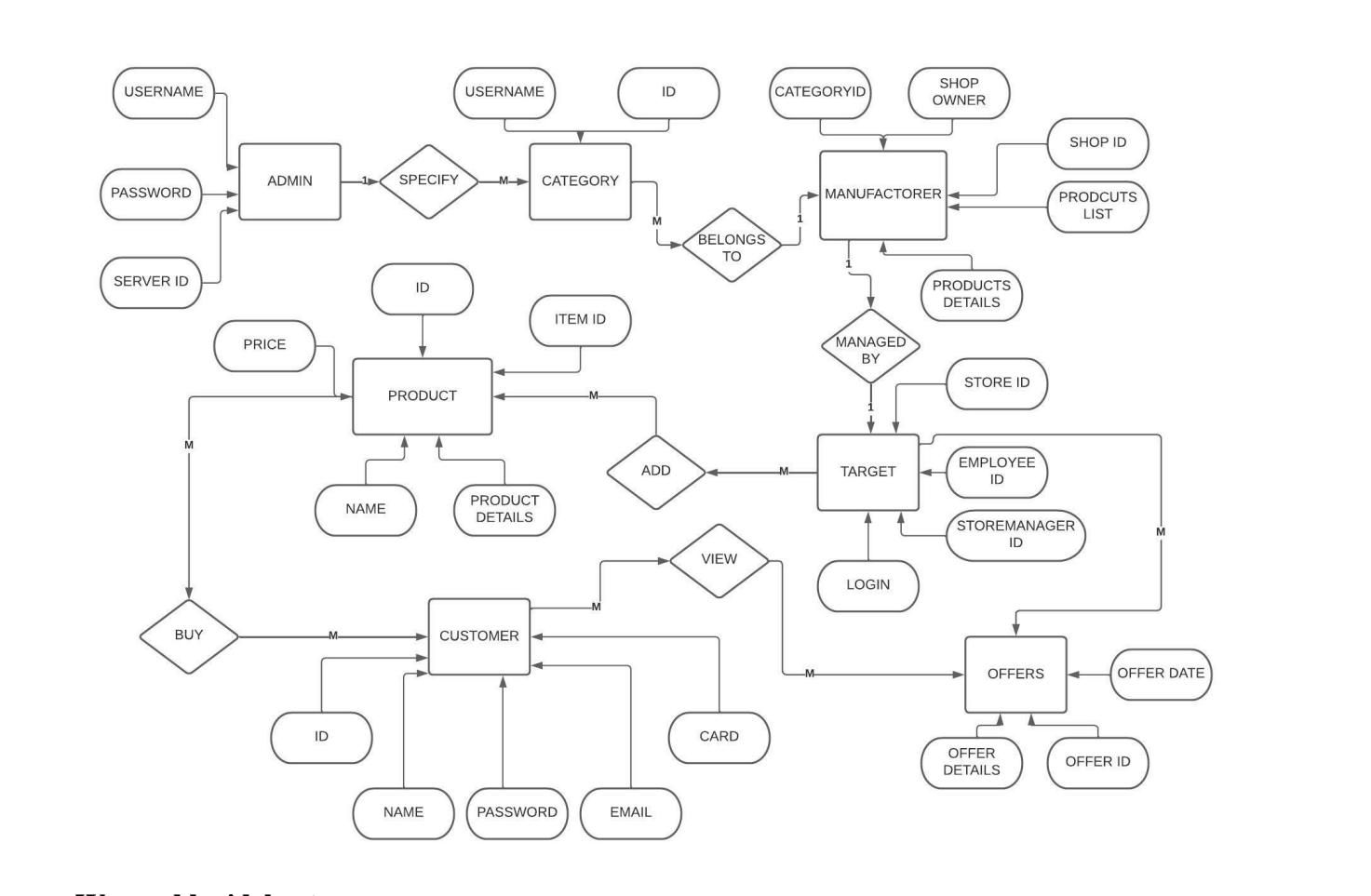
Complete Steps 3-6 in Final Project requirements document. Step 3: Map the ER diagram into relational schema. Show the resulting relational schema: show your tables, primary keys and foreign keys. Step 4: Discuss database normalization rules on your tables. Show the functional dependencies that violate 1st, 2nd and 3rd normal forms. Normalize your table(s) into 3NF. Step 5: Show the final relational schema after normalization. Step 6: Create tables using appropriate SQL command. Make sure to include primary key and foreign key definitions and triggered actions on foreign keys. Decide also about NOT NULL constraints and DEFAULT values for the attributes. USERNAME PASSWORD SERVER ID M BUY ADMIN PRICE -M- ID NAME SPECIFY ID P PRODUCT USERNAME NAME M PRODUCT DETAILS CUSTOMER CATEGORY ITEM ID PASSWORD -M- -M M EMAIL ID ADD BELONGS TO VIEW CARD CATEGORYID -M- -M- MANUFACTORER MANAGED BY DO TARGET SHOP OWNER LOGIN PRODUCTS DETAILS STORE ID EMPLOYEE ID OFFERS SHOP ID STOREMANAGER ID OFFER DETAILS PRODCUTS LIST M OFFER DATE OFFER ID
Step by Step Solution
There are 3 Steps involved in it
Youve provided an ER EntityRelationship diagram and a list of steps from a project requirements document Lets go through the steps one by one Step 3 Map the ER diagram into relational schema In the re... View full answer

Get step-by-step solutions from verified subject matter experts
 Study Help