







Question: Complete Table 1 : Constants and Equations, Inputs Complete Table 2 : Calculate Volume of Cylinder Radius length, entered in cell F 1 3 ,
Complete Table : Constants and Equations, Inputs Complete Table : Calculate Volume of Cylinder
Radius length, entered in cell F should begin at and increase by increments of
as defined in Table Numbers should be centered and formatted to two decimal
places. The Table should end at cell F The list of numbers should change
automatically if is updated to a different value.
Using the Volume Equation with Constraint, calculate the Volume of the cylinder SLS
rocket and fill in the rest of Table Numbers should be centered and formatted to
two decimal places. The Volume values should change depending upon what is input
for the Constraint C in Table
Complete Table : Analysis
In cell K create a formula to determine the Maximum Volume of the cylinder.
In cell K create a formula to determine the Radius corresponding to the Maximum
Volume.
The second column in Table should be centered with numbers formatted to decimal
places.
Apply conditional formatting to Table so that the cells corresponding to the Maximum
Volume and associated Radius r with values found in K and K have a light red
background with dark red text. Table should highlight the results found in Table
Complete Table : Final Dimensions of SLS rocket and Verification
In cell K calculate the SLS rocket height using the constraint equation in C
In cell K recalculate the SLS rocket volume by using and found in Tables and
Use the equation shown in cell C for this calculation.
In cell K answer the question "Does the radius exceed the maximum allowed radius
length" with a "YES" or NO based on the user input from cell C Graphing
Graph Cylinder Volume V versus the Radius with proper plotting techniques and move this graph to a new sheet named Volume Graph. Radius should be shown on the horizontal axis. The graph should be formatted so that NO negative values are plotted on the vertical axis representing Volume.
NOTE: The following test cases will be evaluated to verify the accuracy of your spreadsheet. Change your input and verify the outputs to the following test cases:
tableTest Case,CIncrement dRRmax,Vmax,rhrRmaxNOYESNONO SLS dimensions must satisfy the requirement that the sum of the height plus twenty times the radius should equal a user defined value
What dimensions and h produce an SLS rocket with the largest volume storage capacity?
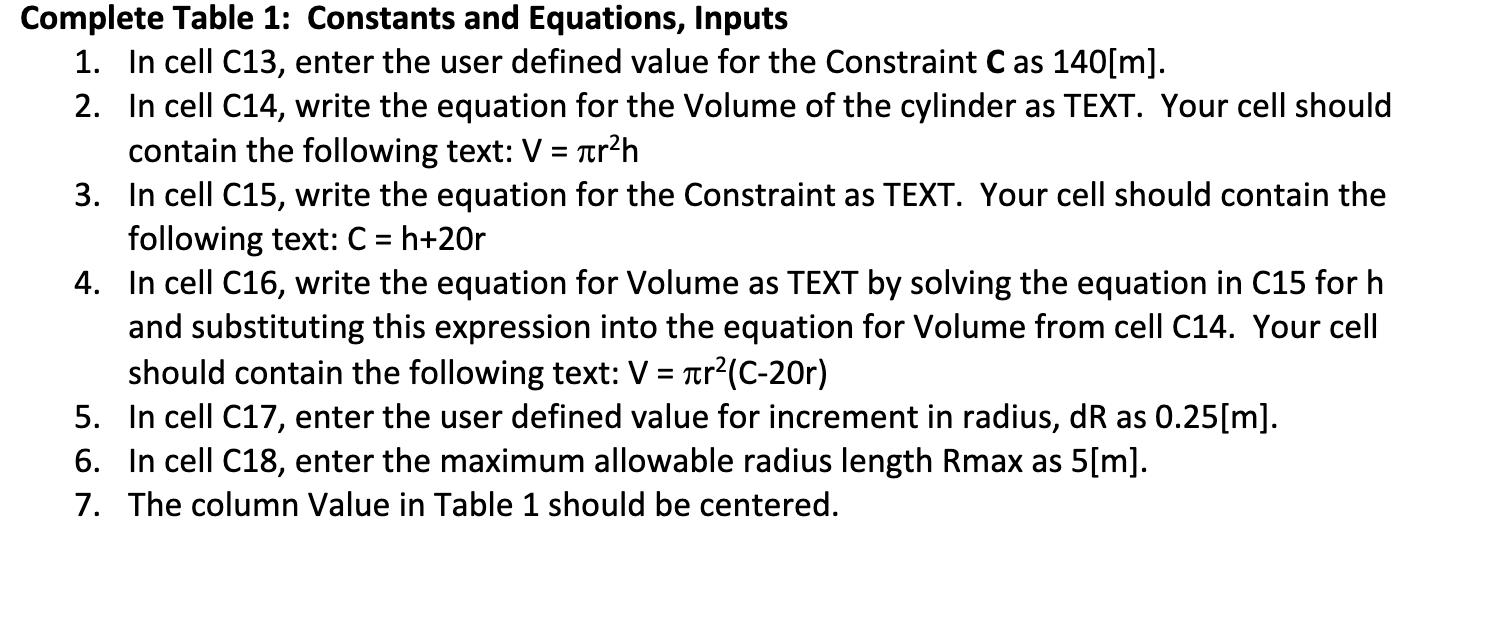
In cell C enter the user defined value for the Constraint C as m
In cell C write the equation for the Volume of the cylinder as TEXT. Your cell should
contain the following text:
In cell C write the equation for the Constraint as TEXT. Your cell should contain the
following text:
In cell C write the equation for Volume as TEXT by solving the equation in C for h
and substituting this expression into the equation for Volume from cell C Your cell
should contain the following text:
In cell C enter the user defined value for increment in radius, dR as m
In cell C enter the maximum allowable radius length Rmax as m
The column Value in Table should be centered. PLEASE SHOW STEP BY STEP.
Step by Step Solution
There are 3 Steps involved in it
1 Expert Approved Answer
Step: 1 Unlock

Question Has Been Solved by an Expert!
Get step-by-step solutions from verified subject matter experts
Step: 2 Unlock
Step: 3 Unlock
 Study Help