







Question: Complete the attached tender summary form using the following information: IndirectCosts(IDC)=Contingency(risk/opportunityallowance)=Margin=$1,650,000$700,000$9%ofsubtotalcost Distribute both indirect costs and contingency to all appropriate items (i.e. excluding the items
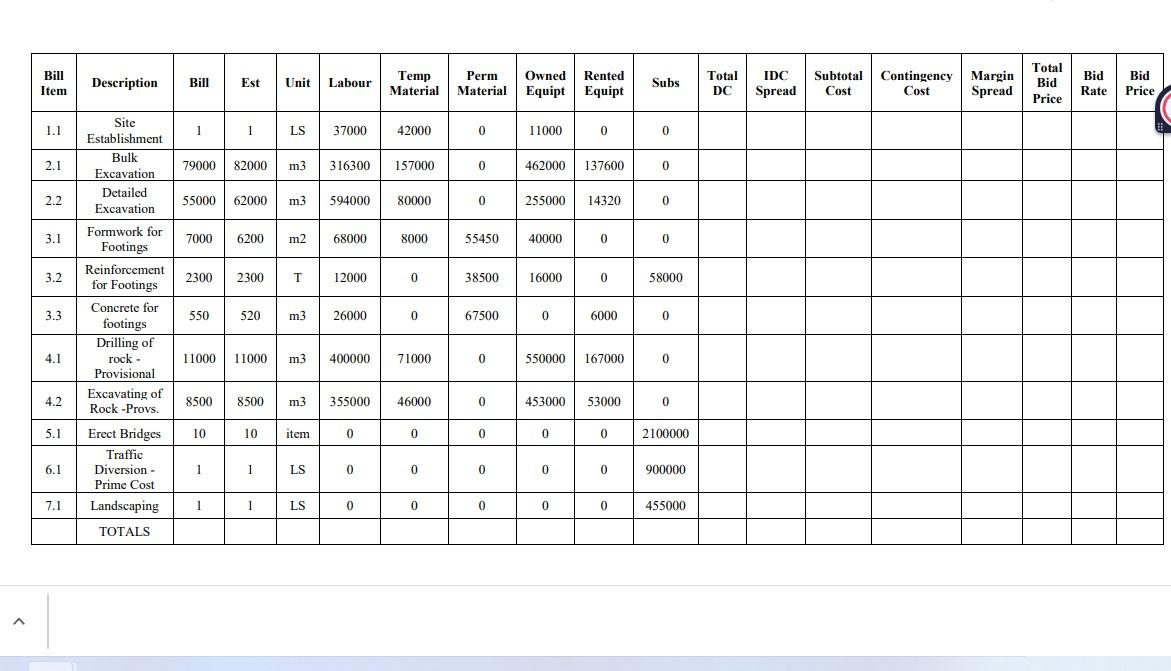
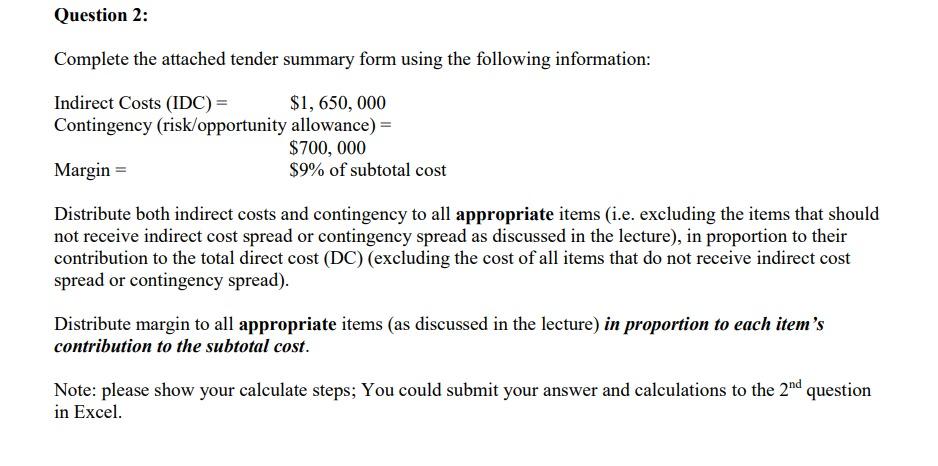
Complete the attached tender summary form using the following information: IndirectCosts(IDC)=Contingency(risk/opportunityallowance)=Margin=$1,650,000$700,000$9%ofsubtotalcost Distribute both indirect costs and contingency to all appropriate items (i.e. excluding the items that should not receive indirect cost spread or contingency spread as discussed in the lecture), in proportion to their contribution to the total direct cost (DC) (excluding the cost of all items that do not receive indirect cost spread or contingency spread). Distribute margin to all appropriate items (as discussed in the lecture) in proportion to each item's contribution to the subtotal cost. Note: please show your calculate steps; You could submit your answer and calculations to the 2nd question in Excel. Complete the attached tender summary form using the following information: IndirectCosts(IDC)=Contingency(risk/opportunityallowance)=Margin=$1,650,000$700,000$9%ofsubtotalcost Distribute both indirect costs and contingency to all appropriate items (i.e. excluding the items that should not receive indirect cost spread or contingency spread as discussed in the lecture), in proportion to their contribution to the total direct cost (DC) (excluding the cost of all items that do not receive indirect cost spread or contingency spread). Distribute margin to all appropriate items (as discussed in the lecture) in proportion to each item's contribution to the subtotal cost. Note: please show your calculate steps; You could submit your answer and calculations to the 2nd question in Excel
Step by Step Solution
There are 3 Steps involved in it

Get step-by-step solutions from verified subject matter experts
 Study Help