







Question: Complete the Down OK? column. Use nested IF functions in cell K5. Include an AND function as part of the criteria in the second IF
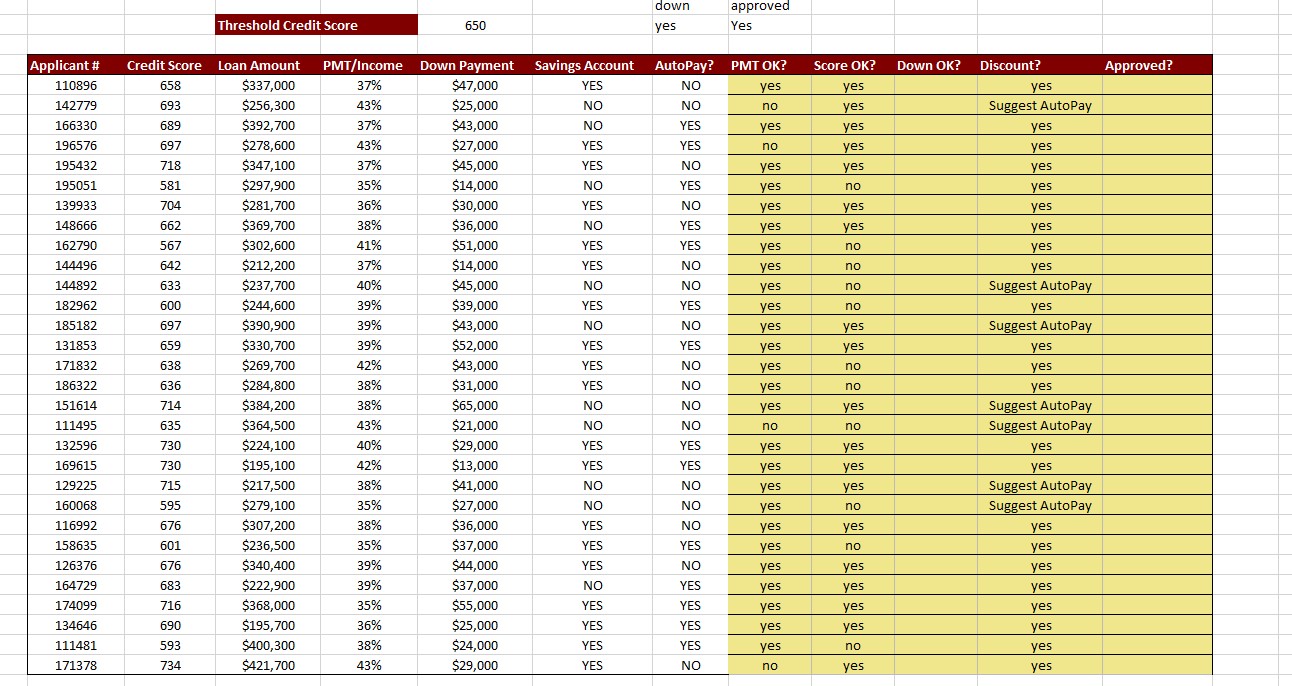
Complete the "Down OK?" column.
- Use nested IF functions in cell K5. Include an AND function as part of the criteria in the second IF function.
- Return Yes if the "Down Payment" (cell F5) exceeds 10% of the "Loan Amount" (cell D5) or if the "Down Payment" exceeds 5% of the "Loan Amount" and the "PMT/Income" ratio (cell E5) is less than 40%.
- Otherwise return No.
- Copy your formula down to complete the "Down OK?" column.
and
"Approved?" column.
- Use the three nested IF functions with an AND function as part of the criteria for the first IF function in cell M5.
- Return Yes if "PMT OK?" (cell I5), "Score OK?" (cell J5), and "Down OK?" (cell K5) are all Yes.
- Return "Loan too large" (without the quotes) if "PMT OK?" is No.
- Return "Score too low" (without the quotes) if "Score OK?" is No.
- Otherwise, return "Down too low" (without the quotes).
- Notice that if "PMT OK?" is "No", only "Loan too large" is displayed, regardless of the status of "Score OK?" and "Down OK?" See the reading for details on why. Copy your function down to complete the "Approved?" column.
(can you please do both)
Step by Step Solution
There are 3 Steps involved in it
1 Expert Approved Answer
Step: 1 Unlock

Question Has Been Solved by an Expert!
Get step-by-step solutions from verified subject matter experts
Step: 2 Unlock
Step: 3 Unlock
 Study Help