Question: Complete the following code and make sure it runs correctly (it is java): Follow all the instructions: This is the fish.txt given: One fish two
Complete the following code and make sure it runs correctly (it is java): Follow all the instructions:
 This is the fish.txt given:
One fish two fish red fish blue fish. Black fish blue fish old fish new fish. This one has a little star. This one has a little car. Say! What a lot of fish there are.
This is the index maker java given:
/* * This program takes a text file, creates an index (by line numbers) * for all the words in the file and writes the index * into the output file. The program takes input and output file names * from the command-line args or prompts the user for the file names. */ import java.util.Scanner; import java.io.*; public class IndexMaker { public static void main(String[] args) throws IOException { Scanner keyboard = new Scanner(System.in); String fileName; // Open input file: if (args.length > 0) fileName = args[0]; else { System.out.print(" Enter input file name: "); fileName = keyboard.nextLine().trim(); } BufferedReader inputFile = new BufferedReader(new FileReader(fileName), 1024); // Create output file: if (args.length > 1) fileName = args[1]; else { System.out.print(" Enter output file name: "); fileName = keyboard.nextLine().trim(); } PrintWriter outputFile = new PrintWriter(new FileWriter(fileName)); // Create index: DocumentIndex index = new DocumentIndex(); String line; int lineNum = 0; while ((line = inputFile.readLine()) != null) { lineNum++; index.addAllWords(line, lineNum); } // Save index: for (IndexEntry entry : index) outputFile.println(entry); // Finish: inputFile.close(); outputFile.close(); keyboard.close(); System.out.println("Done."); } }
This is all under one assignment to make sure to complete everything, if you have any questions please leave a comment, do not ignore the question as it is important
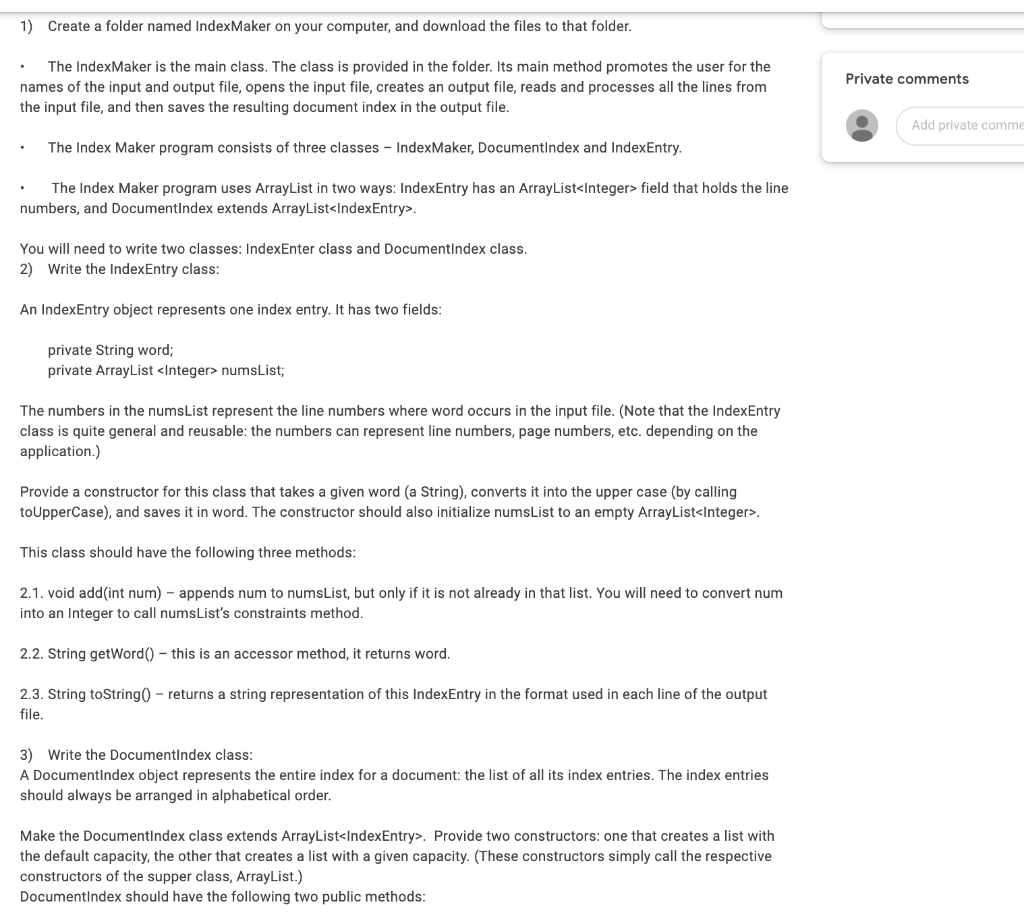
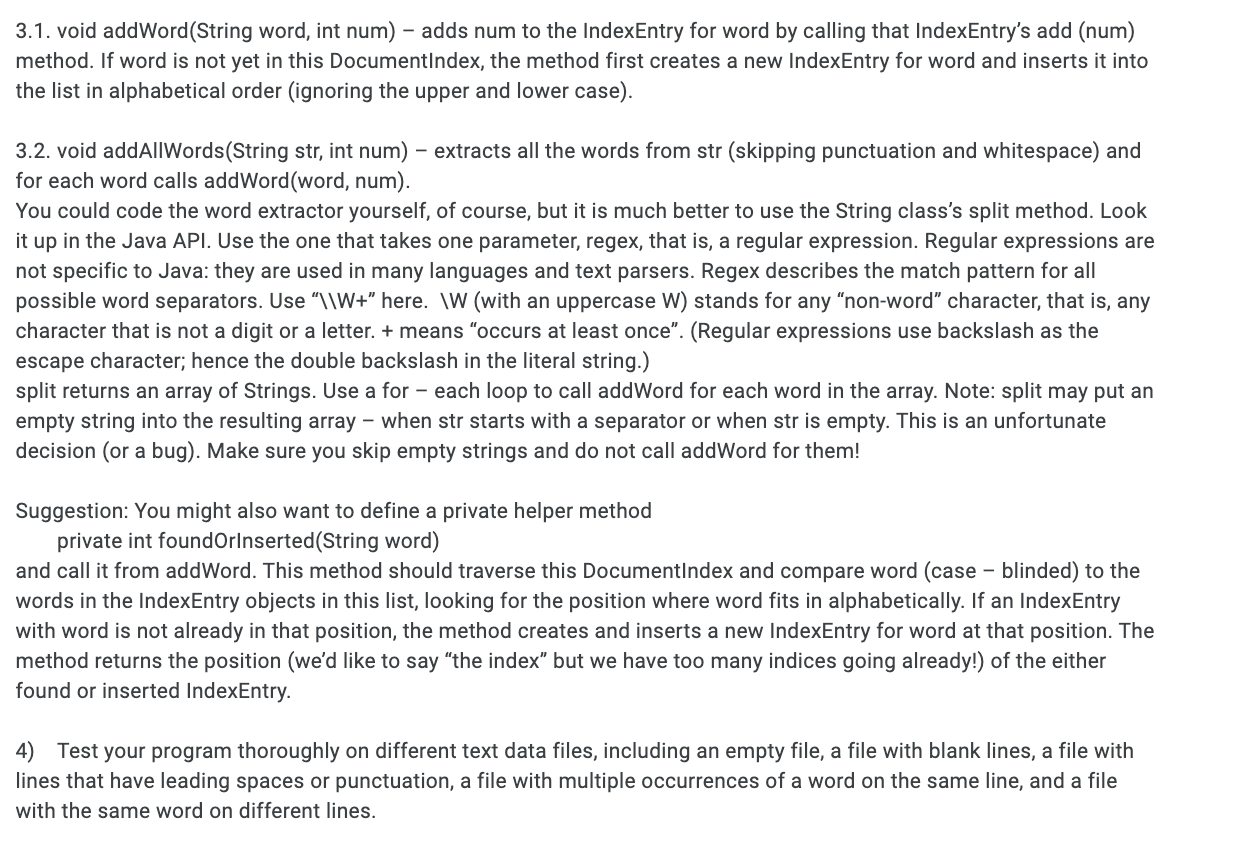
1) Create a folder named Index Maker on your computer, and download the files to that folder. Private comments The Index Maker is the main class. The class is provided in the folder. Its main method promotes the user for the names of the input and output file, opens the input file, creates an output file, reads and processes all the lines from the input file, and then saves the resulting document index in the output file. Add private comme The Index Maker program consists of three classes - Index Maker, DocumentIndex and IndexEntry. The Index Maker program uses ArrayList in two ways: IndexEntry has an ArrayList. You will need to write two classes: IndexEnter class and DocumentIndex class. 2) Write the IndexEntry class: An IndexEntry object represents one index entry. It has two fields: private String word; private ArrayList numsList; The numbers in the numsList represent the line numbers where word occurs in the input file. (Note that the IndexEntry class is quite general and reusable: the numbers can represent line numbers, page numbers, etc. depending on the application.) Provide a constructor for this class that takes a given word (a String), converts it into the upper case (by calling to UpperCase), and saves it in word. The constructor should also initialize numsList to an empty ArrayList. This class should have the following three methods: 2.1. void add(int num) - appends num to numsList, but only if it is not already in that list. You will need to convert num into an Integer to call numsList's constraints method. 2.2. String getWord - this is an accessor method, it returns word. 2.3. String toString0 - returns a string representation of this IndexEntry in the format used in each line of the output file. 3) Write the Documentindex class: A DocumentIndex object represents the entire index for a document: the list of all its index entries. The index entries should always be arranged in alphabetical order. Make the DocumentIndex class extends ArrayList. Provide two constructors: one that creates a list with the default capacity, the other that creates a list with a given capacity. These constructors simply call the respective constructors of the supper class, ArrayList.) DocumentIndex should have the following two public methods: 3.1. void addWord(String word, int num) - adds num to the IndexEntry for word by calling that IndexEntry's add (num) method. If word is not yet in this DocumentIndex, the method first creates a new IndexEntry for word and inserts it into the list in alphabetical order (ignoring the upper and lower case). 3.2. void addAllWords(String str, int num) extracts all the words from str (skipping punctuation and whitespace) and for each word calls addWord(word, num). You could code the word extractor yourself, of course, but it is much better to use the String class's split method. Look it up in the Java API. Use the one that takes one parameter, regex, that is, a regular expression. Regular expressions are not specific to Java: they are used in many languages and text parsers. Regex describes the match pattern for all possible word separators. Use 'l\W+ here. WW (with an uppercase W) stands for any non-word character, that is, any character that is not a digit or a letter. + means occurs at least once. (Regular expressions use backslash as the escape character; hence the double backslash in the literal string.) split returns an array of Strings. Use a for each loop to call addWord for each word in the array. Note: split may put an empty string into the resulting array - when str starts with a separator or when str is empty. This is an unfortunate decision (or a bug). Make sure you skip empty strings and do not call addWord for them! Suggestion: You might also want to define a private helper method private int foundOrinserted(String word) and call it from addWord. This method should traverse this DocumentIndex and compare word (case blinded) to the words in the IndexEntry objects in this list, looking for the position where word fits in alphabetically. If an IndexEntry with word is not already in that position, the method creates and inserts a new IndexEntry for word at that position. The method returns the position (we'd like to say "the index" but we have too many indices going already!) of the either found or inserted IndexEntry. 4) Test your program thoroughly on different text data files, including an empty file, a file with blank lines, a file with lines that have leading spaces or punctuation, a file with multiple occurrences of a word on the same line, and a file with the same word on different lines









 Study Help