







Question: Complete the following queries using the Bookstore database and submit as SQL file. 1. View all the customer's (first name, last name, balance) who

Complete the following queries using the Bookstore database and submit as SQL file.
1. View all the customer's (first name, last name, balance) who have an area code of 320 AND have a balance on their account.

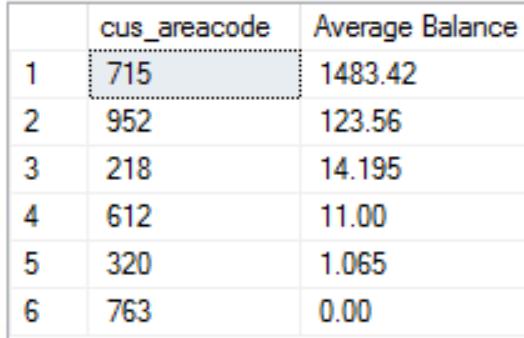
2. View the average balance on all customer accounts by area code. Display in descending order of the average balance with the average column renamed 'Average Balance'.
SELECT field1_name, AVG(field2_name) AS 'Average Balance'
FROM table_name
GROUP BY field1_name
ORDER BY 'Average Balance' DESC;
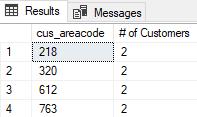
4. Display a list of the number of customers in each area code for area codes with more than one customer. Use the COUNT() aggregate function in the following syntax:
SELECT field1_name, COUNT(field2_name) AS '# of Customers'
FROM table_name
GROUP BY field1_name
HAVING COUNT(field2_name) equality condition;
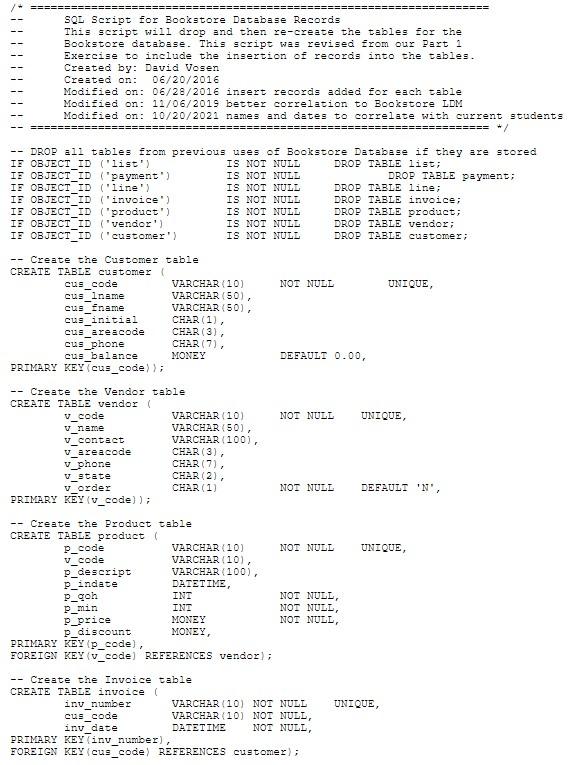
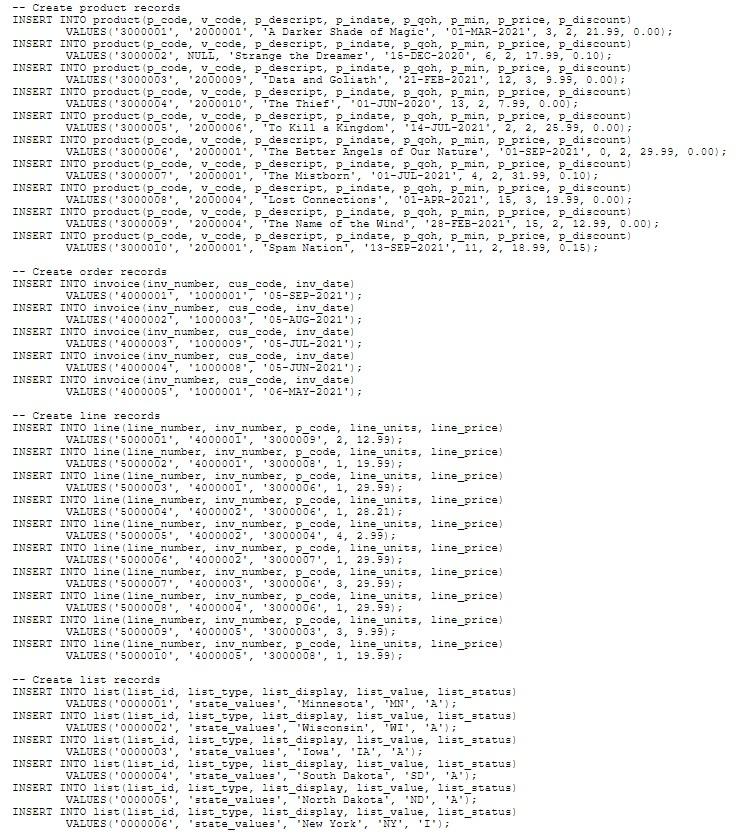
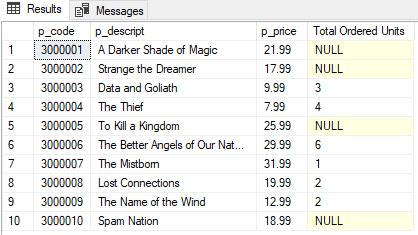
5. Display a list of all the products (code, description, and price), whether or not they have been ordered, and the total units that have been ordered. Use SUM function and GROUP BY in your statement which lists all called fields. You will need to use line_units in your statement.
SQL Script for Bookstore Database Records This script will drop and then re-create the tables for the Bookstore database. This script was revised from our Part 1 Exercise to include the insertion of records into the tables. Created by: David Vosen Created on: 06/20/2016 Modified on: 06/28/2016 insert records added for each table Modified on: 11/06/2019 better correlation to Bookstore LDM Modified on: 10/20/2021 names and dates to correlate with current students ======= ====== ========= */ -- DROP all tables from previous uses of Bookstore IF OBJECT_ID ('list') IF OBJECT ID ("payment") IF OBJECT ID ('line'). IF OBJECT ID ('invoice") IF OBJECT ID ('product'). IF OBJECT ID ('vendor') IF OBJECT_ID ('customer') -- Create the Customer table CREATE TABLE customer ( cus_code cus_iname cus_fname cus_initial cus_areacode -- cus_phone cus_balance PRIMARY KEY (cus_code)); -- Create the Vendor table CREATE TABLE vendor ( v_code v_name v_contact v_areacode v_phone V_state v_order PRIMARY KEY (v_code)); Create the Product CREATE TABLE product ( P_code v_code p_descript Pindate P_goh P_min P_price p_discount. VARCHAR (10) VARCHAR (50), VARCHAR (50), CHAR(1), CHAR (3), CHAR (7), MONEY table inv_number cus_code VARCHAR (10) VARCHAR (50), VARCHAR(100), CHAR(3), CHAR (7), CHAR (2), CHAR (1) IS NOT NULL IS NOT NULL IS NOT NULL IS NOT NULL IS NOT NULL IS NOT NULL IS NOT NULL VARCHAR (10) VARCHAR(10), VARCHAR (100), DATETIME, INT INT MONEY MONEY, PRIMARY KEY (p_code), FOREIGN KEY (v_code) REFERENCES vendor); -- Create the Invoice table CREATE TABLE invoice ( NOT NULL NOT NULL DEFAULT 0.00, NOT NULL Database if they are stored DROP TABLE list; DROP TABLE payment; DROP TABLE line; DROP TABLE invoice; DROP TABLE product; DROP TABLE vendor; DROP TABLE customer; NOT NULL VARCHAR (10) NOT NULL VARCHAR (10) NOT NULL, DATETIME NOT NULL, NOT NULL, NOT NULL, NOT NULL, inv date PRIMARY KEY (inv_number), FOREIGN KEY (cus_code) REFERENCES customer); UNIQUE, UNIQUE, DEFAULT 'N', UNIQUE, UNIQUE,
Step by Step Solution
There are 3 Steps involved in it

Get step-by-step solutions from verified subject matter experts
 Study Help