







Question: Complete the formulas in the spreadsheet below. Select the correct VLOOKUP function in cell C8 to find the unit price for the order quantity. (Type
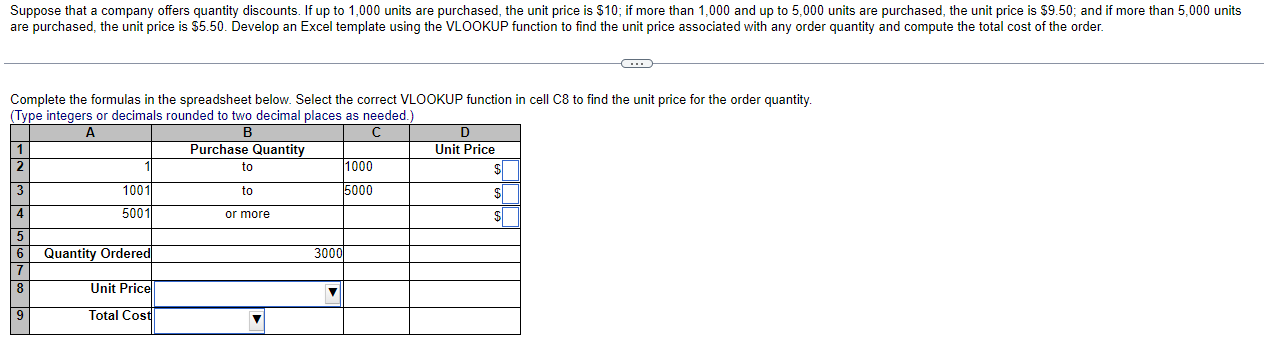
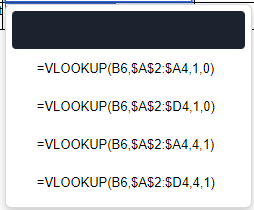
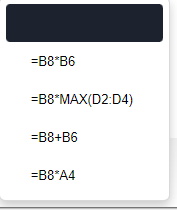
Complete the formulas in the spreadsheet below. Select the correct VLOOKUP function in cell C8 to find the unit price for the order quantity. (Type integers or decimals rounded to two decimal places as needed.) \begin{tabular}{|l|r|r|r|r|} \hline & A & B & C & D \\ \hline 1 & & Purchase Quantity & & Unit Price \\ \hline 2 & 1 & to & 1000 & $ \\ \hline 3 & 1001 & to & 5000 & $ \\ \hline 4 & 5001 & or more & & \\ \hline 5 & & 3000 & & \\ \hline 6 & Quantity Ordered & & & \\ \hline 7 & & & & \\ \hline 8 & Unit Price & & & \\ \hline 9 & Total Cost & & & \\ \hline \end{tabular} =VLOOKUP(B6,$A$2:$A4,1,0)=VLOOKUP(B6,$A$2:$D4,1,0)=VLOOKUP(B6,$A$2:$A4,4,1)=VLOOKUP(B6,$A$2:$D4,4,1) =B8MAX(D2:D4)=B8+B6=B8A4 Complete the formulas in the spreadsheet below. Select the correct VLOOKUP function in cell C8 to find the unit price for the order quantity. (Type integers or decimals rounded to two decimal places as needed.) \begin{tabular}{|l|r|r|r|r|} \hline & A & B & C & D \\ \hline 1 & & Purchase Quantity & & Unit Price \\ \hline 2 & 1 & to & 1000 & $ \\ \hline 3 & 1001 & to & 5000 & $ \\ \hline 4 & 5001 & or more & & \\ \hline 5 & & 3000 & & \\ \hline 6 & Quantity Ordered & & & \\ \hline 7 & & & & \\ \hline 8 & Unit Price & & & \\ \hline 9 & Total Cost & & & \\ \hline \end{tabular} =VLOOKUP(B6,$A$2:$A4,1,0)=VLOOKUP(B6,$A$2:$D4,1,0)=VLOOKUP(B6,$A$2:$A4,4,1)=VLOOKUP(B6,$A$2:$D4,4,1) =B8MAX(D2:D4)=B8+B6=B8A4
Step by Step Solution
There are 3 Steps involved in it

Get step-by-step solutions from verified subject matter experts
 Study Help