





Question: Complete the practice using c++. Program 6.2 at lower part in this document. Program 6.2 #include using namespace std; void readChar(); //prototype for readChar function

Complete the practice using c++.

Program 6.2 at lower part in this document.
Complete the practice using c++. Program 6.2 at lower part in this

document. Program 6.2 #include using namespace std; void readChar(); //prototype for readChar
function void reverseOrder (char let[], int last_index); //prototype for reversefunction int main()

Program 6.2

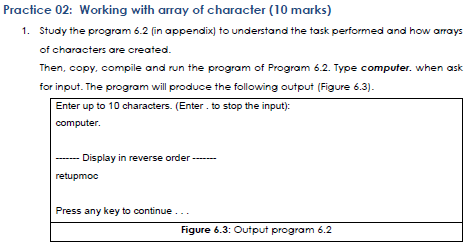
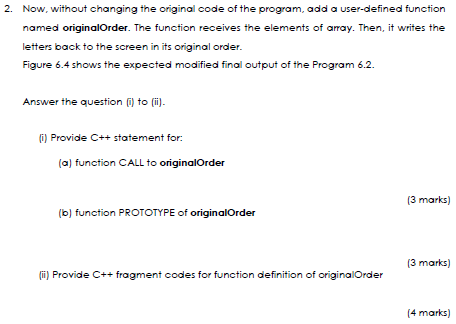
#include using namespace std; void readChar(); //prototype for readChar function void reverseOrder (char let[], int last_index); //prototype for reversefunction int main() { readChar(); //call readChar function and transfer nothing cout >let[i]; //if . exit the loop if (let[i]=='.') break; //the last index of array let newIndex=i; } cout =0; j--) cout Practice 02: Working with array of character (10 marks) 1. Study the program 6.2 (in appendix) to understand the task performed and how arrays of characters are created. Then, copy, compile and run the program of Program 6.2. Type computer. when ask for input. The program will produce the following output (Figure 6.3). Enter up to 10 characters. (Enter to stop the input): computer. Display in reverse order ----- retupmoc Press any key to continue.. Figure 6.3: Output program 6.2 2. Now, without changing the original code of the program, add a user-defined function named originalOrder. The function receives the elements of array. Then, it writes the letters back to the screen in its original order. Figure 6.4 shows the expected modified final output of the Program 6.2. Answer the question (1) to (i)- i) Provide C++ statement for: (a) function CALL to originalOrder (3 marks) (b) function PROTOTYPE of originalOrder (3 marks) ) Provide C++ fragment codes for function definition of originalOrder (4 marks) 3. Compile and run the completed modified program of Figure 6.2. Type computer. when asked for input. The program is expected to produce the following output (Figure 6.4). Enter up to 10 characters. (Enter. to stop the input): computer. Display in reverse order ---- retupmoc Display in original order ------- computer Press any key to continue.. Figure 6.4: Expected output of modified Program 6.2

Step by Step Solution

There are 3 Steps involved in it

1 Expert Approved Answer
Step: 1 Unlock blur-text-image
Question Has Been Solved by an Expert!

Get step-by-step solutions from verified subject matter experts

Step: 2 Unlock
Step: 3 Unlock

Students Have Also Explored These Related Databases Questions!