





Question: Complete the table below using your Kali desktop via VirtualBox: Ping cats.com using IPV4 Ping cats.com using IPv6 Display local arp table Display Ipv4 address
Complete the table below using your Kali desktop
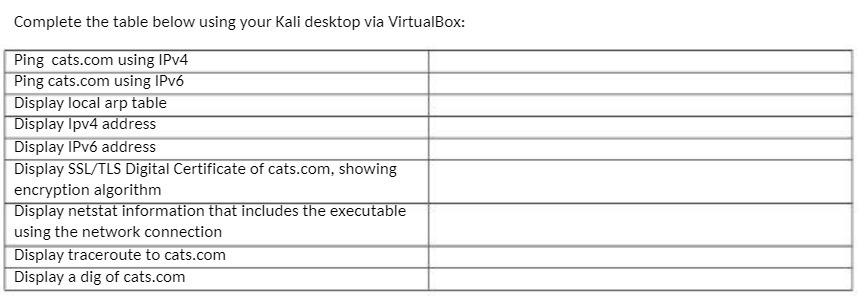
Complete the table below using your Kali desktop via VirtualBox: Ping cats.com using IPV4 Ping cats.com using IPv6 Display local arp table Display Ipv4 address Display IPv6 address Display SSL/TLS Digital Certificate of cats.com, showing encryption algorithm Display netstat information that includes the executable using the network connection Display traceroute to cats.com Display a dig of cats.com

Step by Step Solution

There are 3 Steps involved in it

1 Expert Approved Answer
Step: 1 Unlock blur-text-image

Question Has Been Solved by an Expert!

Get step-by-step solutions from verified subject matter experts

Step: 2 Unlock
Step: 3 Unlock

Students Have Also Explored These Related Mathematics Questions!