







Question: Composition Design Pattern File / Folder combination is a typical example of the composite design pattern. A file has a name, size, and extension. A
Composition Design Pattern
FileFolder combination is a typical example of the composite design pattern. A file has a name, size, and extension.
A folder has similar attribute without an extension plus a list of files or other folders. You are required to write a
demonstration application that traverses files and folders in a selected directory.
Class diagram
Design a class diagram showing the abovementioned structure using the composite design oastern. You have to
show all companents including the Application class.
Application
marks
Implement a Net deskitop application CH or VB by which you can choose a certain folder when the program starts.
Once you select a folder, you should recursinely traverse all of its contents files and folders and fill the required
information as follows:
Folder : only name
File : name, size, extension
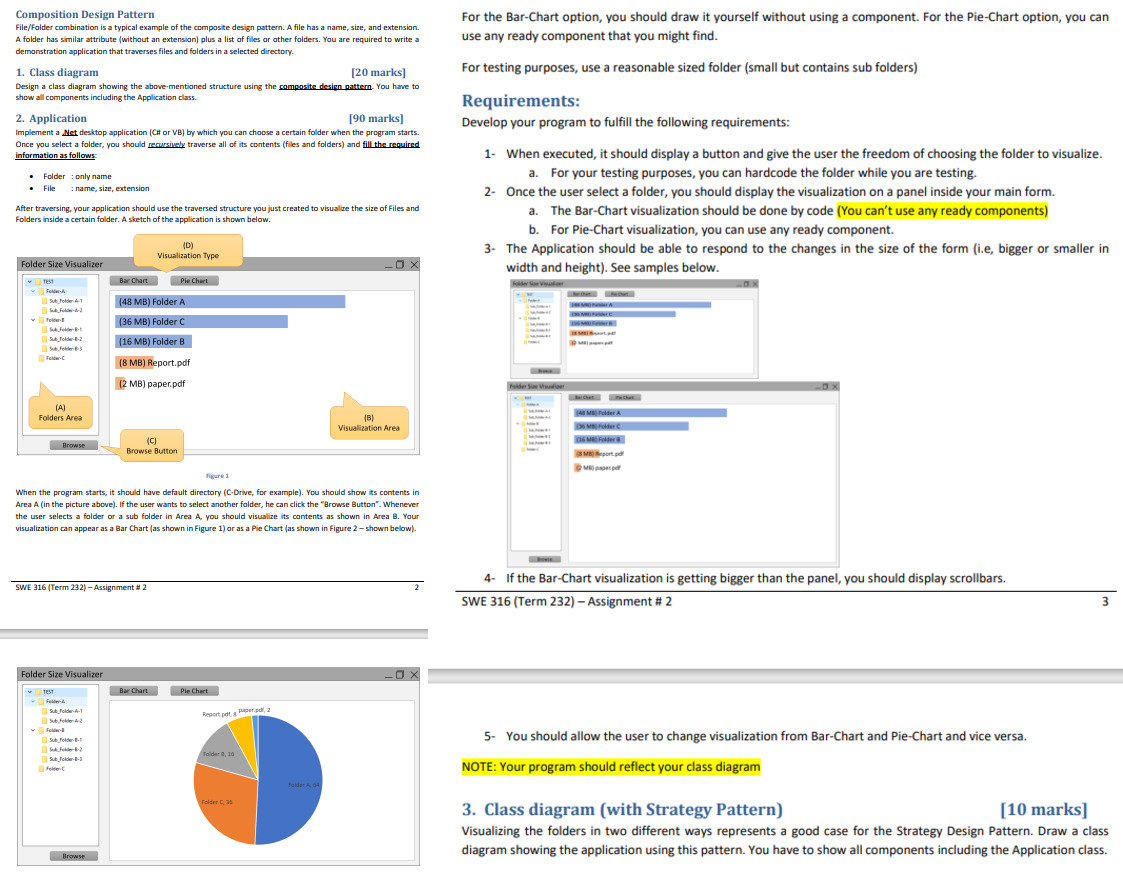
After traversing, your application should use the traversed structure you just created to visualize the size of files and
Folders inside a certain folder. A sketch of the application is shown below.
When the program starts, it should have default directory CDrive, for example You should show its contents in
Area A in the picture above If the user wants to select another folder, he can click the "Browse Button". Whenever
the user selects a folder or a sub folder in Area A you should visualize its contents as shown in Area Your
visualization can appear as a Bar Chart as shown in Figure or as a Pie Chart as shown in Figure shown below
For the BarChart option, you should draw it yourself without using a component. For the PieChart option, you can
use any ready component that you might find.
For testing purposes, use a reasonable sized folder small but contains sub folders
Requirements:
Develop your program to fulfill the following requirements:
When executed, it should display a button and give the user the freedom of choosing the folder to visualize.
a For your testing purposes, you can hardcode the folder while you are testing.
Once the user select a folder, you should display the visualization on a panel inside your main form.
a The BarChart visualization should be done by code You can't use any ready components
b For PieChart visualization, you can use any ready component.
The Application should be able to respond to the changes in the size of the form ie bigger or smaller in
You should allow the user to change visualization from BarChart and PieChart and vice versa.
NOTE: Your program should reflect your class diagram
Class diagram with Strategy Pattern
marks
Visualizing the folders in two different ways represents a good case for the Strategy Design Pattern. Draw a class
diagram showing the application using this pattern. You have to show all components including the Application class.
Step by Step Solution
There are 3 Steps involved in it
1 Expert Approved Answer
Step: 1 Unlock

Question Has Been Solved by an Expert!
Get step-by-step solutions from verified subject matter experts
Step: 2 Unlock
Step: 3 Unlock
 Study Help