







Question: * Computer Graphics Define a slider that changes the radius of the shaded circle. Be sure that the radius value is greater than zero. circle.js
Computer Graphics
Define a slider that changes the radius of the shaded circle. Be sure that the radius value is greater than zero.
circle.js
class CircleD
static vertexPositions ;
static vertexColors ;
static shaderProgram ;
static positionBuffer ;
static colorBuffer ;
static aPositionShader ;
static aColorShader ;
static initialize
CircleDshaderProgram initShadersglvshaderglslfshaderglsl;
const radius ;
const center vec radius, radius;
const numSegments ;
First vertex o'clock with black color
CircleDvertexPositions.pushveccenter radius, center;
CircleDvertexColors.pushvec;
for let i ; i numSegments; i
const angle i numSegments Math.PI;
const x radius Math.cosangle center;
const y radius Math.sinangle center;
Vary red color as a function of angle
const fadeFactor ;
const red Math.cos fadeFactor;
CircleDvertexPositions.pushvecx y;
CircleDvertexColors.pushvecred;
Load the data into the GPU
CircleDpositionBuffer glcreateBuffer;
glbindBufferglARRAYBUFFER, CircleDpositionBuffer;
glbufferDataglARRAYBUFFER, flattenCircleDvertexPositions glSTATICDRAW;
CircleDcolorBuffer glcreateBuffer;
glbindBufferglARRAYBUFFER, CircleDcolorBuffer;
glbufferDataglARRAYBUFFER, flattenCircleDvertexColors glSTATICDRAW;
CircleDaPositionShader glgetAttribLocationCircleDshaderProgram, "aPosition";
CircleDaColorShader glgetAttribLocationCircleDshaderProgram, "aColor";
constructor
if CircleDshaderProgram CircleDinitialize;
draw
gluseProgramCircleDshaderProgram;
glbindBufferglARRAYBUFFER, CircleDpositionBuffer;
glvertexAttribPointerCircleDaPositionShader, glFLOAT, false, ;
glbindBufferglARRAYBUFFER, CircleDcolorBuffer;
glvertexAttribPointerCircleDaColorShader, glFLOAT, false, ;
glenableVertexAttribArrayCircleDaPositionShader;
glenableVertexAttribArrayCircleDaColorShader;
gldrawArraysglTRIANGLEFAN, CircleDvertexPositions.length;
gldisableVertexAttribArrayCircleDaPositionShader;
gldisableVertexAttribArrayCircleDaColorShader;
app.js
var canvas;
var gl;
var sq;
var sq;
var sq;
var sq;
var sq;
var sq;
var triangle;
var circle;
var ellipse;
Function to handle button click event
function rotateEllipse
ellipse.rotate; Call a function to rotate the ellipse by degrees
render; Render the updated scene
window.onload function init
canvas document.getElementByIdglcanvas" ;
gl canvas.getContextwebgl;
if gl alert "WebGL isn't available" ;
glviewport canvas.width, canvas.height ;
glclearColor;
Create an event listener for the rotate button
const rotateButton document.getElementByIdrotateButton;
rotateButton.addEventListenerclick rotateEllipse;
sq new Square;
sq new Square;
sq new Square;
sq new Square;
sq new Square;
sq new Square;
triangle new TriangleD;
circle new CircleD;
ellipse new EllipseD;
render;
;
function render
glclear glCOLORBUFFERBIT ;
sqdraw;
sqdraw;
sqdraw;
sqdraw;
sqdraw;
sqdraw;
triangle.draw;
circle.draw;
ellipse.draw;
index.html
Not supported
Rotate Ellipse
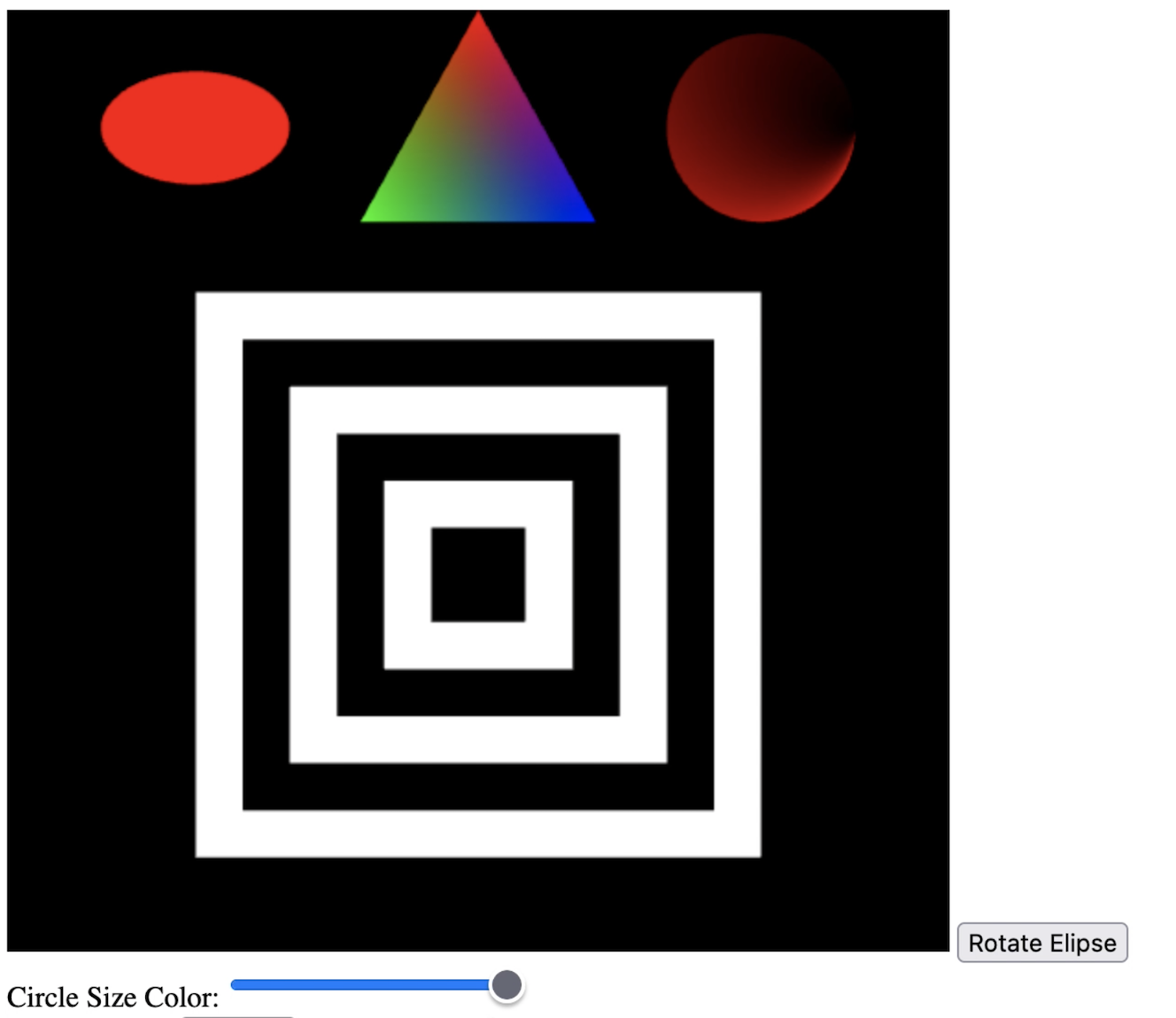
Step by Step Solution
There are 3 Steps involved in it
1 Expert Approved Answer
Step: 1 Unlock

Question Has Been Solved by an Expert!
Get step-by-step solutions from verified subject matter experts
Step: 2 Unlock
Step: 3 Unlock
 Study Help