







Question: Computer Science help C++ Input text file below: NCORES 1 START 0 PID 3 CORE 100 SSD 0 CORE 80 SSD 0 CORE 40 SSD
Computer Science help C++
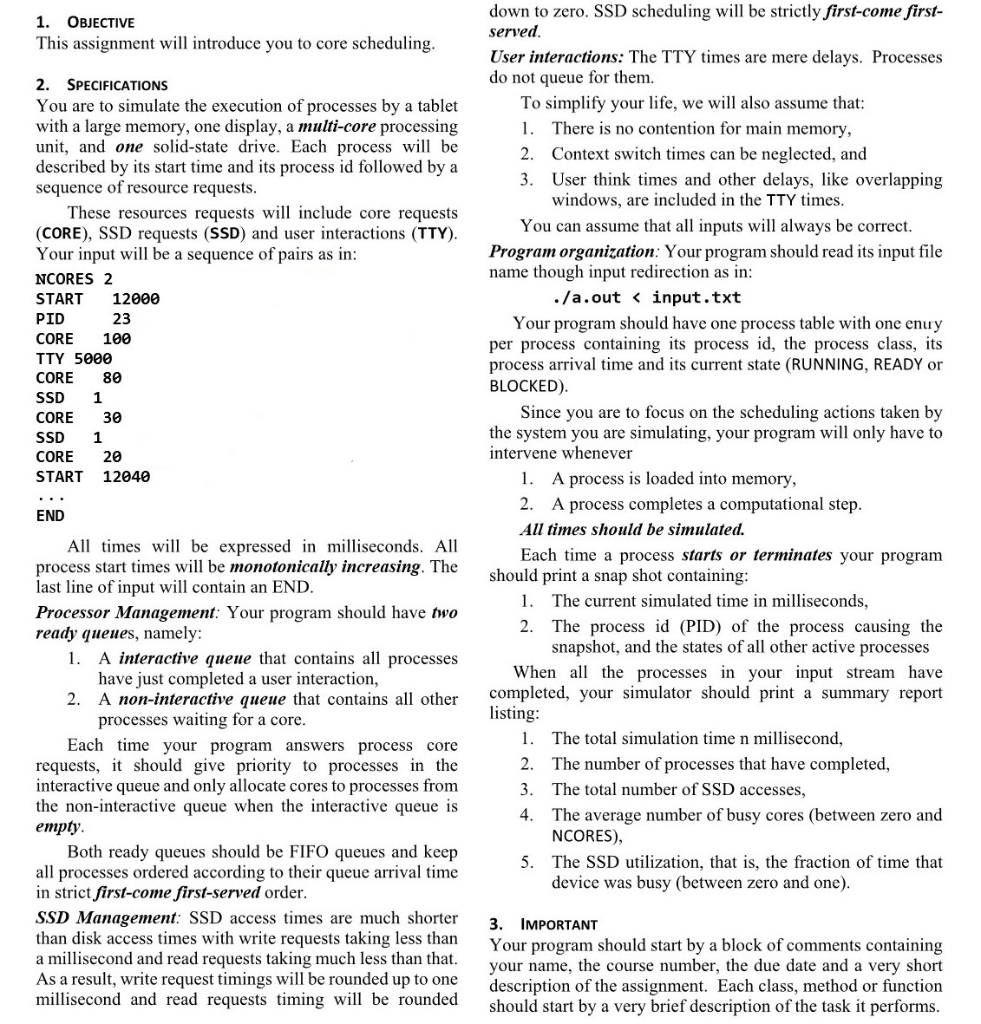
Input text file below:
NCORES 1
START 0
PID 3
CORE 100
SSD 0
CORE 80
SSD 0
CORE 40
SSD 0
CORE 80
SSD 0
CORE 40
SSD 0
CORE 90
SSD 1
CORE 100
TTY 5000
CORE 20
TTY 5000
CORE 80
SSD 1
CORE 30
SSD 0
CORE 90
SSD 1
CORE 30
SSD 1
CORE 20
SSD 1
CORE 30
SSD 1
CORE 20
SSD 1
CORE 30
SSD 1
CORE 20
SSD 1
CORE 30
SSD 1
CORE 20
START 3
PID 5
CORE 120
SSD 0
CORE 60
SSD 0
CORE 20
SSD 0
CORE 30
SSD 0
CORE 80
SSD 0
CORE 80
SSD 0
CORE 40
SSD 0
CORE 80
SSD 0
CORE 40
SSD 0
CORE 90
SSD 0
CORE 80
SSD 0
CORE 40
SSD 0
CORE 90
SSD 1
CORE 100
TTY 5000
CORE 80
SSD 0
CORE 80
SSD 0
CORE 40
SSD 0
CORE 90
SSD 1
CORE 30
SSD 1
CORE 20
SSD 1
CORE 30
SSD 1
CORE 20
SSD 1
CORE 30
SSD 1
CORE 20
START 5
PID 7
CORE 120
SSD 0
CORE 60
SSD 0
CORE 20
SSD 0
CORE 30
START 8
PID 9
CORE 100
SSD 0
CORE 80
SSD 0
CORE 40
SSD 0
CORE 70
SSD 0
CORE 80
SSD 0
CORE 40
SSD 0
CORE 90
SSD 0
CORE 80
SSD 0
CORE 40
SSD 0
CORE 90
SSD 1
CORE 110
SSD 0
CORE 40
SSD 0
CORE 90
SSD 1
CORE 100
TTY 3000
CORE 120
TTY 2000
CORE 80
SSD 1
CORE 30
SSD 1
CORE 20
SSD 1
CORE 30
SSD 1
CORE 20
SSD 1
CORE 30
SSD 1
CORE 20
START 13
PID 11
CORE 120
SSD 0
CORE 60
SSD 0
CORE 20
SSD 0
CORE 30
SSD 0
CORE 80
SSD 0
CORE 60
SSD 0
CORE 20
SSD 0
CORE 30
SSD 0
CORE 80
SSD 0
CORE 80
SSD 0
CORE 40
SSD 0
CORE 80
SSD 0
CORE 40
SSD 0
CORE 90
SSD 0
CORE 80
SSD 0
CORE 40
SSD 0
CORE 90
SSD 1
CORE 100
TTY 5000
CORE 80
SSD 0
CORE 80
SSD 0
CORE 40
SSD 0
CORE 90
SSD 1
CORE 30
SSD 1
CORE 20
SSD 1
CORE 30
SSD 0
CORE 90
SSD 1
CORE 30
SSD 1
CORE 20
SSD 1
CORE 30
SSD 1
CORE 20
SSD 1
CORE 30
SSD 1
CORE 20
END
Output Text File below:
-- ARRIVAL event for process 3 at time 0 ms
Process 3 starts at time 0 ms
Process Table:
There are no active processes.
-- ARRIVAL event for process 5 at time 3 ms
Process 5 starts at time 3 ms
Process Table:
Process 3 is RUNNING.
-- ARRIVAL event for process 7 at time 5 ms
Process 7 starts at time 5 ms
Process Table:
Process 3 is RUNNING.
Process 5 is READY.
-- ARRIVAL event for process 9 at time 8 ms
Process 9 starts at time 8 ms
Process Table:
Process 3 is RUNNING.
Process 5 is READY.
Process 7 is READY.
-- ARRIVAL event for process 11 at time 13 ms
Process 11 starts at time 13 ms
Process Table:
Process 3 is RUNNING.
Process 5 is READY.
Process 7 is READY.
Process 9 is READY.
Process 7 terminates at time 1180 ms.
Process Table:
Process 3 is READY.
Process 5 is READY.
Process 7 is TERMINATED.
Process 9 is RUNNING.
Process 11 is READY.
Process 5 terminates at time 9250 ms.
Process Table:
Process 3 is BLOCKED.
Process 5 is TERMINATED.
Process 9 is RUNNING.
Process 11 is READY.
Process 9 terminates at time 9270 ms.
Process Table:
Process 3 is BLOCKED.
Process 9 is TERMINATED.
Process 11 is RUNNING.
Process 11 terminates at time 9689 ms.
Process Table:
Process 3 is BLOCKED.
Process 11 is TERMINATED.
Process 3 terminates at time 12359 ms.
Process Table:
Process 3 is TERMINATED.
SUMMARY:
Total elapsed time: 12359 ms
Number of processes that completed: 5
Total number of SSD accesses: 90
Average number of busy cores: 0.463
SSD utilization: 0.0028
Total core time: 5720
Total SSD time:35
1. OBJECTIVE This assignment will introduce you to core scheduling. 2. SPECIFICATIONS You are to simulate the execution of processes by a tablet with a large memory, one display, a multi-core processing unit, and one solid-state drive. Each process will be described by its start time and its process id followed by a sequence of resource requests. These resources requests will include core requests (CORE), SSD requests (SSD) and user interactions (TTY). Your input will be a sequence of pairs as in: NCORES 2 START 12000 PID 23 CORE 100 TTY 5000 CORE 80 SSD 1 CORE 30 SSD 1 CORE 20 START 12040 down to zero. SSD scheduling will be strictly first-come first- served. User interactions: The TTY times are mere delays. Processes do not queue for them. To simplify your life, we will also assume that: 1. There is no contention for main memory, 2. Context switch times can be neglected, and 3. User think times and other delays, like overlapping windows, are included in the TTY times. You can assume that all inputs will always be correct. Program organization: Your program should read its input file name though input redirection as in: ./a.out
Step by Step Solution
There are 3 Steps involved in it

Get step-by-step solutions from verified subject matter experts
 Study Help