







Question: Computer Security Think Critically: PDF Passwords Read real-world scenario to help understand and apply the theory. PDF Passwords There are two known facts about PDFs
Computer Security
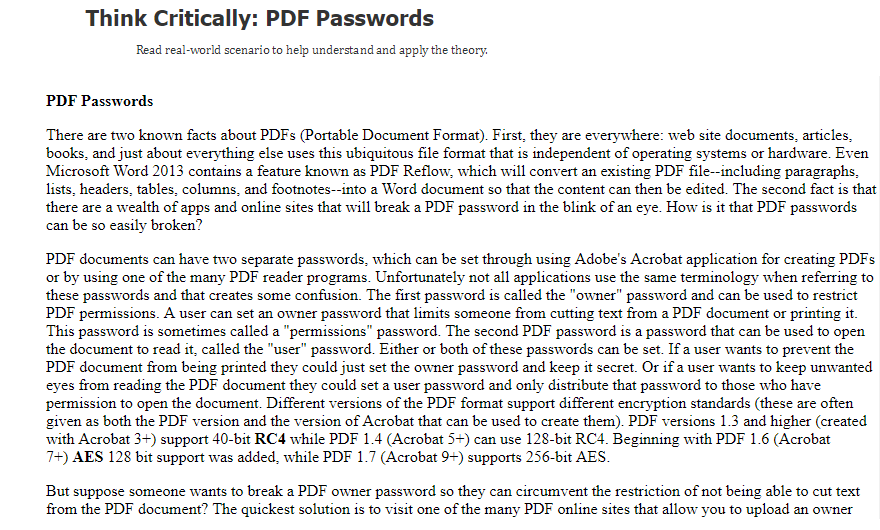
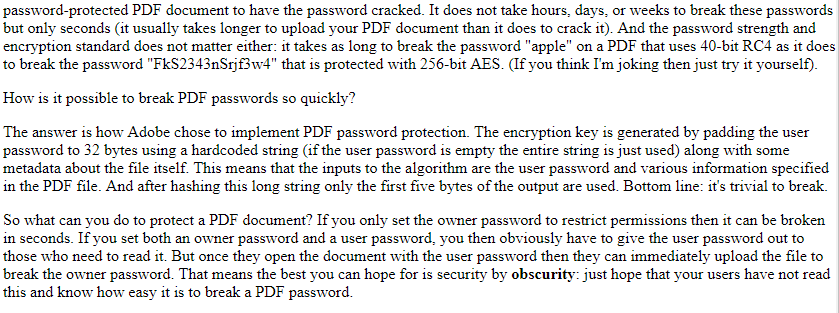
Think Critically: PDF Passwords Read real-world scenario to help understand and apply the theory. PDF Passwords There are two known facts about PDFs (Portable Document Format). First, they are everywhere: web site documents, articles books, and just about everything else uses this ubiquitous file format that is independent of operating systems or hardware. Even Microsoft Word 2013 contains a feature known as PDF Reflow, which will convert an existing PDF file--including paragraphs, lists, headers, tables, columns, and footnotes--into a Word document so that the content can then be edited. The second fact is that there are a wealth of apps and online sites that will break a PDF password in the blink of an eye. How is it that PDF passwords can be so easily broken? PDF documents can have two separate passwords, which can be set through using Adobe's Acrobat application for creating PDFs or by using one of the many PDF reader programs. Unfortunately not all applications use the same terminology when referring to these passwords and that creates some confusion. The first password is called the "owner" password and can be used to restrict PDF permissions. A user can set an owner password that limits someone from cutting text from a PDF document or printing it This password is sometimes called a "permissions" password. The second PDF password is a password that can be used to open the document to read it, called the "user" password. Either or both of these passwords can be set. If a user wants to prevent the PDF document from being printed they could just set the owner password and keep it secret. Or if a user wants to keep unwanted eyes from reading the PDF document they could set a user password and only distribute that password to those who havie permission to open the document. Different versions of the PDF format support different encryption standards (these are often given as both the PDF version and the version of Acrobat that can be used to create them). PDF versions 1.3 and higher (created with Acrobat 3+) support 40-bit RC4 while PDF 1.4 (Acrobat 5+) can use 128-bit RC4. Beginning with PDF 1.6 (Acrobat 7+) AES 128 bit support was added, while PDF 1.7 (Acrobat 9+) supports 256-bit AES But suppose someone wants to break a PDF owner password so they can circumvent the restriction of not being able to cut text from the PDF document? The quickest solution is to visit one of the many PDF online sites that allow you to upload an owner
Step by Step Solution
There are 3 Steps involved in it

Get step-by-step solutions from verified subject matter experts
 Study Help