







Question: Computing Bond Issue Price and Preparing an Amortization Table in Excel On December 31, 2021, Kaplan, Inc., issues $550,000 of 9% bonds that pay
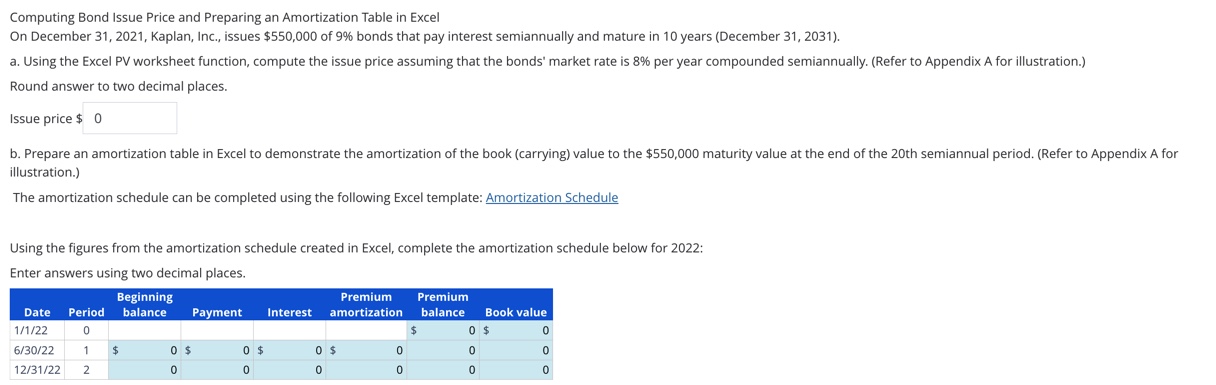
Computing Bond Issue Price and Preparing an Amortization Table in Excel On December 31, 2021, Kaplan, Inc., issues $550,000 of 9% bonds that pay interest semiannually and mature in 10 years (December 31, 2031). a. Using the Excel PV worksheet function, compute the issue price assuming that the bonds' market rate is 8% per year compounded semiannually. (Refer to Appendix A for illustration.) Round answer to two decimal places. Issue price $ 0 b. Prepare an amortization table in Excel to demonstrate the amortization of the book (carrying) value to the $550,000 maturity value at the end of the 20th semiannual period. (Refer to Appendix A for illustration.) The amortization schedule can be completed using the following Excel template: Amortization Schedule Using the figures from the amortization schedule created in Excel, complete the amortization schedule below for 2022: Enter answers using two decimal places. Beginning Premium Date Period balance 1/1/22 0 Payment Interest amortization Premium balance $ Book value 0 $ 0 6/30/22 1 $ 12/31/22 2 0 $ 0 $ 0 $ 0 0 0 0 0 0 0 0 0
Step by Step Solution
There are 3 Steps involved in it

Get step-by-step solutions from verified subject matter experts
 Study Help