







Question: Configure the following network using packet tracer: Complete the following configuration: 1. Configure the PC1, PC2, Ethernet and serial as the ip address on
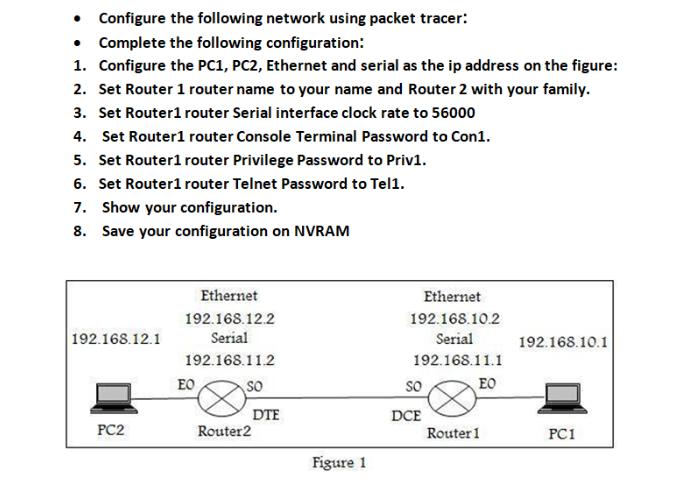
Configure the following network using packet tracer: Complete the following configuration: 1. Configure the PC1, PC2, Ethernet and serial as the ip address on the figure: 2. Set Router 1 router name to your name and Router 2 with your family. 3. Set Router1 router Serial interface clock rate to 56000 4. Set Router1 router Console Terminal Password to Con1. 5. Set Router1 router Privilege Password to Priv1. 6. Set Router1 router Telnet Password to Tel1. 7. Show your configuration. 8. Save your configuration on NVRAM Ethernet Ethernet 192.168.12.2 192.168.10.2 192.168.12.1 Serial Serial 192.168.10.1 192.168.11.2 192.168.11.1 EO so so EO DTE Router2 DCE Router 1 PC2 PC1 Figure 1
Step by Step Solution
3.51 Rating (154 Votes )
There are 3 Steps involved in it
Router1 Configuration Router1enable Router1configure terminal Router1config Hostname Jishan Jishanco... View full answer

Get step-by-step solutions from verified subject matter experts
 Study Help