







Question: Congratulations on being provided your first programming task at the grocery store chain where you were recently hired as a computer programmer to create a
Congratulations on being provided your first programming task at the grocery store chain where you were recently hired as a computer programmer to create a Grocery Calculator. You will begin your very first coding assignment this module. Your project will incrementally evolve during the next several modules. Your first task is to create the Grocery class as outlined in the Module 01 UML diagram, and instances of the Grocery class as outlined below.
Your task this module is to do the following:
Grocery Class:
In a new project create the Grocery class and its properties/variables/states/attributes and methods/behaviors/actions/functions/procedures.
Use appropriate access modifiers in your state and method declarations. The UML Diagram for the Grocery class is replicated below.
Code constructors, get() and set() methods, and a toString() method.
Override the toString() method using appropriate syntax.
In the toString() overridden method, convert the name attribute/field to UPPER CASE using the attribute.toUpperCase() method.
Do not code set() methods for any attributes that are calculated within the Grocery class. You may code get() methods as appropriate.
Code a constructor that takes no parameters but sets values to zero or the like.
Code a parameterized constructor that accepts name, quantity, and cost as parameters.
Create formatted output in the toString() methods to list all attributes in an easy-to-read format with headings, dollar sign formatting, two decimal place formatting for doubles, appropriate line breaks, separator lines between output of object instances, and object item numbers (such as 1, 2, 3) that are calculated and assigned when creating object instances.
Class including the Main() Method:
In the same project in which you created the Grocery class above, create a driver class that includes a Main() method that uses the Grocery class.
Include appropriate package import declarations as needed.
Input: Use a loop to garner user input from the console using java.util.Scanner and place the input into a fixed-length array.Prompt the user with a menu of two choices such as:
(1) Input a Grocery item,
(-1) End user input.
The loop will then prompt users for the grocery name, quantity, and cost at a unit or individual level when option 1 is entered; terminate user input/looping when option -1 is entered.
Use a technique to signal the end of input such as a sentinel.
Data Structure Storage: Code your class containing the Main() method to store user input in a fixed-length array while the program is executing. Consider setting the array length to exactly the number of required objects input by the user.
Data Validation:Include the following validation in separate methods both returning Boolean results:
Cost must be > 0.
Quantity must be >= 1.
For invalid data, simply output a message to the console informing the user of the improper data entered and do notcreate a Grocery object instance.
Only create a Grocery object instance when the data is considered valid.
Output: to the console while executing the program:
Use System.out.printf to echo back to the user the data they input once validated.
Output: to the console after the user terminates input:Call a method to output an appropriately-formatted heading including:
A greeting.
Your Name.
Your Class, Module/Week, and Assignment.
Date/Time stamps.
Call the toString() method for each Grocery object instance to output the name, quantity, cost, extendedCost, and titles/headings for each using formatting.
Call a method to output the totalExtendedCost, totalQuantity, and the average cost (totalExtendedCost / totalQuantity) one time at the end of the program using appropriate formatting and formatting that separates this output from the other output.
Other:
Run your program with at least three Grocery object instances varying the attribute values.
Observe proper commenting/documentation techniques. Include clearly written comments/documentation to explain the purpose of major blocks of code. As needed/appropriate, include additional levels of comments/documentation detail to help you understand your code and logic as well as to help your reader understand the same.
Observe proper naming conventions for classes, attributes, methods, etc.
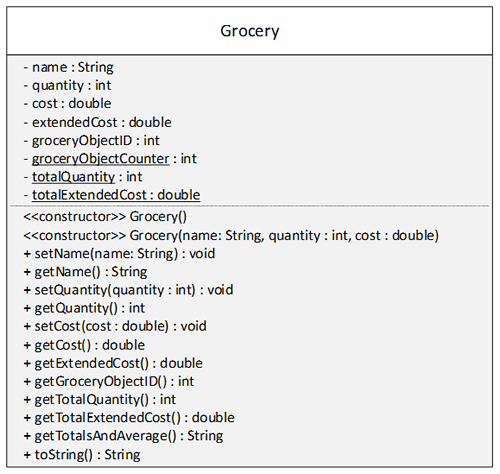
Grocery name: String -quantity int - cost: double - extendedCost: double - groceryObjectID: int int - totalQuantity int - totalExtendedCost: double > Grocery) > Grocery(name: String, quantity : int, cost : double) +setName(name: String): void + get Name) String + setQuantity(quantity: int) void + getQuantity): int + setCost(cost: double) void + getCost(): double +getExtendedCost(): double +getGroceryObjectlD): int +getTotalQuantity): int +getTotalExtendedCost(): double +getTotalsAndAverage(): String toString): String
Step by Step Solution
There are 3 Steps involved in it

Get step-by-step solutions from verified subject matter experts
 Study Help