







Question: Consider the client - server application you have deployed in Section C . 4 to answer the Multiple Correct - Multiple Selection question. To score
Consider the clientserver application you have deployed in Section C to answer the "Multiple Correct Multiple Selection" question. To score full points, select & mark all correcttrue answersassertions For each wrong answer, points are deducted from the question's score.
A The Python server is programmed to accept requests sent to its UDP port # from any of its network adapters, including the Loopback Network adapter
B The Loopback Network is only accessible by the applications running on the same system, and the frame traffic they generate remains within this virtual network.
C is a valid IPv. address that can be assigned to any Loopback Network adapter.
D The clientserver application runs correctly only if the ncat client connects to the Loopback Network with the IPv. @
E All the frames exchanged between the clientserver are copied to the Loopback Network interface
C Implementing the Loopback Network Testbed
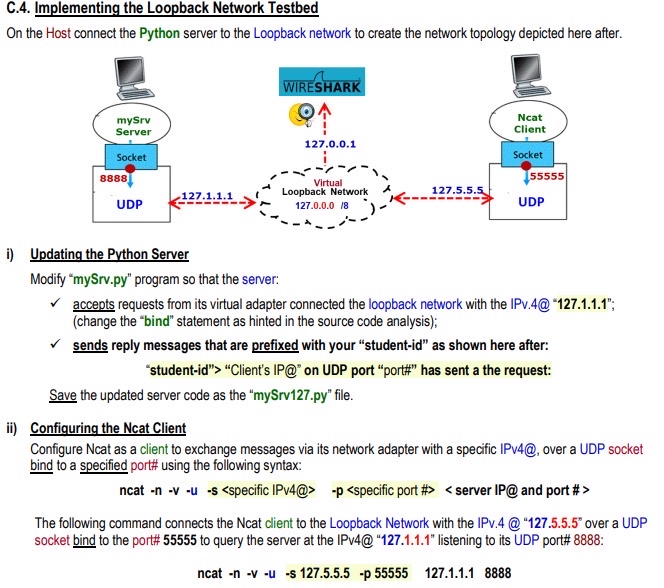
On the Host connect the Python server to the Loopback network to create the network topology depicted here after.
i Updating the Python Server
Modify
mySrvpy program so that the server:
accepts requests from its virtual adapter connected the loopback network with the IPv@ ; change the "bind" statement as hinted in the source code analysis;
sends reply messages that are prefixed with your "studentid as shown here after:
"studentid "Client's IP@ on UDP port "port# has sent a the request:
Save the updated server code as the
mySrvpy file.
ii Configuring the Ncat Client
Configure Ncat as a client to exchange messages via its network adapter with a specific IPv@ over a UDP socket bind to a specified port# using the following syntax:
ncat n v u s
Step by Step Solution
There are 3 Steps involved in it
1 Expert Approved Answer
Step: 1 Unlock

Question Has Been Solved by an Expert!
Get step-by-step solutions from verified subject matter experts
Step: 2 Unlock
Step: 3 Unlock
 Study Help