



Question: Consider the Excel spreadsheet below. Please select the Excel formula that creates a new id for products by sellers, it should consist of the Products.
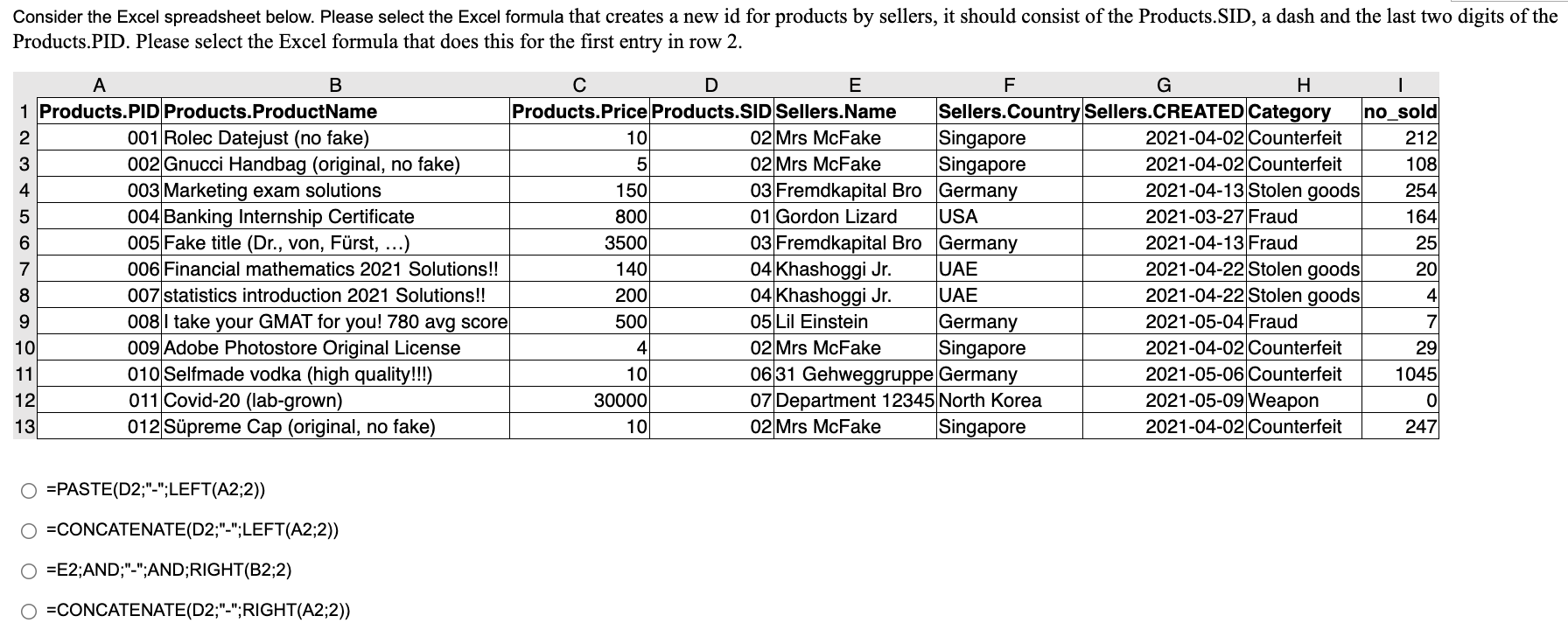
Consider the Excel spreadsheet below. Please select the Excel formula that creates a new id for products by sellers, it should consist of the Products. SID, a dash and the last two digits of the Products.PID. Please select the Excel formula that does this for the first entry in row 2. A B D E F G H | 1 Products.PID Products.ProductName Products.Price Products.SID Sellers.Name Sellers.Country Sellers.CREATED Category no_sold 2 001 Rolec Datejust (no fake) 10 02 Mrs McFake Singapore 2021-04-02 Counterfeit 212 3 002 Gnucci Handbag (original, no fake) 5 02 Mrs McFake Singapore 2021-04-02 Counterfeit 108 4 003 Marketing exam solutions 150 03 Fremdkapital Bro Germany 2021-04-13 Stolen goods 254 5 004 Banking Internship Certificate 800 01 Gordon Lizard USA 2021-03-27 Fraud 164 6 005 Fake title (Dr., von, Frst, ...) 3500 03 Fremdkapital Bro Germany 2021-04-13 Fraud 25 7 006 Financial mathematics 2021 Solutions!! 140 04 Khashoggi Jr. UAE 2021-04-22 Stolen goods 20 8 007 statistics introduction 2021 Solutions!! 200 04 Khashoggi Jr. UAE 2021-04-22 Stolen goods 4 9 0081 take your GMAT for you! 780 avg score 500 05 Lil Einstein Germany 2021-05-04 Fraud 7 10 009 Adobe Photostore Original License 4. 02 Mrs McFake Singapore 2021-04-02 Counterfeit 29 11 010 Selfmade vodka (high quality!!!) 10 06 31 Gehweggruppe Germany 2021-05-06 Counterfeit 1045 12 011 Covid-20 (lab-grown) 30000 07 Department 12345 North Korea 2021-05-09 Weapon 0 13 012 Spreme Cap (original, no fake) 10 02 Mrs McFake Singapore 2021-04-02 Counterfeit 247 000 VOUWN =PASTE(D2;"-";LEFT(A2;2)) O =CONCATENATE(D2;"-";LEFT(A2;2)) =E2;AND;"-";AND;RIGHT(B2;2) =CONCATENATE(D2;"-";RIGHT(A2;2))
Step by Step Solution
There are 3 Steps involved in it

Get step-by-step solutions from verified subject matter experts