







Question: Consider the given GUI below. Design the same layout using DataGridView and add, update and delete records. When records are deleted make sure to ask
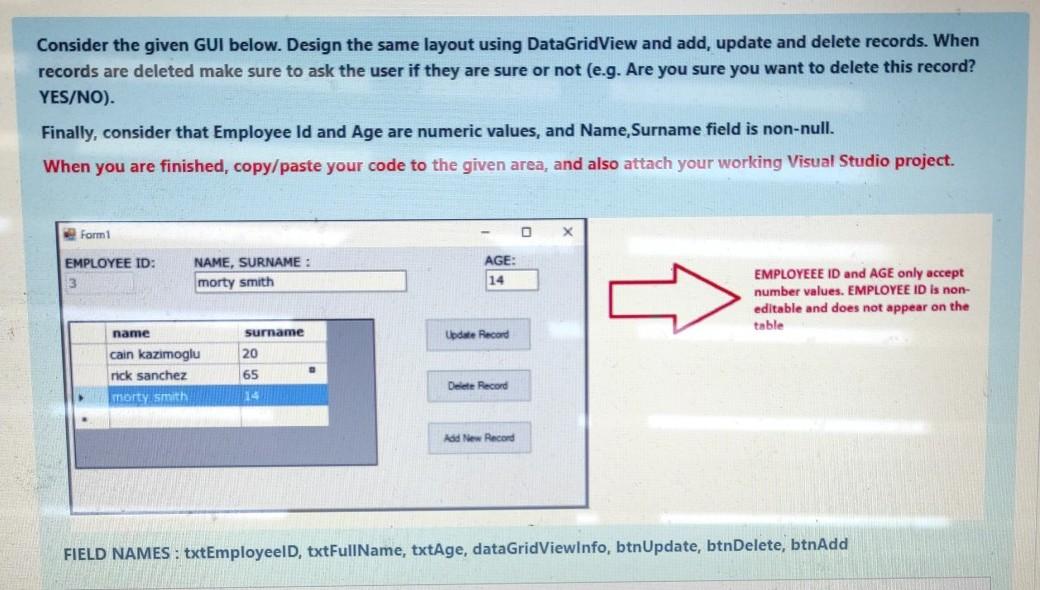
Consider the given GUI below. Design the same layout using DataGridView and add, update and delete records. When records are deleted make sure to ask the user if they are sure or not (e.g. Are you sure you want to delete this record? YES/NO). Finally, consider that Employee Id and Age are numeric values, and Name Surname field is non-null. When you are finished, copy/paste your code to the given area, and also attach your working Visual Studio project. Form EMPLOYEE ID: NAME, SURNAME : morty Smith AGE: 14 EMPLOYEEE ID and AGE only accept number values. EMPLOYEE ID is non- editable and does not appear on the table name Update Record surname 20 cain kazimoglu nick sanchez morty Smith 65 Delete Record 14 Add New Record FIELD NAMES : txtEmployeeld, txtFullName, txtAge, dataGridViewinfo, btnUpdate, btnDelete, btnAdd
Step by Step Solution
There are 3 Steps involved in it

Get step-by-step solutions from verified subject matter experts
 Study Help