







Question: Consider the GUI below (1 Label and 2 Checkbuttons) which has been produced with a Python program using the Tkinter library Checked or Unchecked Nothing
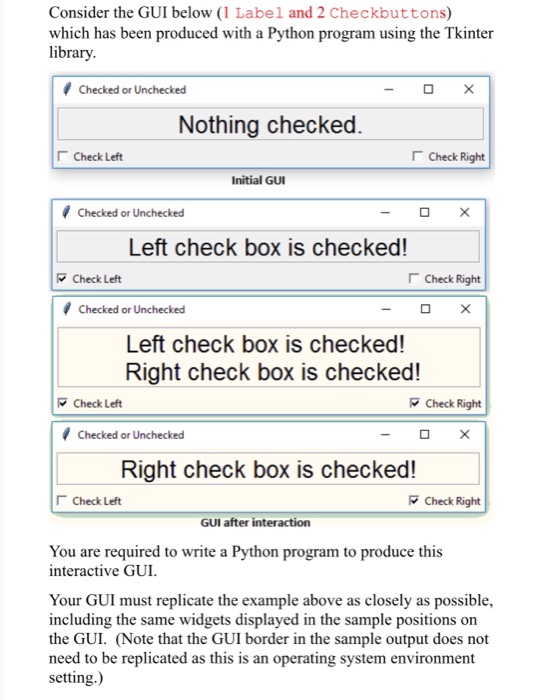
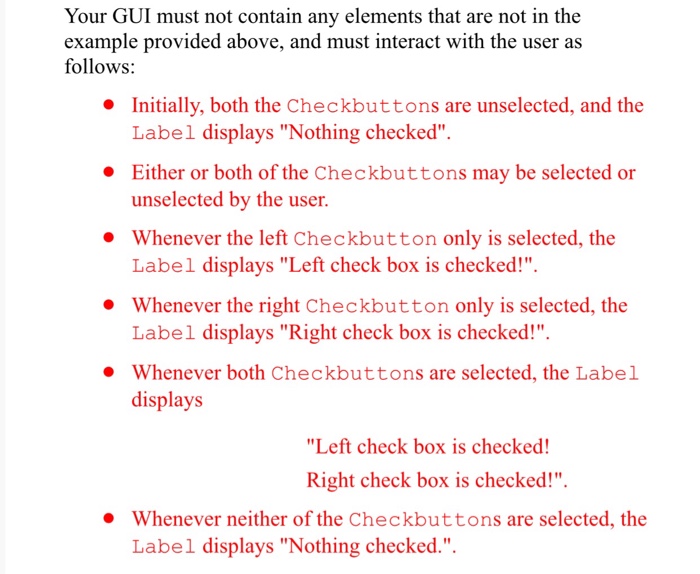
Consider the GUI below (1 Label and 2 Checkbuttons) which has been produced with a Python program using the Tkinter library Checked or Unchecked Nothing checked. -Check Left -Check Right Initial GUI Checked or Unchecked Left check box is checked! Check Left Check Right Checked or Unchecked Left check box is checked! Right check box is checked! Check Left Check Right Checked or Unchecked Right check box is checked! Check Left Check Right GUI after interaction You are required to write a Python program to produce this interactive GUI Your GUI must replicate the example above as closely as possible, including the same widgets displayed in the sample positions on the GUI. (Note that the GUI border in the sample output does not need to be replicated as this is an operating system environment setting.)
Step by Step Solution
There are 3 Steps involved in it

Get step-by-step solutions from verified subject matter experts
 Study Help