







Question: Continuing with the MATLAB problem from Module 2, use a for loop or a while loop to propagate the projectile in 0.01 second time steps
Continuing with the MATLAB problem from Module 2, use a "for" loop or a "while" loop to propagate the projectile in 0.01 second time steps all the way until impact. Mark the impact spot with a marker and display the impact coordinates on the projectile/terrain plot. Label the axes accordingly and give your figure a title. While keeping the initial velocity constant, "experimentally" determine the initial angle of the projectile with respect to the horizontal in order to achieve maximum range.
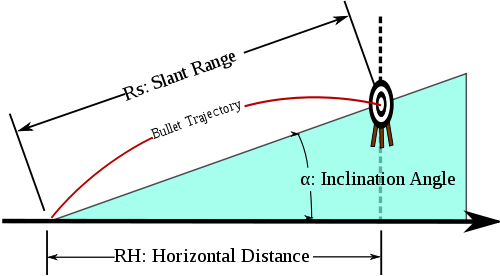
This is my current code from module 2:
v=200; theta_1=50; g=9.81; k=(2*v*sind(theta_1))/g; t=[0:0.01:k]; x=(v*cosd(theta_1)*t); h=(v*sind(theta_1)*t)-(0.5*g*t.*t); theta_2=atand(1/10)*t; figure,hold on plot(x,theta_2,'c'); xlabel("range (meters)"); ylabel("distance (meters)"); j=1; k=0; l=0; for i=1:length(x) if((x(i)/10)>j && k==0) h(i)=h(i)+1; k=1; l=1; end if(l==1) j=j+1; k=0; end end plot(x,h) hold off;
What do I need to chnage in order to address the question at the top? Thanks!
Here was the original problem from module 2:
A projectile is shot at an angle of 50 degrees with respect to the horizontal at a velocity of 200 m/s. Earth's gravity is 9.81 m/s^2. Take the variable x as the range and y as the altitude. Create a MATLAB plot, which plots that trajectory. Now, assume the terrain slopes up by 1 m in y for every 10 m in x. On the same axis, plot the line of the terrain in a different color.
The code in here is the one from this part. So just need to modify it I guess.
PLEASE LET SOMEONE WHO CAN HELP ME, LAST PERSON COPY SOMEONE ELSE AND DIDN'T EVEN ANSWER MY QUESTION!
Rs: Slant Range Bullet Trajectory- a: Inclination Angle RH: Horizontal Distance
Step by Step Solution
There are 3 Steps involved in it

Get step-by-step solutions from verified subject matter experts
 Study Help