







Question: Convert the attached C++ program into MATLAB. Use the attached Excel file for input, inputting the data manually. The second sheet of the spreadsheet has
Convert the attached C++ program into MATLAB. Use the attached Excel file for input, inputting the data manually. The second sheet of the spreadsheet has the answers that you should be able to create.
#include
#include
using namespace std;
// prototypes
float myMax(float [], float);
float myAvg(float [], float);
int main()
{
int cols = 8;
int rows = 3;
float myArray[rows][cols];
float tempArray[cols], dayMax[rows];
int r1 = 0;
float dayMaxAvg;
while(r1
for(int c = 0; c
cout
c+1
cin >> myArray[r1][c];
}
r1++;
}
for(int r2 = 0; r2
for(int c =0; c
tempArray[c] = myArray[r2][c];
}
dayMax[r2] = myMax(tempArray, cols);
cout
}
dayMaxAvg = myAvg(dayMax, rows);
cout
cout
return 0;
}// end of main
// function finds the maximum value in an array
float myMax(float theArray[], float count){
float maxValue = 0, tempMax;
for(int n = 0; n
if(theArray[n] > maxValue){
maxValue = theArray[n];
}
}
return maxValue;
}
// function finds the average value in an array
float myAvg(float theArray[], float count){
float avgValue, sumOfValues = 0;
for(int n = 0; n
sumOfValues = sumOfValues + theArray[n];
}
avgValue = sumOfValues/count;
return avgValue;
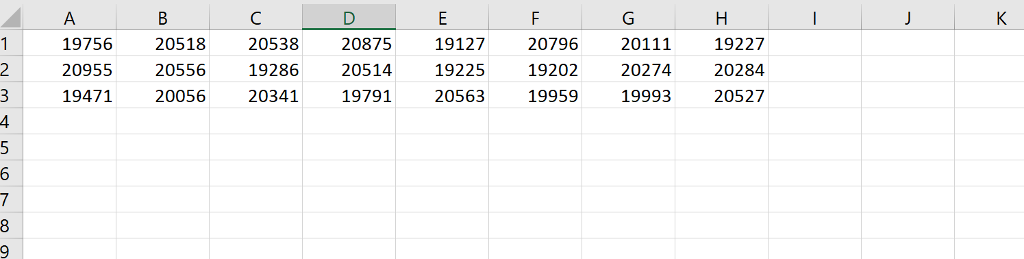
747 282 225 900 H122 143 179 129 009 G221 629 905 211 753 125 990 541 857 009 D221 523 090 C212 155 550 B222 651 794 909 A-21 123456789 747 282 225 900 H122 143 179 129 009 G221 629 905 211 753 125 990 541 857 009 D221 523 090 C212 155 550 B222 651 794 909 A-21 123456789
Step by Step Solution
There are 3 Steps involved in it

Get step-by-step solutions from verified subject matter experts
 Study Help