







Question: Convert this FORM into a Normalized Database 1- Prepare a database named Invoice in raw form/0NF and add all the fields as columns and fill
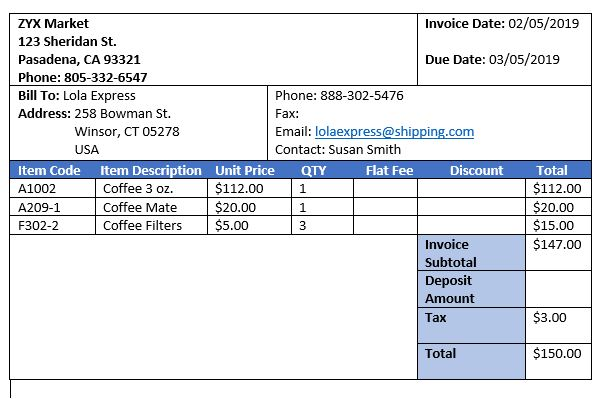
Convert this FORM into a Normalized Database
1- Prepare a database named Invoice in raw form/0NF and add all the fields as columns and fill up the table with given data (line items, name etc.).
2-Perform the Normalization process of 1NF, 2NF, 3NF and normalize the Invoice table. Show all your steps in an organized way. Highlight (in any color) the Primary Key, Composite key, Foreign Key(s) of the Table(s).
NOTE: Here we need the 0NF, 1NF, 2NF, and 3NF with tables not how to create this table in SQL or mySql, etc.
ZYX Market Invoice Date: 02/05/2019 123 Sheridan St. Pasadena, CA 93321 Due Date: 03/05/2019 Phone: 805-332-6547 Bill To: Lola Express Phone: 888-302-5476 Address: 258 Bowman St. Fax: Winsor, CT 05278 Email: lolaexpress@shipping.com USA Contact: Susan Smith Item Code Item Description Unit Price QTY Flat Fee Discount Total A1002 Coffee 3 oz. $112.00 1 $112.00 A209-1 Coffee Mate $20.00 1 $20.00 F302-2 Coffee Filters $5.00 3 $15.00 Invoice $147.00 Subtotal Deposit Amount Tax $3.00 Total $150.00 ZYX Market Invoice Date: 02/05/2019 123 Sheridan St. Pasadena, CA 93321 Due Date: 03/05/2019 Phone: 805-332-6547 Bill To: Lola Express Phone: 888-302-5476 Address: 258 Bowman St. Fax: Winsor, CT 05278 Email: lolaexpress@shipping.com USA Contact: Susan Smith Item Code Item Description Unit Price QTY Flat Fee Discount Total A1002 Coffee 3 oz. $112.00 1 $112.00 A209-1 Coffee Mate $20.00 1 $20.00 F302-2 Coffee Filters $5.00 3 $15.00 Invoice $147.00 Subtotal Deposit Amount Tax $3.00 Total $150.00
Step by Step Solution
There are 3 Steps involved in it

Get step-by-step solutions from verified subject matter experts
 Study Help