







Question: Convert this polling code to interrupting code 1 const byte buttonPin = 2; 2 const byte btnPressedLed = 4; 3 const byte exceededLed = 5;
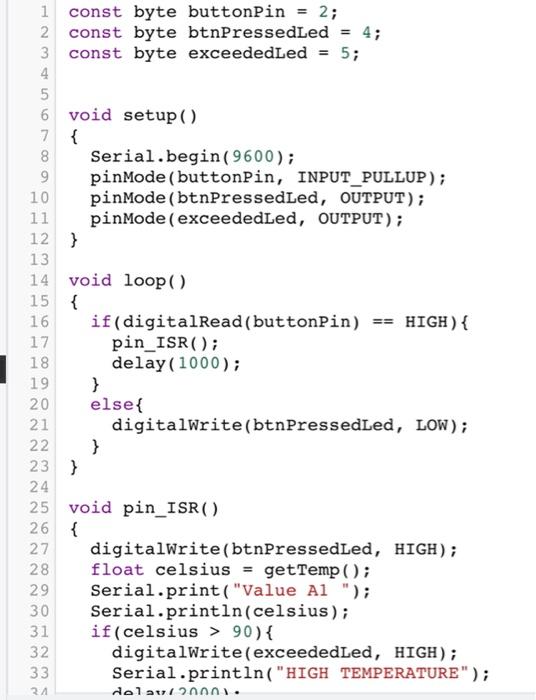
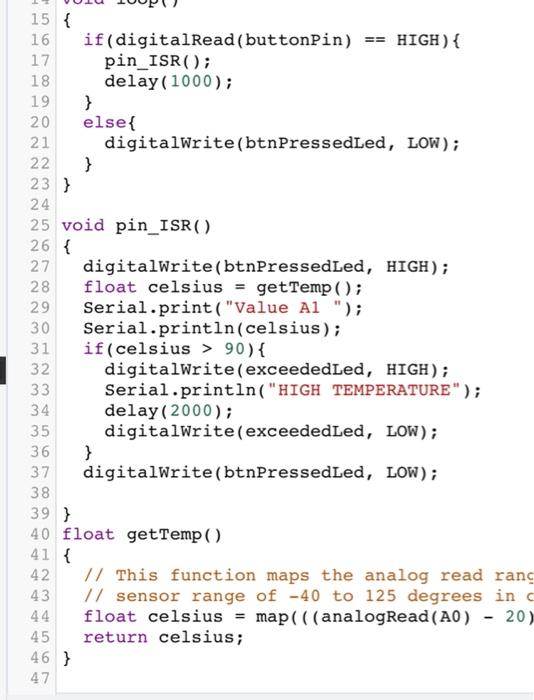
1 const byte buttonPin = 2; 2 const byte btnPressedLed = 4; 3 const byte exceededLed = 5; 4 5 6 void setup() 7 { 8 Serial.begin(9600); 9 pinMode(buttonPin, INPUT_PULLUP); 10 pinMode(btnPressedLed, OUTPUT); 11 pinMode(exceededLed, OUTPUT); 12 } 13 14 void loop() 15 { 16 if(digitalRead(buttonPin) == HIGH) { 17 pin_ISR(); 18 delay(1000); 19 } 20 else{ 21 digitalWrite(btnPressedLed, LOW); 22 } 23 } 24 25 void pin_ISR() 26 { 27 digitalWrite(btnPressedLed, HIGH); 28 float celsius = getTemp(); 29 Serial.print("Value Al "); 30 Serial.println(celsius); if(celsius > 90){ 32 digitalWrite(exceededLed, HIGH); 33 Serial.println("HIGH TEMPERATURE"); dela 2000. 8 31 24 3 15 { 16 if(digitalRead(buttonPin) HIGH) { 17 pin_ISR(); 18 delay(1000); 19 } 20 else{ 21 digitalWrite(btnPressedLed, LOW); 22 } 23 } 24 25 void pin_ISR() 26 { 27 digitalWrite(btnPressedLed, HIGH); 28 float celsius = get Temp(); 29 Serial.print("Value Al "); 30 Serial.println(celsius); 31 if (celsius > 90){ 32 digitalWrite(exceededLed, HIGH); 33 Serial.println("HIGH TEMPERATURE"); 34 delay(2000); 35 digitalWrite(exceededLed, LOW); 36 } 37 digitalWrite(btnPressedLed, LOW); 38 39 } 40 float getTemp(). 41 { 42 1/ This function maps the analog read rang 43 // sensor range of -40 to 125 degrees in 44 float celsius = map(((analogRead(AO) 20) 45 return celsius; 46 } 47 OU 1 const byte buttonPin = 2; 2 const byte btnPressedLed = 4; 3 const byte exceededLed = 5; 4 5 6 void setup() 7 { 8 Serial.begin(9600); 9 pinMode(buttonPin, INPUT_PULLUP); 10 pinMode(btnPressedLed, OUTPUT); 11 pinMode(exceededLed, OUTPUT); 12 } 13 14 void loop() 15 { 16 if(digitalRead(buttonPin) == HIGH) { 17 pin_ISR(); 18 delay(1000); 19 } 20 else{ 21 digitalWrite(btnPressedLed, LOW); 22 } 23 } 24 25 void pin_ISR() 26 { 27 digitalWrite(btnPressedLed, HIGH); 28 float celsius = getTemp(); 29 Serial.print("Value Al "); 30 Serial.println(celsius); if(celsius > 90){ 32 digitalWrite(exceededLed, HIGH); 33 Serial.println("HIGH TEMPERATURE"); dela 2000. 8 31 24 3 15 { 16 if(digitalRead(buttonPin) HIGH) { 17 pin_ISR(); 18 delay(1000); 19 } 20 else{ 21 digitalWrite(btnPressedLed, LOW); 22 } 23 } 24 25 void pin_ISR() 26 { 27 digitalWrite(btnPressedLed, HIGH); 28 float celsius = get Temp(); 29 Serial.print("Value Al "); 30 Serial.println(celsius); 31 if (celsius > 90){ 32 digitalWrite(exceededLed, HIGH); 33 Serial.println("HIGH TEMPERATURE"); 34 delay(2000); 35 digitalWrite(exceededLed, LOW); 36 } 37 digitalWrite(btnPressedLed, LOW); 38 39 } 40 float getTemp(). 41 { 42 1/ This function maps the analog read rang 43 // sensor range of -40 to 125 degrees in 44 float celsius = map(((analogRead(AO) 20) 45 return celsius; 46 } 47 OU
Step by Step Solution
There are 3 Steps involved in it

Get step-by-step solutions from verified subject matter experts
 Study Help