





Question: Convert this to me commenting on another student's post in my own voice. This week's readings helped me understand how to create graphical user interfaces

Convert this to me commenting on another student's post in my own voice.
Convert this to me commenting on another
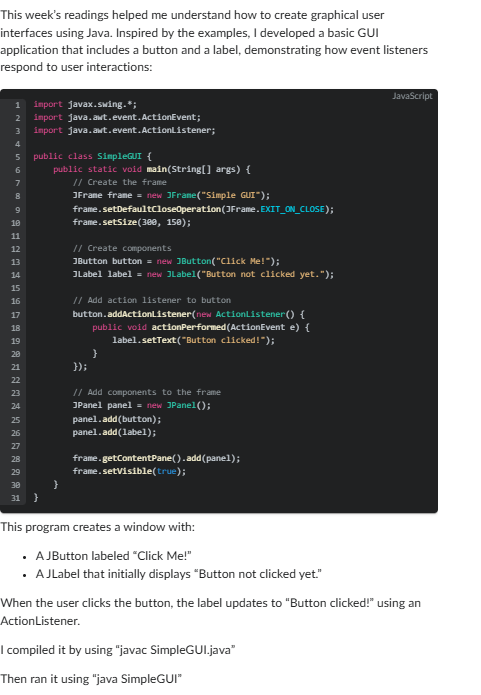
This week's readings helped me understand how to create graphical user interfaces using Java. Inspired by the examples, I developed a basic GUI application that includes a button and a label, demonstrating how event listeners respond to user interactions: Javascript import javax.swing.*; import java. aut. event. ActionEvent; import java. awt. event. ActionListener; public class SimpleGUI { public static void main(String args) { // Create the frameFrame frame = new ]Frame("Simple GUI"); frame. setDefaultCloseOperation (]Frame. EXIT_ON_CLOSE); 19 Frame. setSize (380, 150); 11 12 // Create components 13 JButton button = new ]Button("Click Me!"); 14 JLabel label = new JLabel("Button not clicked yet."); 15 16 // Add action listener to button 17 button. addActionListener (new ActionListener() { public void actionPerformed (ActionEvent e) { 19 label. setText("Button clicked!"); 21 22 23 // Add components to the frame 24 "Panel panel = new ]Panel(); 25 panel.add (button); 26 panel . add(label); 27 28 frame. getContentPane() - add (panel); 29 frame. setVisible( true); 30 31 This program creates a window with: . AJButton labeled "Click Me!" . A JLabel that initially displays "Button not clicked yet." When the user clicks the button, the label updates to "Button clicked!" using an ActionListener. I compiled it by using "javac SimpleGUI.java" Then ran it using "java SimpleGUI"

Step by Step Solution

There are 3 Steps involved in it

1 Expert Approved Answer
Step: 1 Unlock blur-text-image

Question Has Been Solved by an Expert!

Get step-by-step solutions from verified subject matter experts

Step: 2 Unlock
Step: 3 Unlock

Students Have Also Explored These Related Accounting Questions!