







Question: COP 2800, Java Programming, Modify a Java program meeting the following requirements . Using the program provided, PrintCalendar, you are to modify the program to
COP 2800, Java Programming, 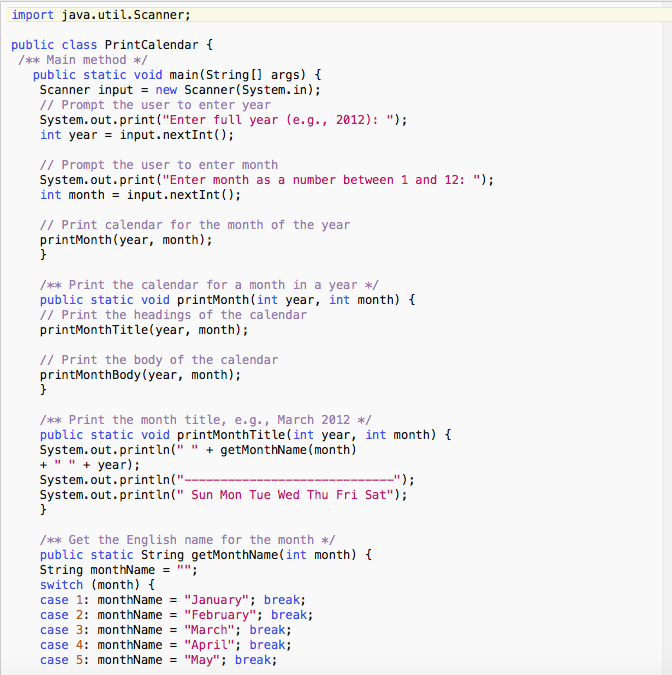
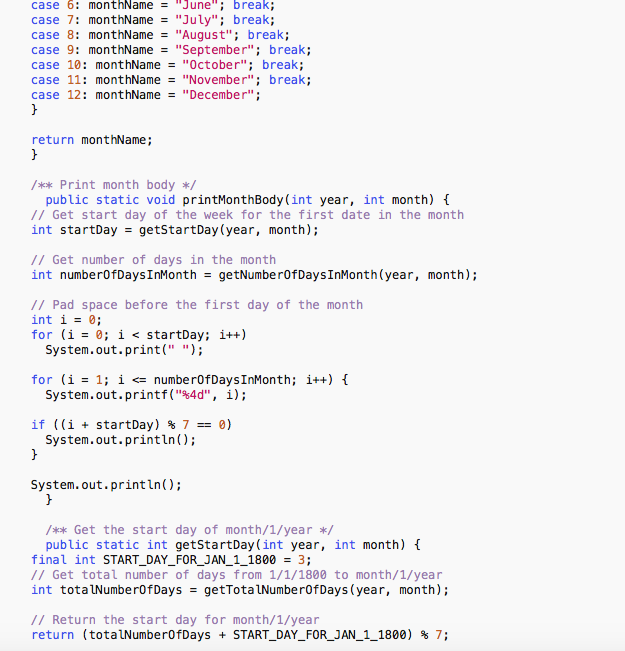
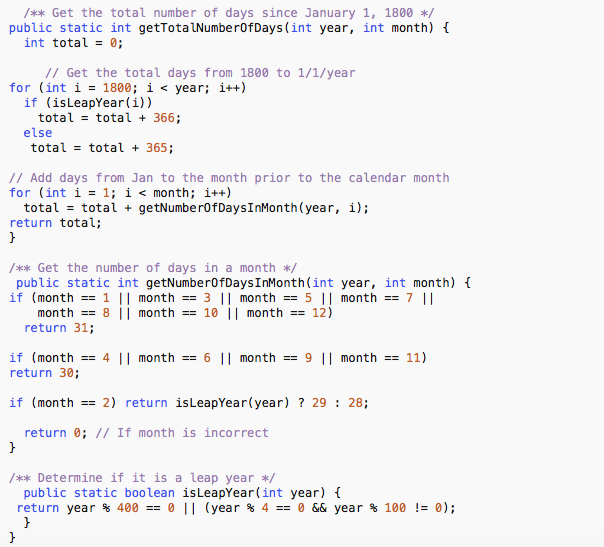
Modify a Java program meeting the following requirements . Using the program provided, PrintCalendar, you are to modify the program to validate the year entered is numeric, positive, and the correct length of four digits. You will also validate the month entered is from 1 to 12. If either is incorrect you need to create a Custom Exception class that states the problem, and allows the member to change either the year or month, using a Try...Catch block. Once you have validated the data you need to print out the calendar for the month entered.
At the beginning of the program add appropriate comments as in previous assignments.
Purpose: Modify a java program from detailed directions. Ability to:
Follow established programming standards for writing java programs Able to interrogate data Create a custom Exception Use the custom Exception with a try catch block
Use the print statement for output
Put your >.java file, pictures of code, proof of compile and output in a zipped file and upload in the Assignment 5 folder
import java.util.Scanner; public class PrintCalendar Main method/ public static void main(String[] args) I Scanner inputnew Scanner(System.in); // Prompt the user to enter year System.out.print("Enter full year (e.g., 2012): "; int year -input.nextInt ); // Prompt the user to enter month System.out.print("Enter month as a number between 1 and 12: "); int monthinput.nextInt); // Print calendar for the month of the year printMonth(year, month); Print the calendar for a month in a year public static void printMonth(int year, int month) // Print the headings of the calendar printMonthTitle(year, month); // Print the body of the calendar printMonthBody (year, month); Print the month title, e.g., March 2012*/ public static void printMonthTitle(int year, int month) t System. out.println(""getMonthName (month) +""+ year) System.out.println(" System.out.println(" Sun Mon Tue Wed Thu Fri Sat"); /* Get the English name for the month*/ public static String getMonthName(int month) ( String monthName ""; switch (month) case 1: monthName"January"; break; case 2: monthName "February"; break; case 3: monthName "March"; break; case 4: monthName"April"; break; case 5: monthName"May"; break; import java.util.Scanner; public class PrintCalendar Main method/ public static void main(String[] args) I Scanner inputnew Scanner(System.in); // Prompt the user to enter year System.out.print("Enter full year (e.g., 2012): "; int year -input.nextInt ); // Prompt the user to enter month System.out.print("Enter month as a number between 1 and 12: "); int monthinput.nextInt); // Print calendar for the month of the year printMonth(year, month); Print the calendar for a month in a year public static void printMonth(int year, int month) // Print the headings of the calendar printMonthTitle(year, month); // Print the body of the calendar printMonthBody (year, month); Print the month title, e.g., March 2012*/ public static void printMonthTitle(int year, int month) t System. out.println(""getMonthName (month) +""+ year) System.out.println(" System.out.println(" Sun Mon Tue Wed Thu Fri Sat"); /* Get the English name for the month*/ public static String getMonthName(int month) ( String monthName ""; switch (month) case 1: monthName"January"; break; case 2: monthName "February"; break; case 3: monthName "March"; break; case 4: monthName"April"; break; case 5: monthName"May"; break
Step by Step Solution
There are 3 Steps involved in it

Get step-by-step solutions from verified subject matter experts
 Study Help