







Question: Copy and paste the following HTML code into a new document: Q4 Create Your Own flower Bouqute Item Unit Price Red Roses $5.5 Yellow Lily
Copy and paste the following HTML code into a new document:
Create Your Own flower Bouqute
a) Write JavaScript code (Q4.js) that is executed when the place order button is pressed and it
calculates the cost of each item (based on quantity specified) entered the online form and the
overall total cost. The results should be displayed on the same page under the form submission
button.
All JavaScript code must be external. If any fields are left blank or do not contain a number, an
alert box should display an appropriate error message upon form submission.
b) The following style rules must be implemented using an external CSS. Ensure that the stylesheet is
properly referenced in the HTML code
- All text in the page must be displayed in MediumBlue.
- The background color of the form is DarkOrange.
- The input form should have a fixed width of 540 pixels.
- The input form should be surrounded by a blue border and the distance from the content to the
border should be 10 pixels.
The resulted page looks like as the following.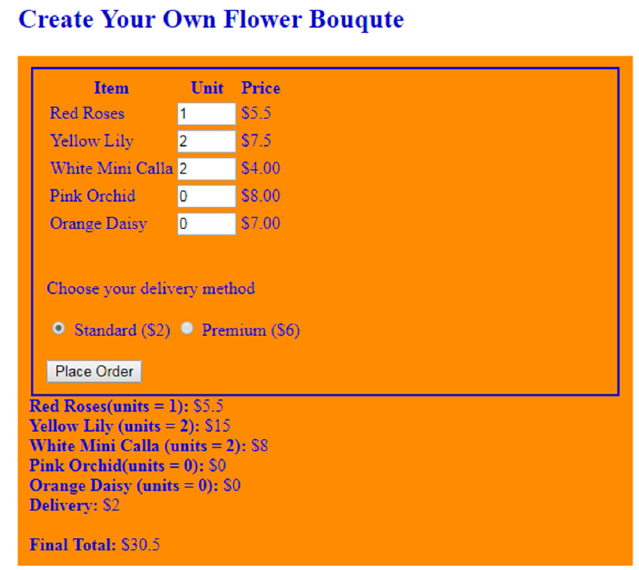
Create Your Own Flower Bouqute Item Unit Price Red Roses Yellow Lily White Mini Calla 2 Pink Orchid0 Orange Daisy 0 $5.5 $7.5 $4.00 $8.00 $7.00 Choose your delivery method Standard (S2) Premium (S6) Place Order ed Roses(units = 1): $5.5 Yellow Lily (units- 2): $15 White Mini Calla (units- 2): $8 Pink Orchid(units 0): S0 Orange Daisy (units 0): SO Delivery: S2 Final Total: S30.5
Step by Step Solution
There are 3 Steps involved in it

Get step-by-step solutions from verified subject matter experts
 Study Help