







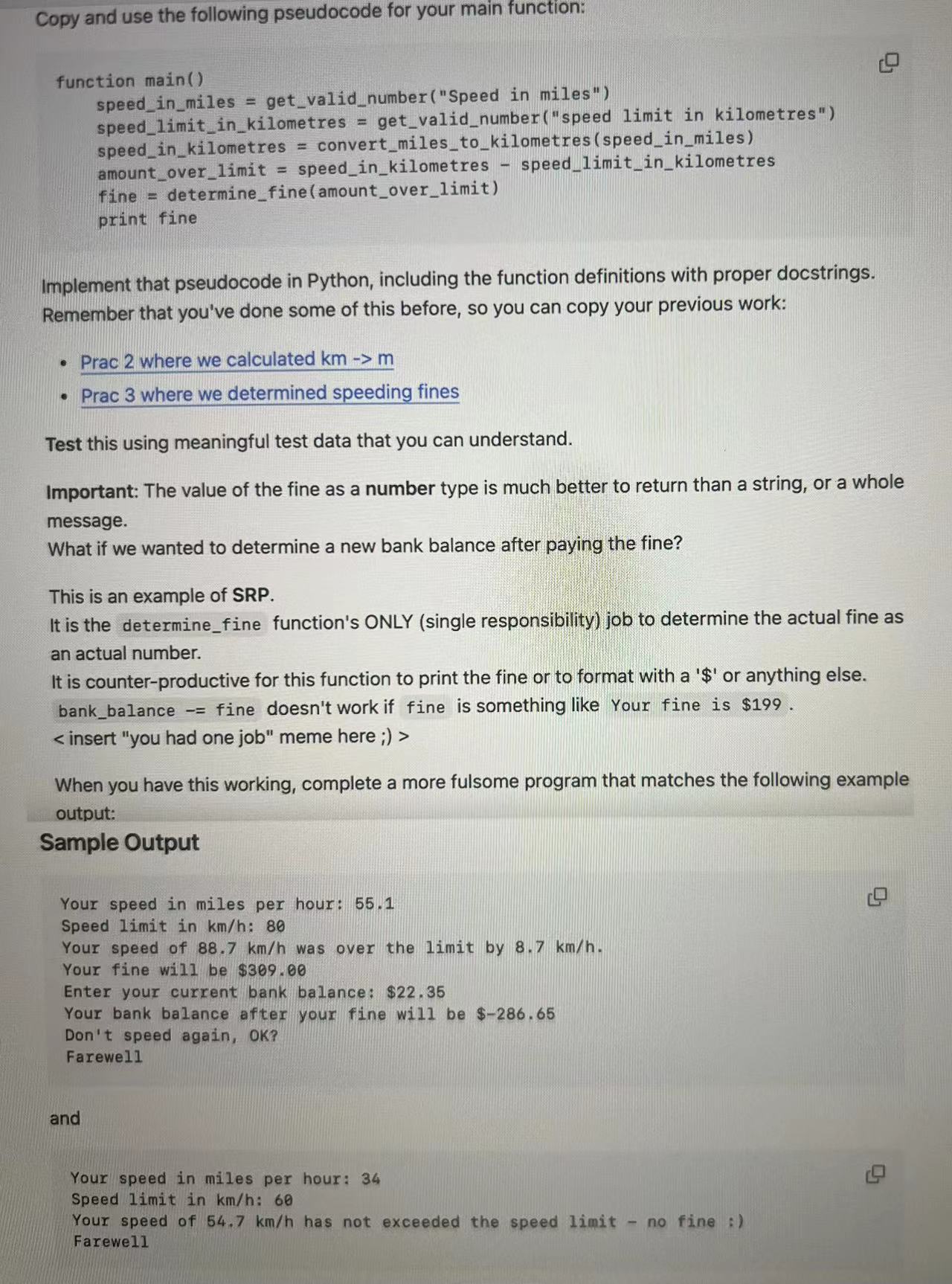
Question: Copy and use the following pseudocode for your main function:speed _ in _ miles = get _ valid _ number ( Speed in miles
Copy and use the following pseudocode for your main function:speedinmiles getvalidnumberSpeed in miles"speedinkilometres convertmilestokilometresspeedinmilesfine determinefineamountoverlimit
Implement that pseudocode in Python, including the function definitions with proper docstrings.
Remember that you've done some of this before, so you can copy your previous work:
Prac where we calculated
Prac where we determined speeding fines
Test this using meaningful test data that you can understand.
Important: The value of the fine as a number type is much better to return than a string, or a whole
message.
What if we wanted to determine a new bank balance after paying the fine?
This is an example of SRP
It is the determinefine function's ONLY single responsibility job to determine the actual fine as
an actual number.
It is counterproductive for this function to print the fine or to format with a $ or anything else.
bankbalance fine doesn't work if fine is something like Your fine is $
insert "you had one job" meme here
When you have this working, complete a more fulsome program that matches the following example
output:
Sample OutputSpeed limit in kmh:
Your speed of textrmkmtextrmhmathrm was over the limit by kmtextrmhmathrm
Your fine will be $
Enter your current bank balance: $
Your bank balance after your fine will be $
Don't speed again, OK
Farewell
and
Your speed in miles per hour:
Speed limit in kmh:
Your speed of textrmkmtextrmhmathrm has not exceeded the speed limit no fine
Farewe
Step by Step Solution
There are 3 Steps involved in it
1 Expert Approved Answer
Step: 1 Unlock

Question Has Been Solved by an Expert!
Get step-by-step solutions from verified subject matter experts
Step: 2 Unlock
Step: 3 Unlock
 Study Help