



Question: //copy file f1 to f2 using standard I/O #include int copyfile(const char *f1, const char *f2) { FILE *inf, *outf; int c; if ((inf =
//copy file f1 to f2 using standard I/O #includeint copyfile(const char *f1, const char *f2) { FILE *inf, *outf; int c; if ((inf = fopen(f1,"r")) == NULL) { return (-1); } if ((outf = fopen(f2, "w")) == NULL) { fclose(inf); return (-2); } while ((c=getc(inf)) != EOF) { putc(c, outf); } fclose(inf); fclose(outf); return (0); } int main(int argc, char * argv[]) { copyfile(argv[1], argv[2]); }
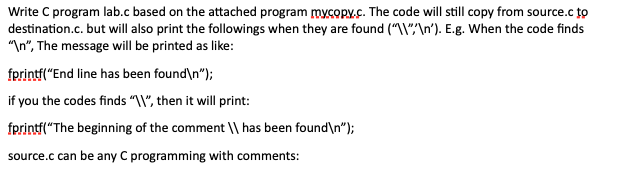
Write C program lab.c based on the attached program mycopy.c. The code will still copy from source. to destination.c. but will also print the followings when they are found ("1\"' '). E.g. When the code finds ", The message will be printed as like: fprintf("End line has been found "); if you the codes finds "1", then it will print: fprintf("The beginning of the comment || has been found "); source.c can be any C programming with comments: Write C program lab.c based on the attached program mycopy.c. The code will still copy from source. to destination.c. but will also print the followings when they are found ("1\"' '). E.g. When the code finds ", The message will be printed as like: fprintf("End line has been found "); if you the codes finds "1", then it will print: fprintf("The beginning of the comment || has been found "); source.c can be any C programming with comments
Step by Step Solution
There are 3 Steps involved in it

Get step-by-step solutions from verified subject matter experts