







Question: Copy the file ints into the project folder. (file ints contains random integers and they are on each line) // create a new int.txt file
Copy the file ints into the project folder. (file ints contains random integers and they are on each line) // create a new int.txt file in your project folder and just put some random integers (one integer on each line) (you can try 19 integers )
Create a method "void sortInts(String filename)" that
- Reads the data from the file one line at a time and saves it into an array.
- Sorts the array from smallest item to largest
- Writes the array of data into the new file, without writing any null values.
- Open your new file to check that the file has been properly created.
- You can assume that there are less than 100 items in the file.
- The new file should be called filename_sorted
To sort an array, go through each item once (outer loop) and for each item to the right (inner loop), check if the item to the right is greater (otherwise swap them using a temporary variable)
The code must pass all the following tests in the photo attached
and use file objects, scanner objects, printwriter
do not use string buffer.
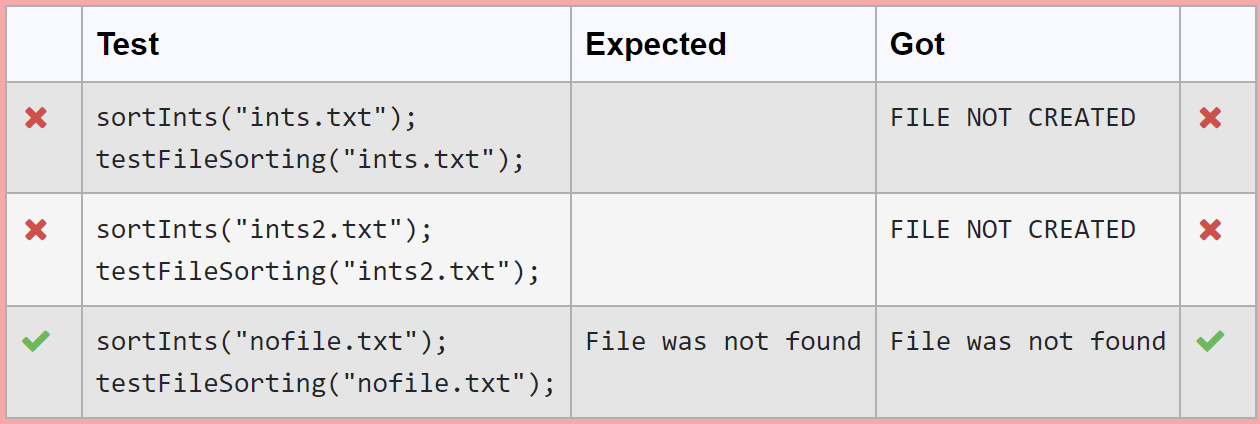
Test Expected Got X FILE NOT CREATED sortInts("ints.txt"); testFileSorting("ints.txt"); X FILE NOT CREATED sortInts("ints2.txt"); testFileSorting("ints2.txt"); File was not found File was not found sortInts("nofile.txt"); testFileSorting("nofile.txt")
Step by Step Solution
There are 3 Steps involved in it

Get step-by-step solutions from verified subject matter experts
 Study Help