







Question: Copy this and finish writing the code. Look at #4 from the instruction page for help. Make sure to copy the code given and finish
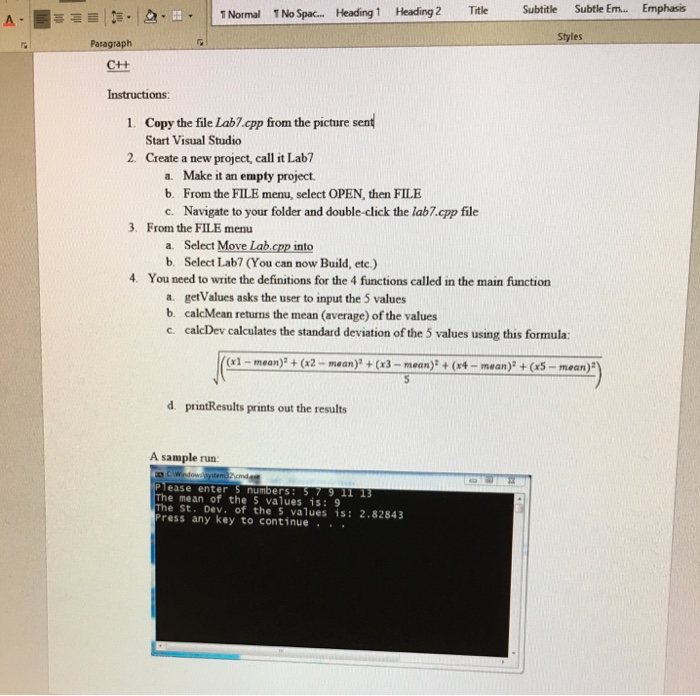
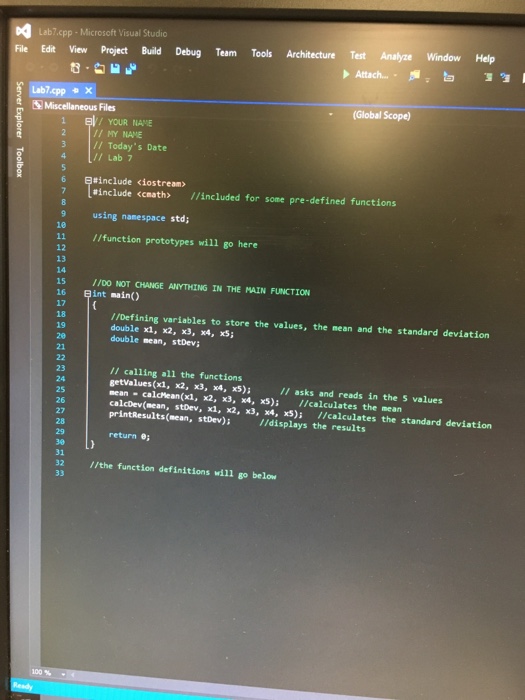 Copy this and finish writing the code. Look at #4 from the instruction page for help. Make sure to copy the code given and finish writing it up.
 O Normal TNo Spac.. Heading 1 Heading 2 Title Subtitle Subtle Em... Emphasis Styles Paragraph Ct+ Instructions: 1. Copy the file Lab7.cpp from the picture sent Start Visual Studio 2. Create a new project, call it Lab? a. Make it an empty project b. From the FILE menu, select OPEN, then FILE c. Navigate to your folder and double-click the lab7.cpp file 3. From the FILE menu a. Select Move Lab.cpp into b. Select Lab7 (You can now Build, etc.) 4. You need to write the definitions for the 4 functions called in the main function a. getValues asks the user to input the 5 values b. calcMean returns the mean (average) of the values c. calcDev calculates the standard deviation of the 5 values using this formula: (x1-mean)(x2 mean) + (x3- mean) + (x4-mean) +(x5-mean) d printResults prints out the results A sample run Please enter 5 numbers: 5 79 11 13 The mean of the 5 values is: 9 The St. Dev, of the 5 values is: 2.82843 press any key to continue
Step by Step Solution
There are 3 Steps involved in it

Get step-by-step solutions from verified subject matter experts
 Study Help