



Question: COSC 1P03 Assignment 1 Puzzling it out Due: Jan. 31, 2020 @ 4:00 pm (late date Feb. 3 @ 4:00 pm) The objective of this
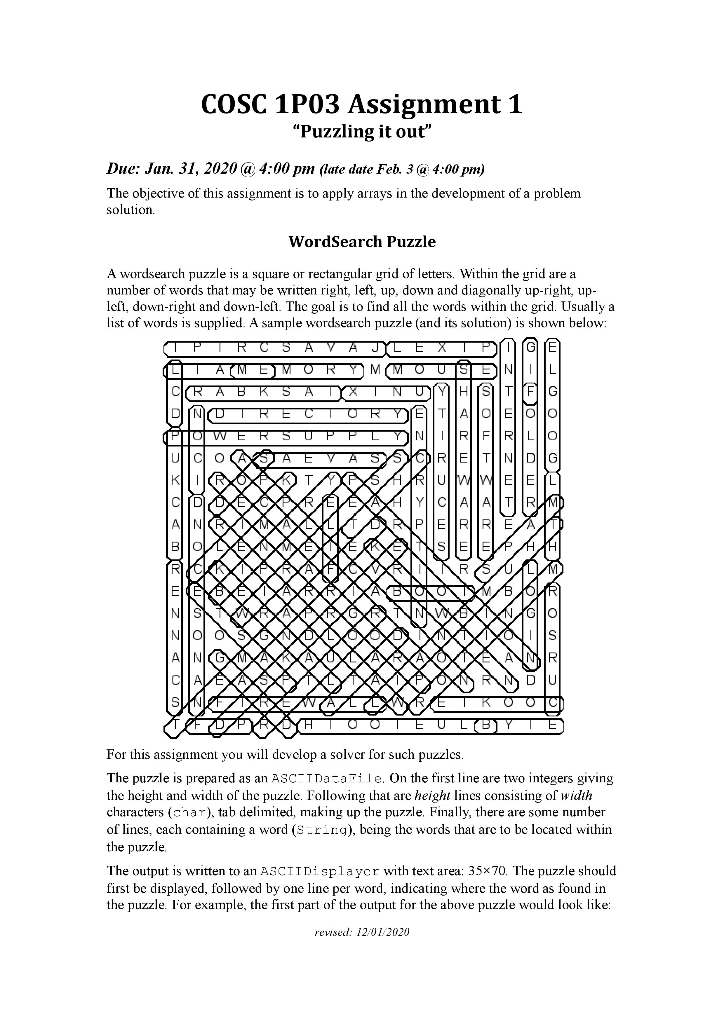
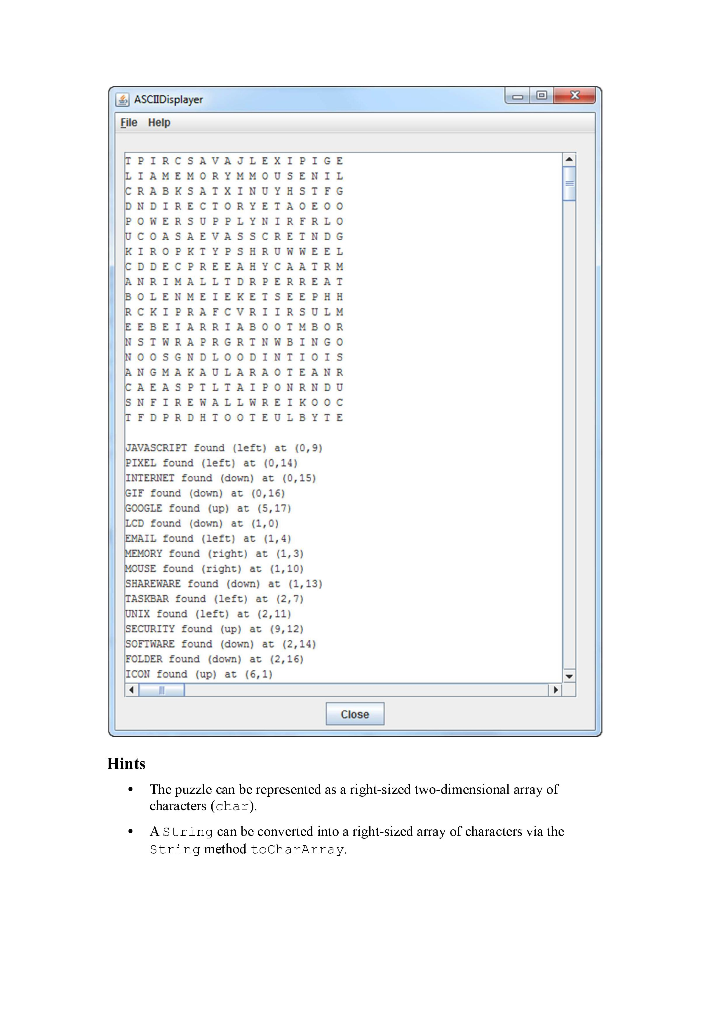
COSC 1P03 Assignment 1 "Puzzling it out" Due: Jan. 31, 2020 @ 4:00 pm (late date Feb. 3 @ 4:00 pm) The objective of this assignment is to apply arrays in the development of a problem solution. WordSearch Puzzle A wordsearch puzzle is a square or rectangular grid of letters. Within the grid are a number of words that may be written right, left, up, down and diagonally up-right, up- left, down-right and down-left. The goal is to find all the words within the grid. Usually a list of words is supplied. A sample wordsearch puzzle (and its solution) is shown below: R 3 LE X IPOO CI A (MEMORY MOUSE) CR ABKSA TYX IN DINUIRECTOR DE Pro WER SUPPLYN UCOADA EV A SY z Zoumozocold D D S M D DIO SASUK moc -3 m O w z w Our art Pa doa-Otomor0G) - CCDUODIS TOOOorm w z ZCO SHUMELLETKO FOLYSH TOOTE ULOYIB For this assignment you will develop a solver for such puzzles. The puzzle is prepared as an ASCIDacatile. On the first line are two integers giving the height and width of the puzzle. Following that are height lines consisting of width characters (char), tab delimited, making up the puzzle. Finally, there are some number of lines, cach containing a word (S-ring), being the words that are to be located within the puzzle The output is written to an ASCIIDisplayer with text area: 35x70. The puzzle should first be displayed, followed by one line per word, indicating where the word as found in the puzzle. For example, the first part of the output for the above puzzle would look like: rewed: 12/01/2020 ASCIIDisplayer File Help T PIRCSAVAJLEXIPIGE LI AMEMORYMMOUSENIL CRABKSAIXINUYHSTFG DN DIRECTORY EIA OE OO POWER SUPPLYNIR FRLO U COASAEVASS CREIND G KIROP KIYP SHRUNWEEL CD DECPREEAHY CAAIRM ANRIMALLIDRPERRE AT BOLENMEIE KEISE EPHH RCKIPRAFCVRIIRSULM E EBEIARRIABOOIMBOR N SIWRAPRGRINWBINGO NOOSGNDLOODINTIOIS ANGMAKAULARAOTEANR CAEASPILIAIPON RNDU SNFIREWALL WREIKOOC IFDPRDHI OOIE ULBYIE JAVASCRIPT found (left) at (0,9) PIXEL found (left) at (0,14) INTERNET found (down) at (0,15) GIF found (down) at (0,16) GOOGLE found (up) at (5,17) LCD found (down) at (1,0) EMAIL found (left) at (1,4) MEMORY found (right) at (1,3) MOUSE found (right) at (1,10) SHAREWARE found (down) at (1,13) TASKBAR found (left) at (2,7) UNIX found (left) at (2,11) SECURITY found (up) at (9,12) SOFTWARE found (down) at (2,14) FOLDER found (down) at (2,16) ICON found (up) at (6,1) Close Hints The puzzle can be represented as a right-sized two-dimensional array of characters (chaz). Astring can be converted into a right-sized array of characters via the Str:rg method tocharArray, A word can occur in any of & directions starting from a square in the puzzle o to the right (normal text: MEMORY above) o to the left (backwards: PIXE) o downwards (INTERNET) o upwards (COOGLE) o diagonally downwards to the right (APPLICAZION) o diagonally downwards to the left (CFAT) o diagonally upwards to the right (WIRELESS) o diagonally upwards to the left (PROGRAMMER) Consider writing separate methods such as: privale boolean search:kigt... { int x, irL y, Slsing word) { that look for a word starting from position (x, y) in the puzzle and proceeding in the designated direction (right in this case). The method returns true if the word is found in the designated direction starting from the indicated position. You would have 8 such methods. Lach of these methods will be quite similar. A word cannot occur starting from (x,y) if there isn't enough room from (x, y) to the edge of the puzzle in the designated direction. For example, if the puzzle is 10X10, we are checking from position (3,7) to the right and the word is more than 3 characters in length. Consider developing the solution in phases such as: I read and display puzzle 2. check for a single word in one direction only (e.g. right) 3. repeatedly add the ability to check for a single word in each of the other 7 directions 4. add the ability to search for multiple words. Don't lise the big puzzle for testing. Make special small puzzles to test each of the 8 search methods above such as the included puzzle right.tx: that has only one word written to the right. Submission: Details regarding preparation and submission of assignments in COSC 1P03 are found on the COSC 1 P03 Sakai Site as Assigrment Guidelires under Course Docurer:Ls. This document includes a discussion of assignment preparation, programming standards, evaluation criteria and academic conduct (including styles for citation) in addition to the detailed assignment submission process copied below. To prepare and submit the assignment electronically, follow the procedure below: 1. Ensure your folder (say Assign -) for the assignment is accessible on your computer and contains the Dr. Java project and all associated java and c-ass files for your assignment. Create a .zip file of your submission by right-clicking on the top level folder (1.e. Assige_2) and selecting Serd Lo/Compressed 12-oped) folder. A zipped version of the folder will be created. Use the default name (Assign_2.zip). It is important that you only submit a .zip file, not ray or .tar or any other type of compression. If you use a type of compression other than .zip your assignment may not be marked. 3. Log on to Sakai and select the COSC 1P03 site. 4. On the Ass-gncer...s page select Assigrmen. 1. Altach your .zio lilo (eg, Assign_1.zip) to the assignment submission (use the Add Allach-lenl.s bullon and select Browse). Navigate to where you stored your assignment and select the .zip file (eg. Assign_1.z.). The file will be added to your submission. Be sure to check the fono: Pledge checkbox, Press Submit to submit the assignment. 5. Assignments incorrectly submitted will lose marks. Assignments without the required files may not be marked. DrJava The .zip folder you submit should contain the project folder including all files relevant to the project - the .dr-ava, java and .class files for the assignment. If your project requires any special instructions to run, these instructions must be included in a read me lilc. Other Platforms Students must create their project using an IDE that is available on the Brock Computer Science lab computers. Currently, these are NetBeans, IntelliJ and Dr. Java. Markers must be able to open, compile and run your project on the lab computers. Assignments completed using some other IDE may not be marked. COSC 1P03 Assignment 1 "Puzzling it out" Due: Jan. 31, 2020 @ 4:00 pm (late date Feb. 3 @ 4:00 pm) The objective of this assignment is to apply arrays in the development of a problem solution. WordSearch Puzzle A wordsearch puzzle is a square or rectangular grid of letters. Within the grid are a number of words that may be written right, left, up, down and diagonally up-right, up- left, down-right and down-left. The goal is to find all the words within the grid. Usually a list of words is supplied. A sample wordsearch puzzle (and its solution) is shown below: R 3 LE X IPOO CI A (MEMORY MOUSE) CR ABKSA TYX IN DINUIRECTOR DE Pro WER SUPPLYN UCOADA EV A SY z Zoumozocold D D S M D DIO SASUK moc -3 m O w z w Our art Pa doa-Otomor0G) - CCDUODIS TOOOorm w z ZCO SHUMELLETKO FOLYSH TOOTE ULOYIB For this assignment you will develop a solver for such puzzles. The puzzle is prepared as an ASCIDacatile. On the first line are two integers giving the height and width of the puzzle. Following that are height lines consisting of width characters (char), tab delimited, making up the puzzle. Finally, there are some number of lines, cach containing a word (S-ring), being the words that are to be located within the puzzle The output is written to an ASCIIDisplayer with text area: 35x70. The puzzle should first be displayed, followed by one line per word, indicating where the word as found in the puzzle. For example, the first part of the output for the above puzzle would look like: rewed: 12/01/2020 ASCIIDisplayer File Help T PIRCSAVAJLEXIPIGE LI AMEMORYMMOUSENIL CRABKSAIXINUYHSTFG DN DIRECTORY EIA OE OO POWER SUPPLYNIR FRLO U COASAEVASS CREIND G KIROP KIYP SHRUNWEEL CD DECPREEAHY CAAIRM ANRIMALLIDRPERRE AT BOLENMEIE KEISE EPHH RCKIPRAFCVRIIRSULM E EBEIARRIABOOIMBOR N SIWRAPRGRINWBINGO NOOSGNDLOODINTIOIS ANGMAKAULARAOTEANR CAEASPILIAIPON RNDU SNFIREWALL WREIKOOC IFDPRDHI OOIE ULBYIE JAVASCRIPT found (left) at (0,9) PIXEL found (left) at (0,14) INTERNET found (down) at (0,15) GIF found (down) at (0,16) GOOGLE found (up) at (5,17) LCD found (down) at (1,0) EMAIL found (left) at (1,4) MEMORY found (right) at (1,3) MOUSE found (right) at (1,10) SHAREWARE found (down) at (1,13) TASKBAR found (left) at (2,7) UNIX found (left) at (2,11) SECURITY found (up) at (9,12) SOFTWARE found (down) at (2,14) FOLDER found (down) at (2,16) ICON found (up) at (6,1) Close Hints The puzzle can be represented as a right-sized two-dimensional array of characters (chaz). Astring can be converted into a right-sized array of characters via the Str:rg method tocharArray, A word can occur in any of & directions starting from a square in the puzzle o to the right (normal text: MEMORY above) o to the left (backwards: PIXE) o downwards (INTERNET) o upwards (COOGLE) o diagonally downwards to the right (APPLICAZION) o diagonally downwards to the left (CFAT) o diagonally upwards to the right (WIRELESS) o diagonally upwards to the left (PROGRAMMER) Consider writing separate methods such as: privale boolean search:kigt... { int x, irL y, Slsing word) { that look for a word starting from position (x, y) in the puzzle and proceeding in the designated direction (right in this case). The method returns true if the word is found in the designated direction starting from the indicated position. You would have 8 such methods. Lach of these methods will be quite similar. A word cannot occur starting from (x,y) if there isn't enough room from (x, y) to the edge of the puzzle in the designated direction. For example, if the puzzle is 10X10, we are checking from position (3,7) to the right and the word is more than 3 characters in length. Consider developing the solution in phases such as: I read and display puzzle 2. check for a single word in one direction only (e.g. right) 3. repeatedly add the ability to check for a single word in each of the other 7 directions 4. add the ability to search for multiple words. Don't lise the big puzzle for testing. Make special small puzzles to test each of the 8 search methods above such as the included puzzle right.tx: that has only one word written to the right. Submission: Details regarding preparation and submission of assignments in COSC 1P03 are found on the COSC 1 P03 Sakai Site as Assigrment Guidelires under Course Docurer:Ls. This document includes a discussion of assignment preparation, programming standards, evaluation criteria and academic conduct (including styles for citation) in addition to the detailed assignment submission process copied below. To prepare and submit the assignment electronically, follow the procedure below: 1. Ensure your folder (say Assign -) for the assignment is accessible on your computer and contains the Dr. Java project and all associated java and c-ass files for your assignment. Create a .zip file of your submission by right-clicking on the top level folder (1.e. Assige_2) and selecting Serd Lo/Compressed 12-oped) folder. A zipped version of the folder will be created. Use the default name (Assign_2.zip). It is important that you only submit a .zip file, not ray or .tar or any other type of compression. If you use a type of compression other than .zip your assignment may not be marked. 3. Log on to Sakai and select the COSC 1P03 site. 4. On the Ass-gncer...s page select Assigrmen. 1. Altach your .zio lilo (eg, Assign_1.zip) to the assignment submission (use the Add Allach-lenl.s bullon and select Browse). Navigate to where you stored your assignment and select the .zip file (eg. Assign_1.z.). The file will be added to your submission. Be sure to check the fono: Pledge checkbox, Press Submit to submit the assignment. 5. Assignments incorrectly submitted will lose marks. Assignments without the required files may not be marked. DrJava The .zip folder you submit should contain the project folder including all files relevant to the project - the .dr-ava, java and .class files for the assignment. If your project requires any special instructions to run, these instructions must be included in a read me lilc. Other Platforms Students must create their project using an IDE that is available on the Brock Computer Science lab computers. Currently, these are NetBeans, IntelliJ and Dr. Java. Markers must be able to open, compile and run your project on the lab computers. Assignments completed using some other IDE may not be marked
Step by Step Solution
There are 3 Steps involved in it

Get step-by-step solutions from verified subject matter experts