







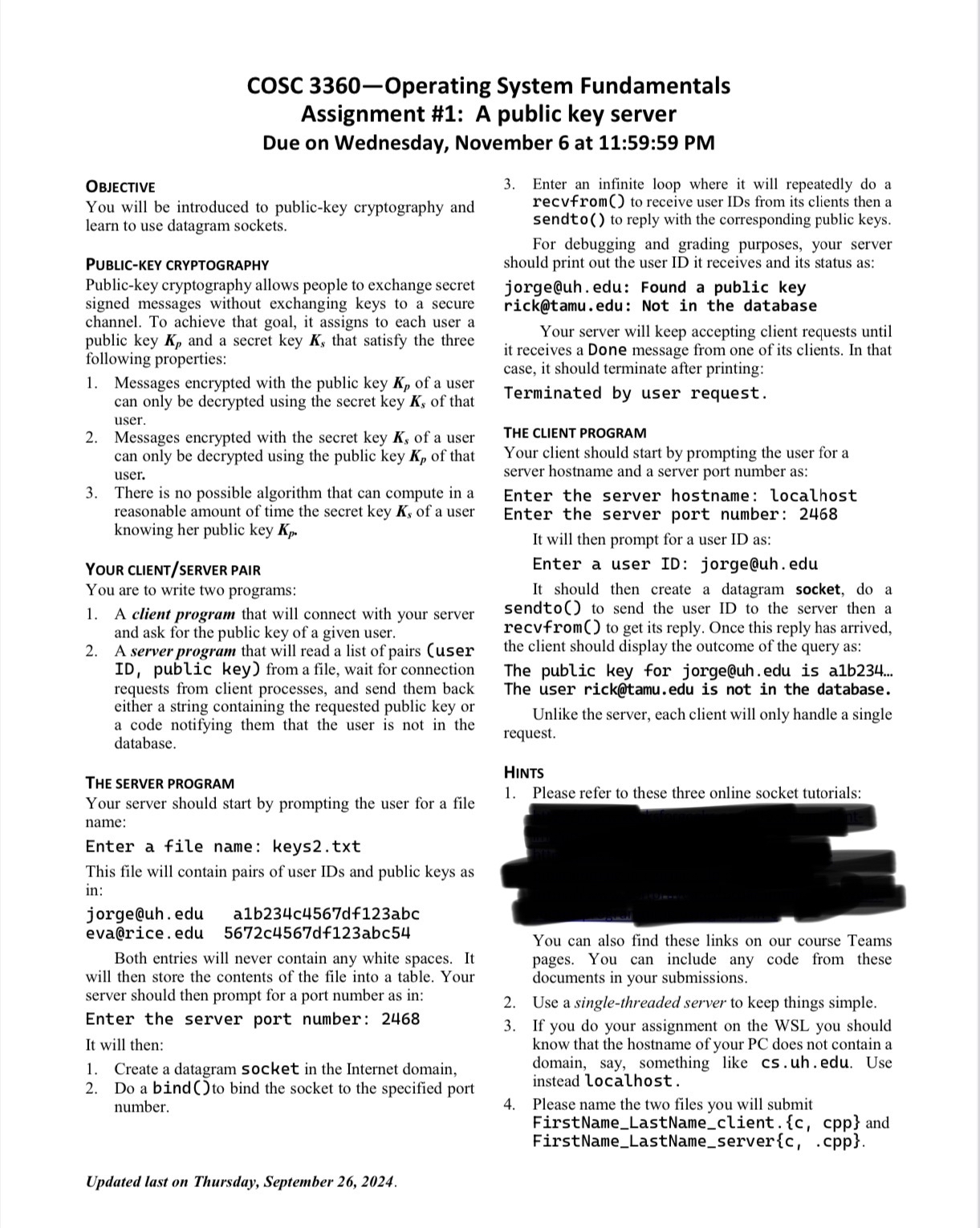
Question: COSC 3 3 6 0 Operating System Fundamentals Assignment # 1 : A public key server Due on Wednesday, November 6 at 1 1 :
COSC Operating System Fundamentals
Assignment #: A public key server
Due on Wednesday, November at :: PM
Enter an infinite loop where it will repeatedly do a
recvfrom to receive user IDs from its clients then a
sendto to reply with the corresponding public keys.
For debugging and grading purposes, your server
should print out the user ID it receives and its status as:
jorge@uhedu: Found a public key
rick@tamu.edu: Not in the database
Your server will keep accepting client requests until
it receives a Done message from one of its clients. In that
case, it should terminate after printing:
Terminated by user request.
THE CLIENT PROGRAM
Your client should start by prompting the user for a
server hostname and a server port number as:
Enter the server hostname: localhost
Enter the server port number:
It will then prompt for a user ID as:
Enter a user ID:
jorge@uhedu
It should then create a datagram socket, do a
sendto to send the user ID to the server then a
recvfrom to get its reply. Once this reply has arrived,
the client should display the outcome of the query as:
The public key for
jorge@uhedu is ab
The user
rick@tamu.edu is not in the database.
Unlike the server, each client will only handle a single
request.
Hints
Please refer to these three online socket tutorials:
You can also find these links on our course Teams
pages. You can include any code from these
documents in your submissions.
Use a singlethreaded server to keep things simple.
If you do your assignment on the WSL you should
know that the hostname of your PC does not contain a
domain, say, something like
csuhedu. Use
instead localhost.
Please name the two files you will submit
FirstNameLastNameclient. and
FirstNameLastNameserverccpp
Step by Step Solution
There are 3 Steps involved in it
1 Expert Approved Answer
Step: 1 Unlock

Question Has Been Solved by an Expert!
Get step-by-step solutions from verified subject matter experts
Step: 2 Unlock
Step: 3 Unlock
 Study Help