







Question: could someone make this program in C for an arduino nano will mivolve usimg the CTICO to control the display that wasi TI Our goal
could someone make this program in C for an arduino nano
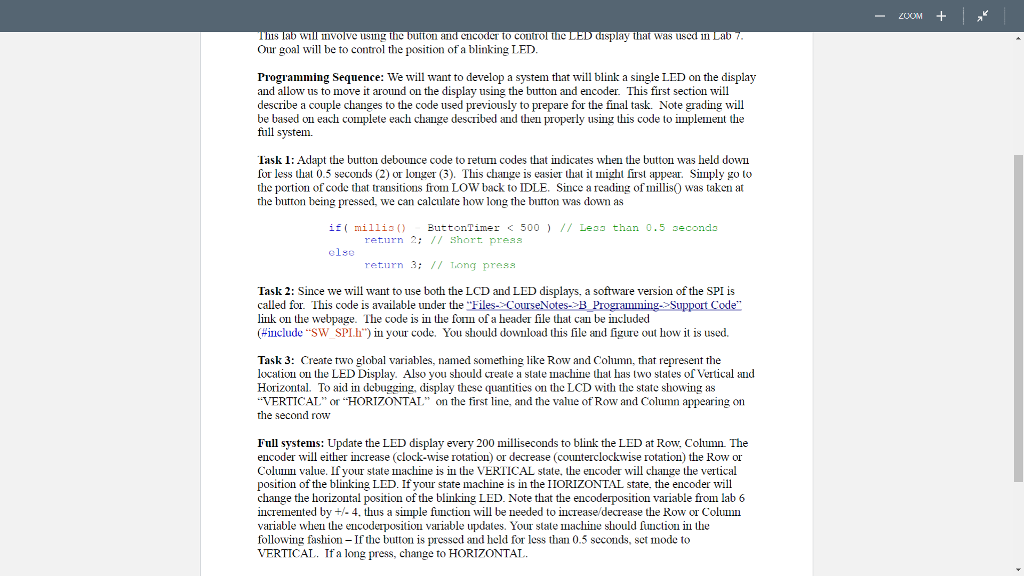
will mivolve usimg the CTICO to control the display that wasi TI Our goal will be to control the position of a blinking LED Progiamming Sequence: We will want to develop a system that will blink a single LED on the display and allow us to move it around on the display using the button and encoder. This first section will describe a couple changes to the code used previously to prepare for the final task. Note grading will be based on each complete each change described and then properly using this code to implement the full system. Task 1: Adapt the button debounce code to retum codes that indicates when the button was held down for less lhal 0.5 seconds (2) or longer (3). This challge is easier lhal it ??ght first appear Simply go lo the portion of code that transitions from LOW back to IDLE. Since a readig of millis was taken at the button being pressed, we can calculate how long the button was down as if( mil1is ButtonTimer B Programming-Support Code" link on the webpage. lhe code is ? the form of a header file that can be included (#include .'SW SPLh" in your code. You should download this file and figure out how it is used. Task 3: Create two global variables, named something like Row and Column, that represent the localion ou the LED Display. Also you should create a state machine thal has two states of Vertical and Horizontal. To aid in debugging, display these quantities on the LCD with the state showing as VERTICAL" or HORIZONTAT" on the first line, and the value of Row and Column appearing on the second row Full systems: Update the LED display every 200 milliseconds to blink the LED at Row, Column. The encoder wll either increase (clock-wise rotation) or decrease (counterclockwise rotation) the Row or Coluun value. If your state machine is i the VERTICAL state, the encoder will change the vertical position of the blinking LED. If your state machine is in the IIORIZONTAL state, the encoder will change the horizontal position of the blinking LED. Note that the encoderposition variable from lab 6 incremented by +4, thus a simple fiunction will be needed to increase/decrease the Row or Column variable when the eucodeiposition vaiable updales. Your stale machine should function in the following fashion - If the button is pressed and held for less than 0.5 scconds, sct mode to VERTICAL.. If a long press, change to HORIZONTAT.. will mivolve usimg the CTICO to control the display that wasi TI Our goal will be to control the position of a blinking LED Progiamming Sequence: We will want to develop a system that will blink a single LED on the display and allow us to move it around on the display using the button and encoder. This first section will describe a couple changes to the code used previously to prepare for the final task. Note grading will be based on each complete each change described and then properly using this code to implement the full system. Task 1: Adapt the button debounce code to retum codes that indicates when the button was held down for less lhal 0.5 seconds (2) or longer (3). This challge is easier lhal it ??ght first appear Simply go lo the portion of code that transitions from LOW back to IDLE. Since a readig of millis was taken at the button being pressed, we can calculate how long the button was down as if( mil1is ButtonTimer B Programming-Support Code" link on the webpage. lhe code is ? the form of a header file that can be included (#include .'SW SPLh" in your code. You should download this file and figure out how it is used. Task 3: Create two global variables, named something like Row and Column, that represent the localion ou the LED Display. Also you should create a state machine thal has two states of Vertical and Horizontal. To aid in debugging, display these quantities on the LCD with the state showing as VERTICAL" or HORIZONTAT" on the first line, and the value of Row and Column appearing on the second row Full systems: Update the LED display every 200 milliseconds to blink the LED at Row, Column. The encoder wll either increase (clock-wise rotation) or decrease (counterclockwise rotation) the Row or Coluun value. If your state machine is i the VERTICAL state, the encoder will change the vertical position of the blinking LED. If your state machine is in the IIORIZONTAL state, the encoder will change the horizontal position of the blinking LED. Note that the encoderposition variable from lab 6 incremented by +4, thus a simple fiunction will be needed to increase/decrease the Row or Column variable when the eucodeiposition vaiable updales. Your stale machine should function in the following fashion - If the button is pressed and held for less than 0.5 scconds, sct mode to VERTICAL.. If a long press, change to HORIZONTAT
Step by Step Solution
There are 3 Steps involved in it

Get step-by-step solutions from verified subject matter experts
 Study Help