







Question: Could someone please help me with this C++ program that covers Sorting Algorthim Analysis? The instructions are posted in the images below, and the 3
Could someone please help me with this C++ program that covers Sorting Algorthim Analysis? The instructions are posted in the images below, and the 3 starting code files are pasted in text below (main.cpp, Sorter.hpp, Timer.hpp)
MAIN.CPP____________________________________________________________________________
#include
using namespace std;
#include "Sorter.hpp"
// displays menu and returns valid option
int displayMenu();
// pause for a key the clear screen
void pause();
int main()
{
int listSize = 10;
int choice = 0;
do
{
choice = displayMenu();
if (choice != 5)
{
do
{
cout
cin >> listSize;
if (listSize
cout
} while (listSize
system("cls");
Sorter* sorterPtr = new Sorter(listSize);
sorterPtr->doSort(choice);
delete sorterPtr;
pause();
}
} while (choice != 5);
return 0;
}
int displayMenu()
{
int choice = 0;
cout
do
{
cin >> choice;
if (choice 5)
cout
} while (choice 5);
return choice;
}
void pause()
{
cout
cin.ignore();
cin.get();
system("cls");
}
SORTER.HPP____________________________________________________________________________
#ifndef _SORTER_HPP
#define _SORTER_HPP
#include "Timer.hpp"
using namespace std;
#include
#include
#include
int findIndexOfSmallest(const vector
int partition(vector
int sortFirstMiddleLast(vector
void order(vector
class Sorter
{
public:
Sorter(int arraySize);
vector
vector
vector
vector
void Run(int type);
void doSort(int choice);
private:
vector
bool m_listSorted;
};
Sorter::Sorter(int arraySize)
{
srand(time(0));
for (int i = 0; i
{
m_array.push_back(rand() % 10000);
}
m_listSorted = false;
}
void Sorter::doSort(int choice)
{
Timer timer;
timer.Start();
switch(choice)
{
case 1:
cout
m_array = selectionSort(m_array);
break;
case 2:
cout
m_array = bubbleSort(m_array);
break;
case 3:
cout
m_array = insertionSort(m_array);
break;
case 4:
cout
m_array = quickSort(m_array,0, m_array.size() - 1);
break;
default:
cout
}
m_listSorted = true;
cout
cout
for (int i = 0; i
{
cout
}
cout
for (int i = m_array.size() - 5; i
{
cout
}
cout
}
vector
{
// Bubble Sort
vector
unsigned int n = sorted.size();
for (unsigned int i = 0; i
{
for (unsigned int j = 0; j
{
if (sorted[j] > sorted[j + 1])
{
int temp = sorted[j];
sorted[j] = sorted[j + 1];
sorted[j + 1] = temp;
}
}
}
return sorted;
}
vector
{
vector
int temp;
for (int front = 0; front
{
int smallest = findIndexOfSmallest(sorted, front);
std::swap(sorted[front], sorted[smallest]);
}
return sorted;
}
vector
{
vector
unsigned int n = sorted.size();
for (int unsorted = 1; unsorted
{
int nextItem = sorted[unsorted];
int loc = unsorted;
while ((loc > 0) && (sorted[loc - 1] > nextItem))
{
// Shift sorted[loc - 1] to the right
sorted[loc] = sorted[loc - 1];
loc--;
} // end while
sorted[loc] = nextItem; // Insert nextItem into sorted region
} // end for
return sorted;
}
vector
{
// the smallest array quickSort will sort
if (last - first + 1
{
theArray = insertionSort(theArray);
}
else
{
// Create the partition: S1 | Pivot | S2
int pivotIndex = partition(theArray, first, last);
// Sort subarrays S1 and S2
quickSort(theArray, first, pivotIndex - 1);
quickSort(theArray, pivotIndex + 1, last);
} // end if
return theArray;
} // end quickSort
int findIndexOfSmallest(const vector
{
int smallestFound = start; // Index of smallest entry found so far
for (int currentIndex = start+1; currentIndex
{
if (arr[currentIndex]
smallestFound = currentIndex;
} // end for
return smallestFound; // Index of smallest entry
} // end findIndexOfSmallest
int partition(vector
{
// Choose pivot using median-of-three selection
int pivotIndex = sortFirstMiddleLast(theArray, first, last);
// Reposition pivot so it is last in the array
std::swap(theArray[pivotIndex], theArray[last - 1]);
pivotIndex = last - 1;
int pivot = theArray[pivotIndex];
// Determine the regions S1 and S2
int indexFromLeft = first + 1;
int indexFromRight = last - 2;
bool done = false;
while (!done)
{
// Locate first entry on left that is >= pivot
while (theArray[indexFromLeft]
indexFromLeft = indexFromLeft + 1;
// Locate first entry on right that is
while (theArray[indexFromRight] > pivot)
indexFromRight = indexFromRight - 1;
if (indexFromLeft
{
std::swap(theArray[indexFromLeft], theArray[indexFromRight]);
indexFromLeft = indexFromLeft + 1;
indexFromRight = indexFromRight - 1;
}
else
done = true;
} // end while
// Place pivot in proper position between S1 and S2, and mark its new location
std::swap(theArray[pivotIndex], theArray[indexFromLeft]);
pivotIndex = indexFromLeft;
return pivotIndex;
} // end partition
int sortFirstMiddleLast(vector
{
int mid = first + (last - first) / 2;
order(theArray, first, mid); // Make theArray[first]
order(theArray, mid, last); // Make theArray[mid]
order(theArray, first, mid); // Make theArray[first]
return mid;
} // end sortFirstMiddleLast
void order(vector
{
if (theArray[i] > theArray[j])
std::swap(theArray[i], theArray[j]); // Exchange entries
} // end order
#endif
TIMER.HPP____________________________________________________________________________
#ifndef TIMER_HPP #define TIMER_HPP
#include
class Timer { public: void Start() { m_startTime = chrono::system_clock::now(); }
unsigned int GetElapsedSeconds() { auto current_time = std::chrono::system_clock::now(); return chrono::duration_cast<:chrono::seconds>( current_time - m_startTime ).count(); }
unsigned int GetElapsedMilliseconds() { auto current_time = std::chrono::system_clock::now(); return chrono::duration_cast<:chrono::milliseconds>( current_time - m_startTime ).count(); }
private: chrono::system_clock::time_point m_startTime; };
#endif
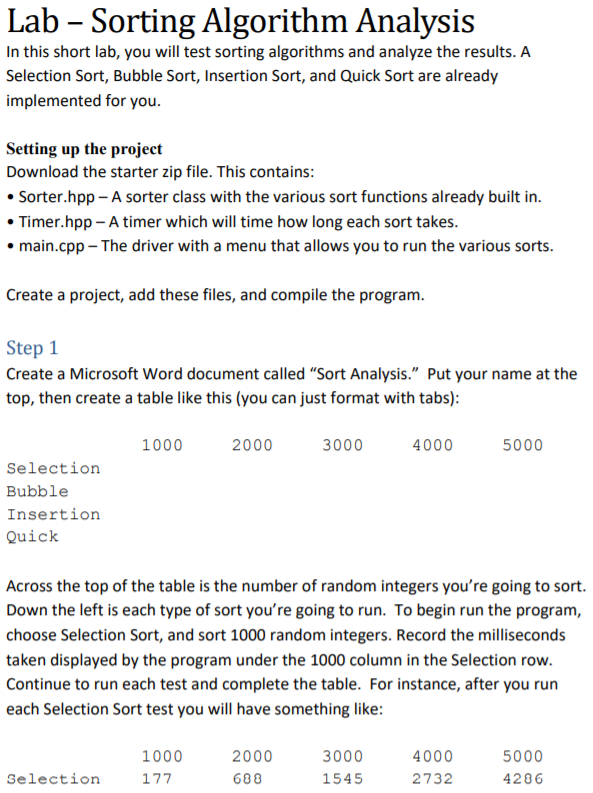
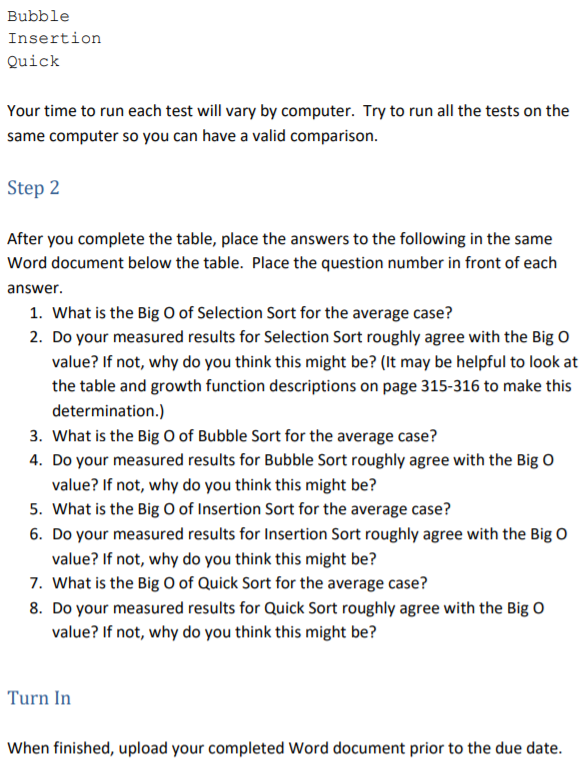
Lab - Sorting Algorithm Analysis In this short lab, you will test sorting algorithms and analyze the results. A Selection Sort, Bubble Sort, Insertion Sort, and Quick Sort are already implemented for you Setting up the project Download the starter zip file. This contains Sorter.hpp- A sorter class with the various sort functions already built in Timer.hpp- A timer which will time how long each sort takes main.cpp The driver with a menu that allows you to run the various sorts Create a project, add these files, and compile the program Create a Microsoft Word document called "Sort Analysis." Put your name at the top, then create a table like this (you can just format with tabs) 1000 2000 3000 4000 5000 Selection Bubble Insertion Quick Across the top of the table is the number of random integers you're going to sort Down the left is each type of sort you're going to run. To begin run the program, choose Selection Sort, and sort 1000 random integers. Record the milliseconds taken displayed by the program under the 1000 column in the Selection row Continue to run each test and complete the table. For instance, after you run each Selection Sort test you will have something like 1000 2000 688 3000 1545 4000 2732 5000 4286 Selection Lab - Sorting Algorithm Analysis In this short lab, you will test sorting algorithms and analyze the results. A Selection Sort, Bubble Sort, Insertion Sort, and Quick Sort are already implemented for you Setting up the project Download the starter zip file. This contains Sorter.hpp- A sorter class with the various sort functions already built in Timer.hpp- A timer which will time how long each sort takes main.cpp The driver with a menu that allows you to run the various sorts Create a project, add these files, and compile the program Create a Microsoft Word document called "Sort Analysis." Put your name at the top, then create a table like this (you can just format with tabs) 1000 2000 3000 4000 5000 Selection Bubble Insertion Quick Across the top of the table is the number of random integers you're going to sort Down the left is each type of sort you're going to run. To begin run the program, choose Selection Sort, and sort 1000 random integers. Record the milliseconds taken displayed by the program under the 1000 column in the Selection row Continue to run each test and complete the table. For instance, after you run each Selection Sort test you will have something like 1000 2000 688 3000 1545 4000 2732 5000 4286 Selection
Step by Step Solution
There are 3 Steps involved in it

Get step-by-step solutions from verified subject matter experts
 Study Help