







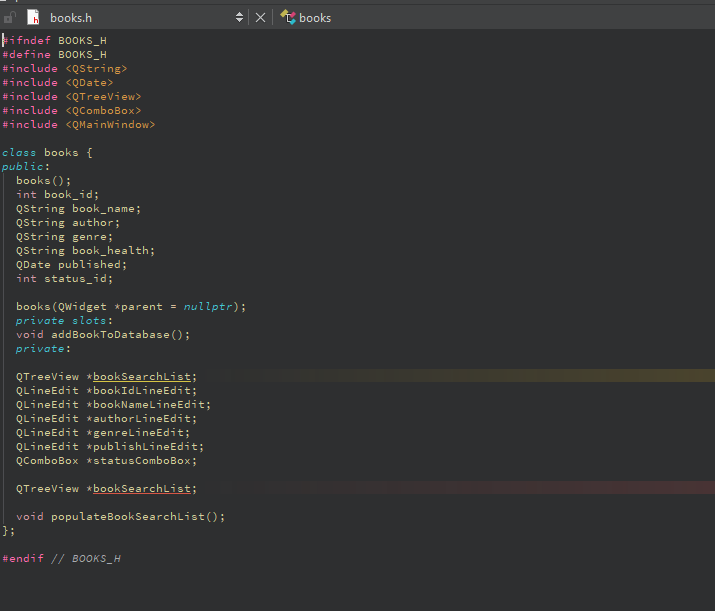
Question: Could you help me fix my books.cpp so the function to add books is complete. the picture is the books.h and heres the books.cpp .
Could you help me fix my books.cpp so the function to add books is complete. the picture is the books.h and heres the books.cpp could you make a database please
#include "books.h
#include
#include
#include
#include
#include
books::booksQWidget parent : QMainWindowparent
setWindowTitleLibrary Books";
Central widget and layout
QWidget centralWidget new QWidgetthis;
QVBoxLayout layout new QVBoxLayoutcentralWidget;
Book search list QTreeView
bookSearchList new QTreeViewthis;
layoutaddWidgetbookSearchList;
setCentralWidgetcentralWidget;
Populate the book search list from the database
populateBookSearchList;
void books::populateBookSearchList
QSqlDatabase db QSqlDatabase::addDatabaseQSQLITE;
dbsetDatabaseNameyourdatabase.db;
if dbopen
qDebug "Unable to open database";
return;
QSqlQuery query;
if queryexecSELECT FROM library.books ORDER BY genre"
QStandardItemModel model new QStandardItemModelthis;
QString currentGenre;
QStandardItem currentGenreItem nullptr;
while querynext
QString genre query.valuegenretoString;
if genre currentGenre
New genre, create a new parent item for it
currentGenre genre;
currentGenreItem new QStandardItemgenre;
modelappendRowcurrentGenreItem;
Create a child item for each book in the genre
QList bookItems;
bookItems new QStandardItemqueryvaluebookname"toString;
bookItems new QStandardItemqueryvalueauthortoString; Author
bookItems new QStandardItemqueryvaluepublishedtoString; Published date
currentGenreItemappendRowbookItems;
Set the model to the book search list
uibookSearchListsetModelmodel;
uibookSearchListsetModelmodel;
else
qDebug "Query failed:" query.lastErrortext;
void books::addBookToDatabase
QString bookId uibookidtext;
QString name uinametext;
QString author uiauthortext;
QString genre uigenretext;
QString publish uipublishtext;
QString status uistatuscurrentText;
QSqlDatabase db QSqlDatabase::database;
QSqlQuery querydb;
query.prepareINSERT INTO library.books bookid bookname, author, genre, published, bookhealth
"VALUES :bookid :bookname, :author, :genre, :published, :bookhealth;
query.bindValue:bookid bookId;
query.bindValue:bookname", name;
query.bindValue:author", author;
query.bindValue:genre", genre;
query.bindValue:published", publish;
query.bindValue:bookhealth", status;
if queryexec
qDebug "Book added successfully";
Update the book search list after adding the new book
populateBookSearchList;
else
qDebug "Error adding book:" query.lastErrortext;
Step by Step Solution
There are 3 Steps involved in it
1 Expert Approved Answer
Step: 1 Unlock

Question Has Been Solved by an Expert!
Get step-by-step solutions from verified subject matter experts
Step: 2 Unlock
Step: 3 Unlock
 Study Help