





Question: Could you help me fix this code in python? I am not really sure what is the problem. Thanks import random import matplotlib.pyplot as plt

Could you help me fix this code in python? I am not really sure what is the problem. Thanks

import random import matplotlib.pyplot as plt import time from array import array import numpy from datetime import datetime

#Here we are printing the date-time and our name now = datetime.now() print("Your name") print("now =", now)

#Now we have created this function so that after sorting we can check whether the array is sorted correctly or not def list_sorted(l): flag = 0 for i in range(1,len(l)): #If we find any left elemnt that is greater than it's right element that means that array is not sorted and we assign flag 1 if(l[i]

if(flag==1): return False #It says the data storage isn't sorted so we return false

else: return True #It says that data storage is sorted so we return true

#Now we have created this function so that we can sort the array def bubbleSort(lst): s = len(lst) #Bubble sort outer loop for i in range(s-1): #Inner loop for j in range(0,s-i-1): #If element at index j > element at index j+1 if(lst[j] > lst[j+1]): lst[j],lst[j+1] = lst[j+1],lst[j]

return lst

#Set N to this sizes N=[128, 256, 512, 1024, 2048, 4096,8192,16384] #Set variables to 0 ,these variable will be used to calculate time difference for list,python array and numpy array a1=0 b1=0 a2=0 b2=0 a3=0 b3=0 running=[]

random.seed(100) #Loop over N for n in N: num=[] #Loop from i=0 to n for i in range(n): #Using random.random() function to generate random number and then multiply it by 10000 #In order to get random number in the range 0-9999 #and convert the random float number to integer and then append it in num num.append(int(random.random()*10000)) #Store time before sorting a1=time.time() print("now working on list") #Call bubble sort function bubbleSort(num) #Store time after sorting in b b1=time.time() #Check the status ,whether it is sorted or not ans=list_sorted(num) print("python list sorted:" +str(ans)) #Similary, we are doing for python array and numpy array print("now working on arrays") python_array = array("i", num) a2=time.time() bubbleSort(python_array)

b2=time.time() ans=list_sorted(python_array) print("python array sorted:"+str(ans)) print("now working on numpy array") numpy_array=numpy.array(num) a3=time.time()

bubbleSort(numpy_array)

b3=time.time() ans=list_sorted(numpy_array) print("numpy array sorted:"+ str(ans)) #Here we are storing the differences of timing running.append([b1-a1,b2-a2,b3-a3]) #Use plt to plot N and running plt.plot(N,running) #Set title , xlabel and ylabel plt.title("Running time of bubble sort for different input sizes") plt.xlabel("Problem size") plt.ylabel("Running time in milliseconds") #Set x scale to log plt.xscale('log') #Set xticks plt.xticks(N) #We show how the plot plt.show() print(running)

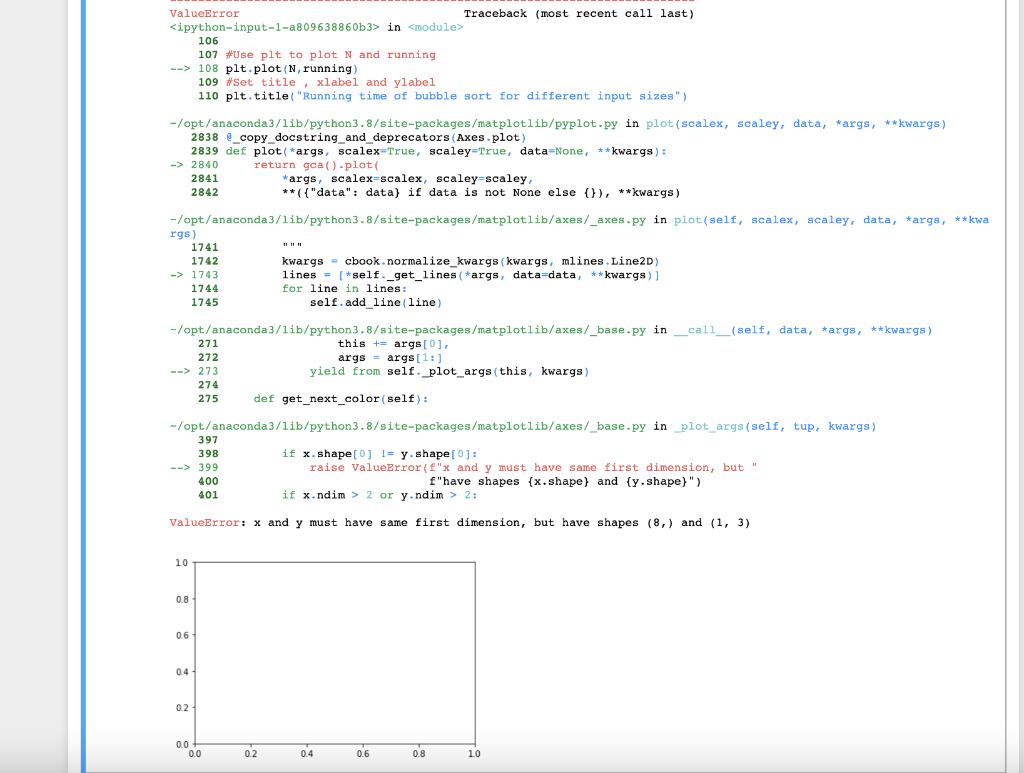
The output is the following:
Could you help me fix this code in python? I am not

ValueError Traceback (most recent call last) in 106 107 #Use plt to plot N and running --> 108 plt.plot(N, running) 109 #Set title, xlabel and ylabel 110 plt.title("Running time of bubble sort for different input sizes") -/opt/anaconda3/lib/python3.8/site-packages/matplotlib/pyplot.py in plot (scalex, scaley, data, *args, **kwargs) 2838 2_copy_docstring_and_deprecators (Axes.plot) 2839 def plot(*args, scalex=True, scaley=True, data=None, **kwargs) : -> 2840 return gca() .plot( 2841 *args, scalex-scalex, scaley=scaley, 2842 **({ "data": data) if data is not None else () ), **kwargs) -/opt/anaconda3/lib/python3.8/site-packages/matplotlib/axes/_axes.py in plot(self, scalex, scaley, data, *args, **kwa rgs) 1741 1742 kwargs = cbook.normalize_kwargs kwargs, mlines. Line2D) -> 1743 lines = [*self._get_lines (*args, data=data, **kwargs) ] 1744 for line in lines: 1745 self.add line (line) -/opt/anaconda3/lib/python3.8/site-packages/matplotlib/axes/_base.py in _call_(self, data, *args, **kwargs) 271 this += args[0], 272 args = args[1:] --> 273 yield from self plot_args(this, kwargs) 274 275 def get_next_color (self): -/opt/anaconda3/lib/python3.8/site-packages/matplotlib/axes/_base.py in plot_args (self, tup, kwargs) 397 398 if x.shape[0] != y-shape[0]: --> 399 raise ValueError("x and y must have same first dimension, but 400 f"have shapes (x.shape) and (y.shape)") 401 if x.ndim > 2 or y.ndim > 2: ValueError: x and y must have same first dimension, but have shapes (8,) and (1, 3) 10 0.8 0.6 0.4 02 0.0 0.0 02 0.4 0.6 0.8 10 ValueError Traceback (most recent call last) in 106 107 #Use plt to plot N and running --> 108 plt.plot(N, running) 109 #Set title, xlabel and ylabel 110 plt.title("Running time of bubble sort for different input sizes") -/opt/anaconda3/lib/python3.8/site-packages/matplotlib/pyplot.py in plot (scalex, scaley, data, *args, **kwargs) 2838 2_copy_docstring_and_deprecators (Axes.plot) 2839 def plot(*args, scalex=True, scaley=True, data=None, **kwargs) : -> 2840 return gca() .plot( 2841 *args, scalex-scalex, scaley=scaley, 2842 **({ "data": data) if data is not None else () ), **kwargs) -/opt/anaconda3/lib/python3.8/site-packages/matplotlib/axes/_axes.py in plot(self, scalex, scaley, data, *args, **kwa rgs) 1741 1742 kwargs = cbook.normalize_kwargs kwargs, mlines. Line2D) -> 1743 lines = [*self._get_lines (*args, data=data, **kwargs) ] 1744 for line in lines: 1745 self.add line (line) -/opt/anaconda3/lib/python3.8/site-packages/matplotlib/axes/_base.py in _call_(self, data, *args, **kwargs) 271 this += args[0], 272 args = args[1:] --> 273 yield from self plot_args(this, kwargs) 274 275 def get_next_color (self): -/opt/anaconda3/lib/python3.8/site-packages/matplotlib/axes/_base.py in plot_args (self, tup, kwargs) 397 398 if x.shape[0] != y-shape[0]: --> 399 raise ValueError("x and y must have same first dimension, but 400 f"have shapes (x.shape) and (y.shape)") 401 if x.ndim > 2 or y.ndim > 2: ValueError: x and y must have same first dimension, but have shapes (8,) and (1, 3) 10 0.8 0.6 0.4 02 0.0 0.0 02 0.4 0.6 0.8 10

Step by Step Solution

There are 3 Steps involved in it

1 Expert Approved Answer
Step: 1 Unlock blur-text-image
Question Has Been Solved by an Expert!

Get step-by-step solutions from verified subject matter experts

Step: 2 Unlock
Step: 3 Unlock

Students Have Also Explored These Related Databases Questions!