







Question: Could you help me to edit the SQL code for the ER diagram I've created with visuals? Basically, the scenario of the system is as
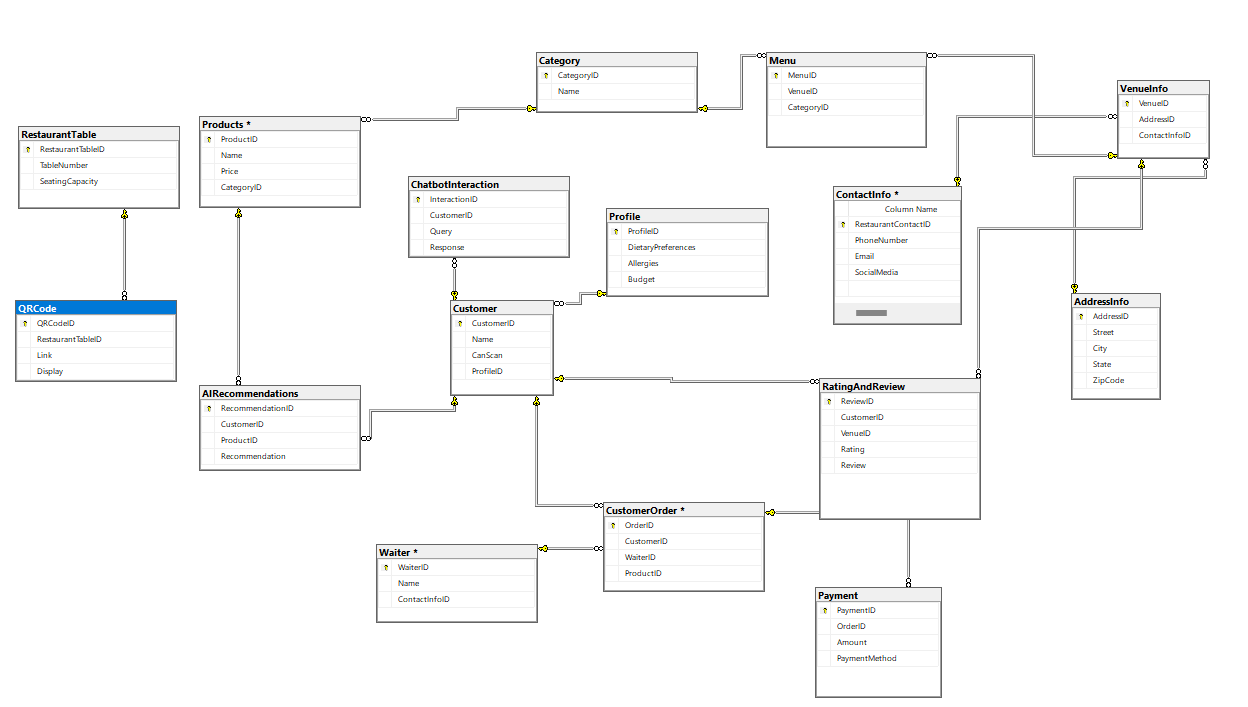
"Could you help me to edit the SQL code for the ER diagram I've created with visuals?
Basically, the scenario of the system is as follows:
A user scans a QR code. After scanning the QR code, they can access a menu interface where they can navigate through categories and view products. Additionally, within the menu, the address and contact information of the venue are provided. Furthermore, QR codes are specific to tables, allowing payments to be attributed to the respective tables, and customers can make payments through the interface. Waiters are responsible for bringing and delivering orders. Also, users can leave comments through the interface and receive recommendations from artificial intelligence. You can make any necessary additions you see fit and adjust the code accordingly. Please either correct the SQL code or provide a different output for the ER diagram."
Here is my sql code for the er diagram visual that i added.
CREATE TABLE Profile
ProfileID INT PRIMARY KEY,
DietaryPreferences VARCHAR
Allergies VARCHAR
Budget DECIMAL
;
CREATE TABLE Customer
CustomerID INT PRIMARY KEY,
Name VARCHAR
CanScan BIT,
ProfileID INT,
FOREIGN KEY ProfileID REFERENCES ProfileProfileID
;
CREATE TABLE RestaurantContactInfo
ContactID INT PRIMARY KEY,
PhoneNumber VARCHAR
Email VARCHAR
SocialMedia VARCHAR
;
CREATE TABLE Waiter
WaiterID INT PRIMARY KEY,
Name VARCHAR
ContactInfoID INT,
FOREIGN KEY ContactInfoID REFERENCES ContactInfoContactID
;
CREATE TABLE AddressInfo
AddressID INT PRIMARY KEY,
Street VARCHAR
City VARCHAR
State VARCHAR
ZipCode VARCHAR
;
CREATE TABLE VenueInfo
VenueID INT PRIMARY KEY,
AddressID INT,
ContactInfoID INT,
FOREIGN KEY AddressID REFERENCES AddressInfoAddressID
FOREIGN KEY ContactInfoID REFERENCES ContactInfoContactID
;
CREATE TABLE Category
CategoryID INT PRIMARY KEY,
Name VARCHAR
;
CREATE TABLE Products
ProductID INT PRIMARY KEY,
Name VARCHAR
Price DECIMAL
CategoryID INT,
FOREIGN KEY CategoryID REFERENCES CategoryCategoryID
;
CREATE TABLE Menu
MenuID INT PRIMARY KEY,
VenueID INT,
CategoryID INT,
FOREIGN KEY VenueID REFERENCES VenueInfoVenueID
FOREIGN KEY CategoryID REFERENCES CategoryCategoryID
;
Assuming RestaurantTable is the correct name for the table referenced in QRCode
CREATE TABLE RestaurantTable
RestaurantTableID INT PRIMARY KEY,
TableNumber INT,
SeatingCapacity INT
;
CREATE TABLE QRCode
QRCodeID INT PRIMARY KEY,
RestaurantTableID INT,
Link VARCHAR
Display VARCHAR
FOREIGN KEY RestaurantTableID REFERENCES RestaurantTableRestaurantTableID
;
Creating CustomerOrder as an alias for Order, considering SQL reserved keywords
CREATE TABLE CustomerOrder
OrderID INT PRIMARY KEY,
CustomerID INT,
WaiterID INT,
ProductID INT,
FOREIGN KEY CustomerID REFERENCES CustomerCustomerID
FOREIGN KEY WaiterID REFERENCES WaiterWaiterID
FOREIGN KEY ProductID REFERENCES ProductsProductID
;
CREATE TABLE Payment
PaymentID INT PRIMARY KEY,
OrderID INT,
Amount DECIMAL
PaymentMethod VARCHAR
FOREIGN KEY OrderID REFERENCES CustomerOrderOrderID
;
CREATE TABLE RatingAndReview
ReviewID INT PRIMARY KEY,
CustomerID INT,
VenueID INT,
Rating INT,
Review TEXT,
FOREIGN KEY CustomerID REFERENCES CustomerCustomerID
FOREIGN KEY VenueID REFERENCES VenueInfoVenueID
;
CREATE TABLE AIRecommendations
RecommendationID INT PRIMARY KEY,
CustomerID INT,
ProductID INT,
Recommendation VARCHAR
FOREIGN KEY CustomerID REFERENCES CustomerCustomerID
FOREIGN KEY ProductID REFERENCES ProductsProductID
;
CREATE TABLE ChatbotInteraction
InteractionID INT PRIMARY KEY,
CustomerID INT,
Query TEXT,
Response TEXT,
FOREIGN KEY CustomerID REFERENCES CustomerCustomerID
;
Feel free to share the SQL code or provide a different output for the ER diagram.
Step by Step Solution
There are 3 Steps involved in it
1 Expert Approved Answer
Step: 1 Unlock

Question Has Been Solved by an Expert!
Get step-by-step solutions from verified subject matter experts
Step: 2 Unlock
Step: 3 Unlock
 Study Help