







Question: Could you help me with this Directions, please? Directions Data Validation Use the Data Validation features to set up the following: Create a drop-down list
Could you help me with this Directions, please?
Directions
Data Validation
Use theData Validationfeatures to set up the following:
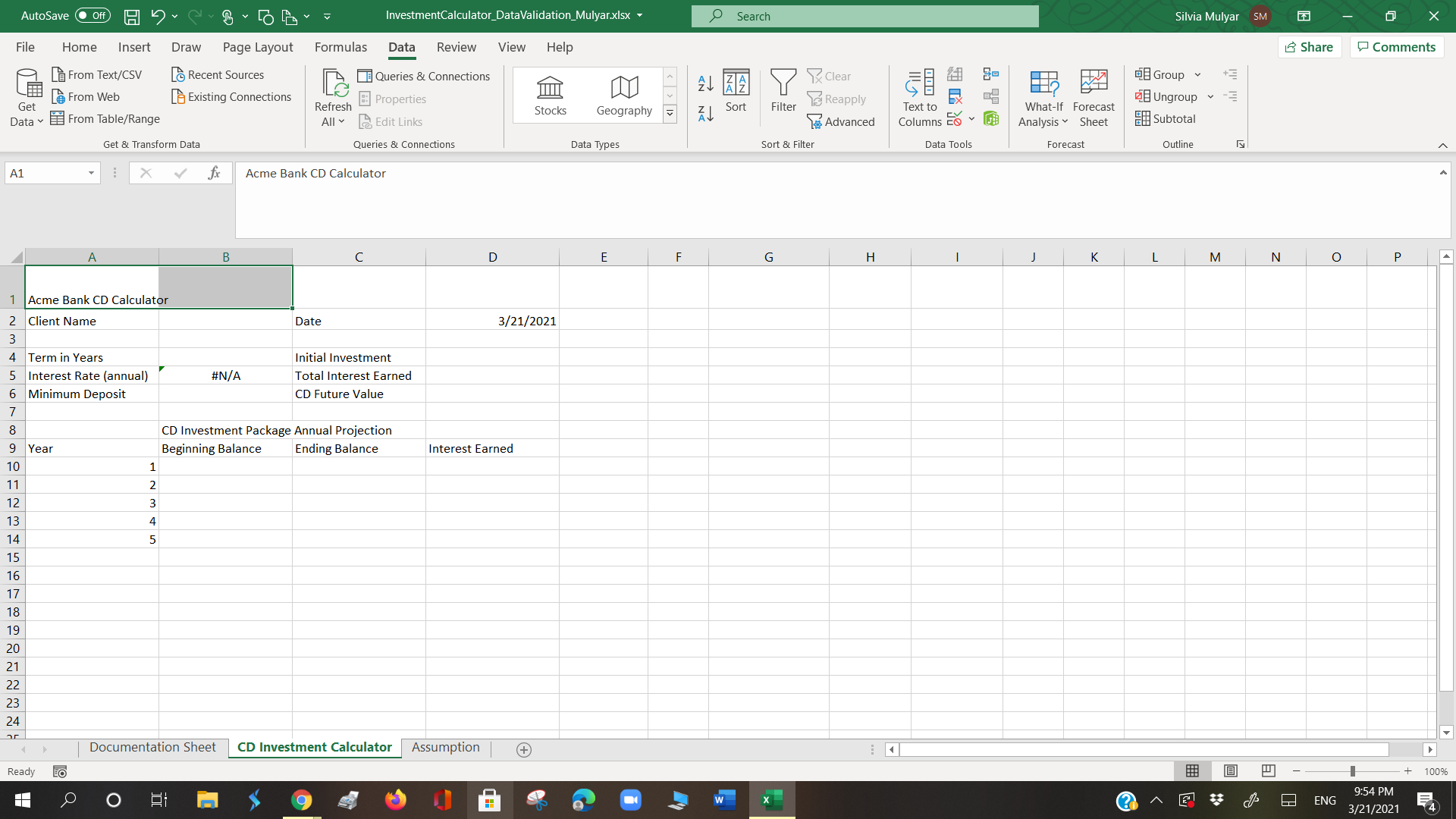
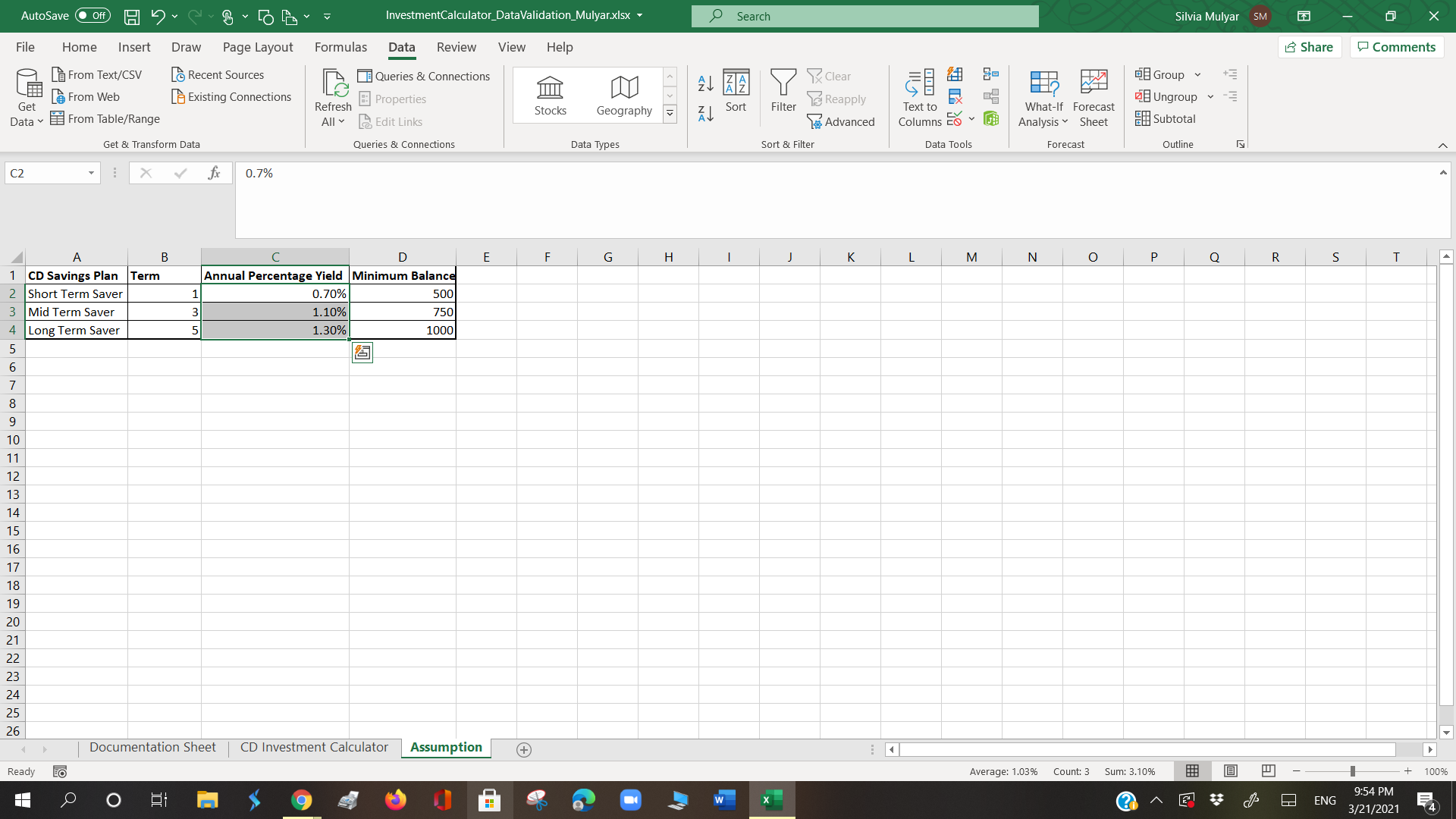
Create a drop-down list inB4to show the term years. Use the information located on the Assumption Tab. Include an Input Message:
- Title:Terms
- Input Message:Select your investment term (in years)
InD2ensure that clients enter a date. The date should be today or a future date. You can use a function in the criteria box for the current date. Be sure to include an:
- Input Message that indicates they should enter today's date
- Error Alert thatwarnsthem if they input a date beforetoday. They should be able to put in a datebeforethe current dateafterthey receive the warning.
- Be sure to include the title for both the Input Message and Error Alert.
InD4ensure that the Initial Investment is equal to or greater than the minimum deposit inB6. Be sure to include an:
- Input Message that indicates they should enter their investment amount
- Error Alert thatpreventsthe client or representative from entering a value if it isless thanthe minimum deposit. They should be provided instructions in the Error message that let's them know the reason for the error message. Once they receive the error message, they will have another opportunity to reenter their Initial Investment.
- Be sure to include the title for both the Input Message and Error Alert.
Lookup Values with Index & Match
Use the Index and Match functions together to lookup data from the Assumptions Tab. Display the following:
- B5should show theInterest Rate (annual). This is listed under the Annual Percentage Yield on the assumptions tab. The rate will change based on the selection of Term in Years inB4.
- B6should show the minimum deposit amount based on the selection of Term in Years inB4
- A8should show the CD Savings Plan based on the selection of Term in Years inB4
- 1 year: Short Term Saver
- 3 year: Mid Term Saver
- 5 year: Long Term Saver
Display Annual Earnings
We will calculate the compound interest earned each year. In reality, CD compound interest is calculated daily or monthly. For simplicity of example, we will calculate the compound interest yearly. The basic formula is
- Ending Balance = Beginning balance * (1+InterestRate)
- The following year's beginning balance is the previous year's ending balance.
- The Interest Earned is calculated by subtracting the Beginning Balance from the Ending Balance
INSERTING FORMULAE
- Set the term in years to5inB4and create the following formulas
- B10The beginning balance is the Initial Investment, use a cell reference
- C10is the year 1 Beginning balance * (1+InterestRate)
- D10is the difference between the Ending Balance for year 1 and the Beginning balance for year 1.
- B11, the beginning balance is the ending balance for year 1, use a cell reference.
- Complete the formulae for all five years.
- InD6use theFVfunction to determine the future value of the investment. Use0for thePMTargument in the PV function, the PV argument should be negative, and set theTypeargument to1(payment at the end of period).
- Use theSUMfunction inD5to calculate the total interest earned over all five years.
Step by Step Solution
There are 3 Steps involved in it

Get step-by-step solutions from verified subject matter experts
 Study Help