







Question: Could you please convert the java code to swift, also below is the screenshot of the number input, really urgent import java.util.Scanner; // A Java
Could you please convert the java code to swift, also below is the screenshot of the number input, really urgent
import java.util.Scanner;
// A Java program that illustrates the use of: // various data types, control structures, I/O (scanner), import, arrays, number formatting, // use of multiple classes, etc.
public class GoShopping2 {
public static void main(String[] args) { Scanner sc; String str; int qty; String name; double pr; ShoppingCart myCart = new ShoppingCart(); // get a new cart object NumberFormat fmt = NumberFormat.getCurrencyInstance(); // this shows how to format currency; see below
do { System.out.println("Enter the name, price, and quantity of the item"); sc = new Scanner(System.in); // get a scanner object to scan input from the standard input name = sc.next(); // get the name pr = Double.parseDouble(sc.next()); // get the price (remember to convert) qty = Integer.parseInt(sc.next()); // get the qty (remember to convert) myCart.addToCart(name, pr, qty); System.out.println(myCart); System.out.println("Do you wish to continue (y)?"); str = sc.next(); } while(str.equalsIgnoreCase("y")); sc.close(); System.out.println("Please pay " + fmt.format(myCart.getTotalPrice())); // display in the proper currency } }
import java.text.NumberFormat;
public class Item { private String name; private double price; private int quantity; // ------------------------------------------------------- // Create a new item with the given attributes. // ------------------------------------------------------- public Item (String itemName, double itemPrice, int numPurchased) { name = itemName; price = itemPrice; quantity = numPurchased; } // ------------------------------------------------------- // Return a string with the information about the item // ------------------------------------------------------- public String toString () { NumberFormat fmt = NumberFormat.getCurrencyInstance(); return (name + "\t" + fmt.format(price) + "\t" + quantity + "\t" + fmt.format(price * quantity)); } // ------------------------------------------------- // Returns the unit price of the item // ------------------------------------------------- public double getPrice() { return price; } // ------------------------------------------------- // Returns the name of the item // ------------------------------------------------- public String getName() { return name; } // ------------------------------------------------- // Returns the quantity of the item // ------------------------------------------------- public int getQuantity() { return quantity; } }
import java.text.NumberFormat;
public class ShoppingCart { private int itemCount; // total number of items in the cart private double totalPrice; // total price of items in the cart private int capacity; // current cart capacity private Item[] cart; // the actual array of items to store things in the cart // ----------------------------------------------------------- // Creates an empty shopping cart with a capacity of 3 items. // ----------------------------------------------------------- public ShoppingCart() { capacity = 3; itemCount = 0; totalPrice = 0.0; cart = new Item[capacity]; }
// ------------------------------------------------------- // Adds an item to the shopping cart. // ------------------------------------------------------- public void addToCart(String itemName, double price, int quantity) { cart[itemCount++] = new Item(itemName, price, quantity); totalPrice += price * quantity; if(itemCount == capacity) { // if full, increase the size of the cart increaseSize(); } } // ------------------------------------------------------- // Returns the contents of the cart together with // summary information. // ------------------------------------------------------- public String toString() // this method is called when an object needs to be "printed" // (when System.out.println() is called, this overriden method is called) { NumberFormat fmt = NumberFormat.getCurrencyInstance(); String contents = " Shopping Cart "; contents += " Item\tPrice\tQty\tTotal "; for (int i = 0; i
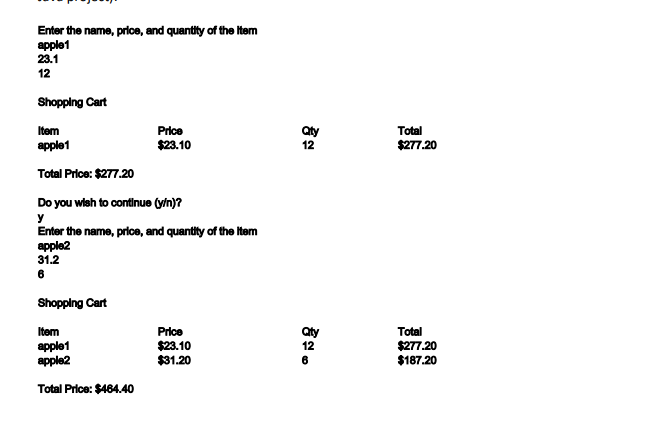
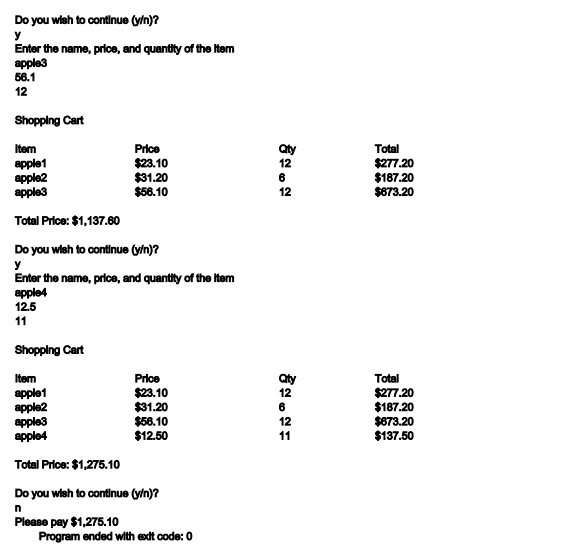
Enter the name, price, and quantity of the Item apple1 23.1 12 Shopping Cart Item apple1 Price $23.10 Qty 12 Total $277.20 Total Price: $277.20 Do you wish to continue (y)? y Enter the name, price, and quantity of the Item apple2 31.2 6 Shopping Cart Item apple1 apple2 Price $23.10 $31.20 aty 12 6 Total $277.20 $187.20 Total Price: $464.40 aty Do you wish to continue (vin)? y Enter the name, price, and quantity of the Item apple3 56.1 12 Shopping Cart Item Price apple1 $23.10 apple2 $31.20 apple3 $56.10 Total Price: $1,137.60 Do you wish to continue (y)? Enter the name, price, and quantity of the Item apple4 12.5 11 12 6 12 Total $277.20 $187.20 $673.20 aty 12 6 12 11 Shopping Cart Item Price apple1 $23.10 apple2 $31.20 apple3 $56.10 apple4 $12.50 Total Price: $1,275.10 Do you wish to continue (y)? n Please pay $1,275.10 Program ended with eact code: 0 Total $277.20 $187.20 $673.20 $137.50
Step by Step Solution
There are 3 Steps involved in it

Get step-by-step solutions from verified subject matter experts
 Study Help