







Question: Could you please help me with this for C programming Project Description: In this project, you will continue your work with the vector calculator project
Could you please help me with this for C programming 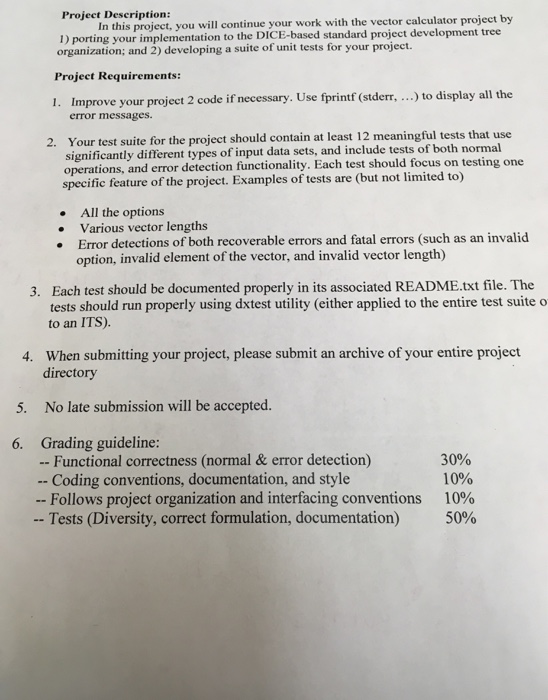
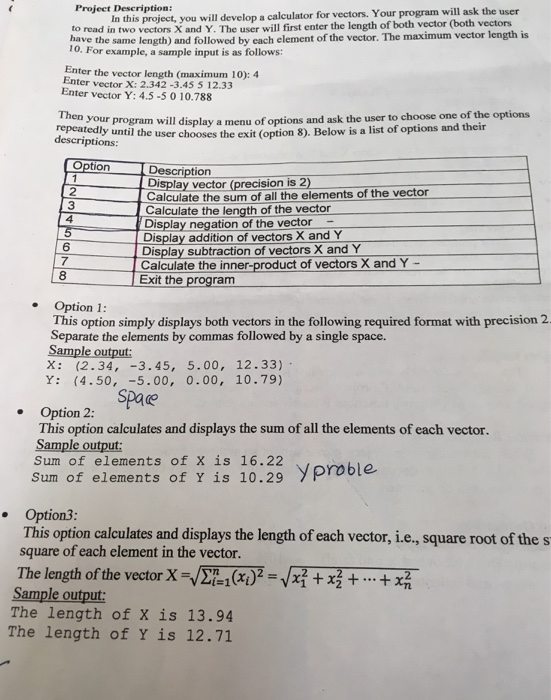
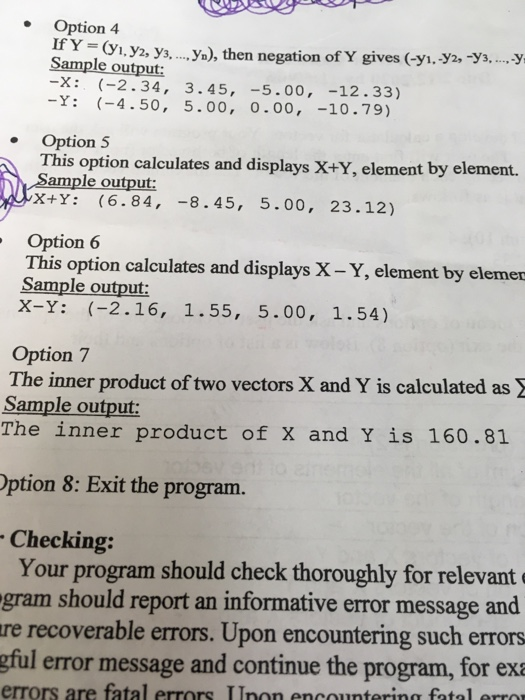
Project Description: In this project, you will continue your work with the vector calculator project by 1) porting your implementation to the DICE-based standard project development tree organization; and 2) developing a suite of unit tests for your project. Project Requirements: 1. Improve your project 2 code if necessary. Use fprintf(stderr, ...) to display all the error messages. 2. Your test suite for the project should contain at least 12 meaningful tests that use significantly different types of input data sets, and include tests of both normal operations, and error detection functionality. Each test should focus on testing one specific feature of the project. Examples of tests are (but not limited to) All the options Various vector lengths Error detections of both recoverable errors and fatal errors (such as an invalid option, invalid element of the vector, and invalid vector length) 3. Each test should be documented properly in its associated README.txt file. The tests should run properly using dxtest utility (either applied to the entire test suite o to an ITS). 4. When submitting your project, please submit an archive of your entire project directory 5. No late submission will be accepted. 30% 6. Grading guideline: -- Functional correctness (normal & error detection) -- Coding conventions, documentation, and style -- Follows project organization and interfacing conventions -- Tests (Diversity, correct formulation, documentation) 10% 10% 50% Project Description: In this project, you will develop a calculator for vectors. Your program will ask the user to read in two vectors X and Y. The user will first enter the length of both vector (both vectors have the same length) and followed by cach element of the vector. The maximum vector length is 10. For example, a sample input is as follows: Enter the vector length (maximum 10): 4 Enter vector X: 2.342 -3.45 5 12.33 Enter Vector Y: 4.5-5 0 10.788 repeatedly until the user chooses the exit descriptions: your program will display a menu of options and ask the user to choose one of the options the user chooses the exit (option 8). Below is a list of options and their Option Description Desolay Ye the Display vector (precision is 2) Calculate the sum of all the elements of the vector Calculate the length of the vector | Display negation of the vector - Display addition of vectors X and Y Display subtraction of vectors X and Y Calculate the inner-product of vectors X and Y - Exit the program Option 1: This option simply displays both vectors in the following required format with precision 2. Separate the elements by commas followed by a single space. Sample output: X: (2.34, -3.45, 5.00, 12.33) Y: (4.50, -5.00, 0.00, 10.79) Space Option 2: This option calculates and displays the sum of all the elements of each vector. Sample output: Sum of elements of X is 16.22 Sum of elements of Y is 10.29 Y proble Option3: This option calculates and displays the length of each vector, i.e., square root of the s square of each element in the vector. The length of the vector X=271(x)2 = x2 + x3 + ... + x2 Sample output: The length of X is 13.94 The length of Y is 12.71 Option 4 If Y = (1, 72, 73... y.), then negation of Y gives (-yi. -Y2, -Y3...-.-Y Sample output: -X: (-2.34, 3.45, -5.00, -12.33) -Y: (-4.50, 5.00, 0.00, -10.79) Option 5 This option calculates and displays X+Y, element by element. Sample output: AX+Y: (6.84, -8.45, 5.00, 23.12) Option 6 This option calculates and displays X - Y, element by elemer Sample output: X-Y: (-2.16, 1.55, 5.00, 1.54) Option 7 The inner product of two vectors X and Y is calculated as Sample output: The inner product of X and Y is 160.81 Option 8: Exit the program. - Checking: Your program should check thoroughly for relevante gram should report an informative error message and are recoverable errors. Upon encountering such errors gful error message and continue the program, for exa errors are fatal errors Inon encountering fatal error
Step by Step Solution
There are 3 Steps involved in it

Get step-by-step solutions from verified subject matter experts
 Study Help