







Question: countdown.js use strict; $(document).ready(function() { var calculateDays = function( date ) { var today = new Date(); var oneDay = 24*60*60*1000; // hours * minutes
countdown.js
"use strict";
$(document).ready(function() {
var calculateDays = function( date ) {
var today = new Date();
var oneDay = 24*60*60*1000; // hours * minutes * seconds * milliseconds
var days = ( date.getTime() - today.getTime() ) / oneDay;
return Math.ceil(days);
};
$("#countdown").click(function() {
var event = $("#event").val();
var dt = $("#date").val();
var message = $("#message");
var date, days;
// clear previous message
message.text( " " );
//make sure task and due date are entered and correct
if (event.length === 0 || dt.length === 0) {
message.text( "Please enter both a name and a date." );
} else {
//make sure due date string has slashes and a 4-digit year
var index = dt.indexOf("/");
if (index === -1) {
message.text( "Please enter the date in MM/DD/YYYY format." );
} else {
// check for the second slash
if (dt.indexOf("/", index + 1) === -1) {
message.text( "Please enter the date in MM/DD/YYYY format." );
}
}
var year = dt.substring(dt.length - 4);
if (isNaN(year)) {
message.text( "Please enter the date in MM/DD/YYYY format." );
}
//convert due date string to Date object and make sure date is valid
date = new Date(dt);
if (date === "Invalid Date") {
message.text( "Please enter the date in MM/DD/YYYY format." );
}
}
// if no error messages, calculate and display days until event
if (message.text() === " ") {
//calculate days
days = calculateDays(date);
//create and display message
if (days === 0) {
message.text( "Hooray! Today is " + event + "!" );
}
if (days
event = event.substring(0,1).toUpperCase() + event.substring(1); // capitalize event
message.text( event + " happened " + Math.abs(days) + " day(s) ago." );
}
if (days > 0) {
message.text( days + " day(s) until " + event + "!" );
}
}
}); // end click()
// set focus on initial page load
$("#event").focus();
}); // end ready()
index.html
Countdown To...
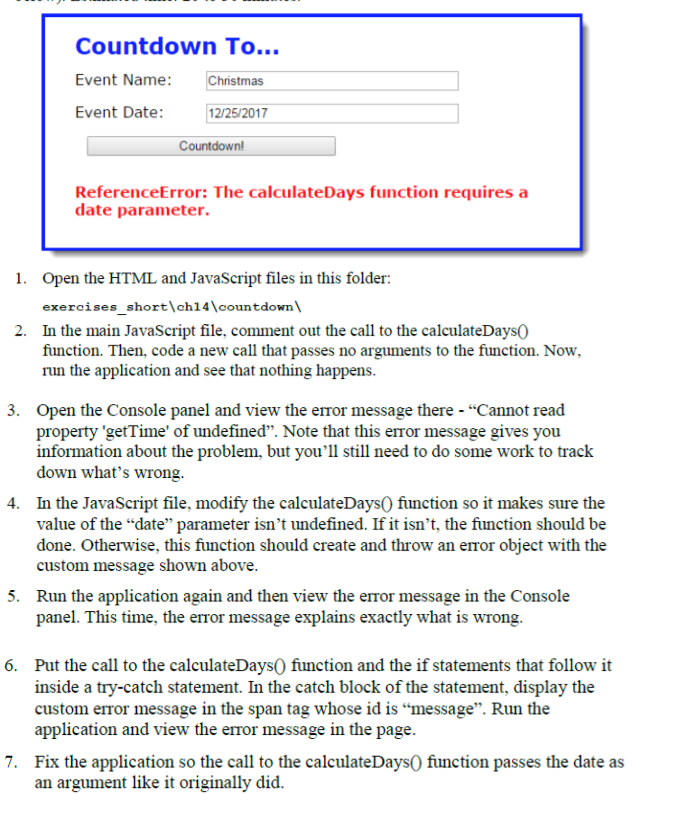
Countdown To... Event Name: Christmas Event Date: 12/25/2017 Countdown! ReferenceError: The calculateDays function requires a date parameter. 1. Open the HTML and JavaScript files in this folder: exercises_short ch14\countdown 2. In the main JavaScript file, comment out the call to the calculateDays0 function. Then, code a new call that passes no arguments to the function. Now, run the application and see that nothing happens. 3. Open the Console panel and view the error message there - "Cannot read property 'getTime' of undefined. Note that this error message gives you information about the problem, but you'll still need to do some work to track down what's wrong. 4. In the JavaScript file, modify the calculateDays() function so it makes sure the value of the "date parameter isn't undefined. If it isn't, the function should be done. Otherwise, this function should create and throw an error object with the custom message shown above. 5. Run the application again and then view the error message in the Console panel. This time, the error message explains exactly what is wrong. 6. Put the call to the calculateDays() function and the if statements that follow it inside a try-catch statement. In the catch block of the statement, display the custom error message in the span tag whose id is message. Run the application and view the error message in the page. 7. Fix the application so the call to the calculateDays() function passes the date as an argument like it originally did
Step by Step Solution
There are 3 Steps involved in it

Get step-by-step solutions from verified subject matter experts
 Study Help