







Question: Course Project Instructions =========================== Write a program that reverses a text file by using a stack. The user interface must consist of 2 list boxes
Course Project Instructions ===========================
Write a program that reverses a text file by using a stack. The user interface must consist of 2 list boxes and 3 buttons. The 3 buttons are: Read - reads the text file into list box 1. Reverse - reverses the items in list box 1 by pushing them onto stack 1, then popping them from stack 1 (in the reverse order) and adding them to list box 2. Write - writes the contents of list box 2 to a new text file. At first, only the Read button is enabled. After it is clicked, it is disabled and the Reverse button is enabled. After it is clicked, it is disabled and the Write button is enabled. After it is clicked, it is disabled. The name of the input text file is "input.txt". The input text file will contain no more than 100 lines of text. This fact is not needed by the program. It simply means that memory usage is not an issue. The name of the output text file is "output.txt". Make sure you study the Course Project Guidance document and the Course Project Output document. Upload your zipped assignment folder, which contains the java and class files.
Course Project Guidance =======================
Suggested import statements: import java.awt.*; import java.awt.event.*; import java.io.*; import javax.swing.*; import javax.swing.border.*; import java.util.*; Suggested class statement: public class ReverseFileViaStack extends JFrame implements ActionListener { // Everything in your class (see below). } Some suggested fields: // Fonts: private final Font fontBold = new Font(Font.DIALOG, Font.BOLD, 14); private final Font fontPlain = new Font(Font.DIALOG, Font.PLAIN, 14); // Lists: private JList list1; private JList list2; // List models: private DefaultListModel listModel1 = new DefaultListModel(); private DefaultListModel listModel2 = new DefaultListModel(); // Stack (from the Java Collections Framework): private Stack stack = new Stack(); Some suggested functions: // Constructor. public ReverseFileViaStack() { // It should setup the entire UI. // Here are a few tricky parts: listModel1 = new DefaultListModel(); list1 = new JList(listModel1); listModel2 = new DefaultListModel(); list2 = new JList(listModel2); } // Button handler. // Calls the appropriate function based on which button was clicked. public void actionPerformed(ActionEvent e) { Object source = e.getSource(); if (source == btnRead) { readFile(); return; } if (source == btnReverse) { reverseFile(); return; } if (source == btnWrite) { writeFile(); return; } } // Reads the input text file line-by-line. // Adds each line it gets to the left list box. // To add each item (line) to the left list box, use its list model // addElement function. private void readFile() { } // Pushes each item from the left list onto the stack. // This uses the stack's push function. // To read each item in the left list box, use its list model // elementAt function (with a loop index). // Then pops the items from the stack one-by-one and adds each of them // to the right list. // This uses the stack's pop function. // To add each item (line) to the right list box, use its list model // addElement function. // This results in the right list being in reverse order of the left. private void reverseFile() { } // See the video. private void setFonts() { UIManager.put("Button.font", fontBold); UIManager.put("ComboBox.font", fontBold); UIManager.put("Label.font", fontBold); UIManager.put("List.font", fontPlain); } // See the video. private void setSpecificSize(JComponent component, Dimension dimension) { component.setMinimumSize(dimension); component.setPreferredSize(dimension); component.setMaximumSize(dimension); } // Reads through the right list item-by-item. // Uses a PrintWriter to write these items to the output file. // Be sure to close the PrintWriter. private void writeFile() { } // The main function. public static void main(String[] args) { ReverseFileViaStack gui = new ReverseFileViaStack(); gui.setDefaultCloseOperation(JFrame.EXIT_ON_CLOSE); } Course Project OutputFile
=========================
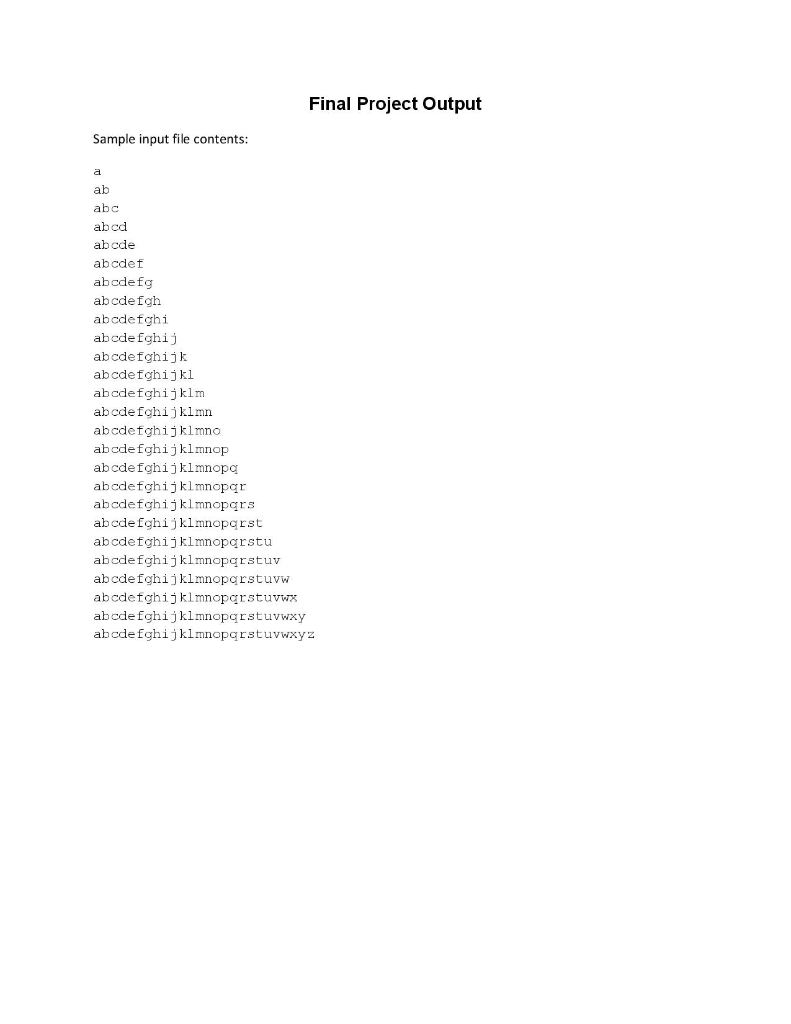
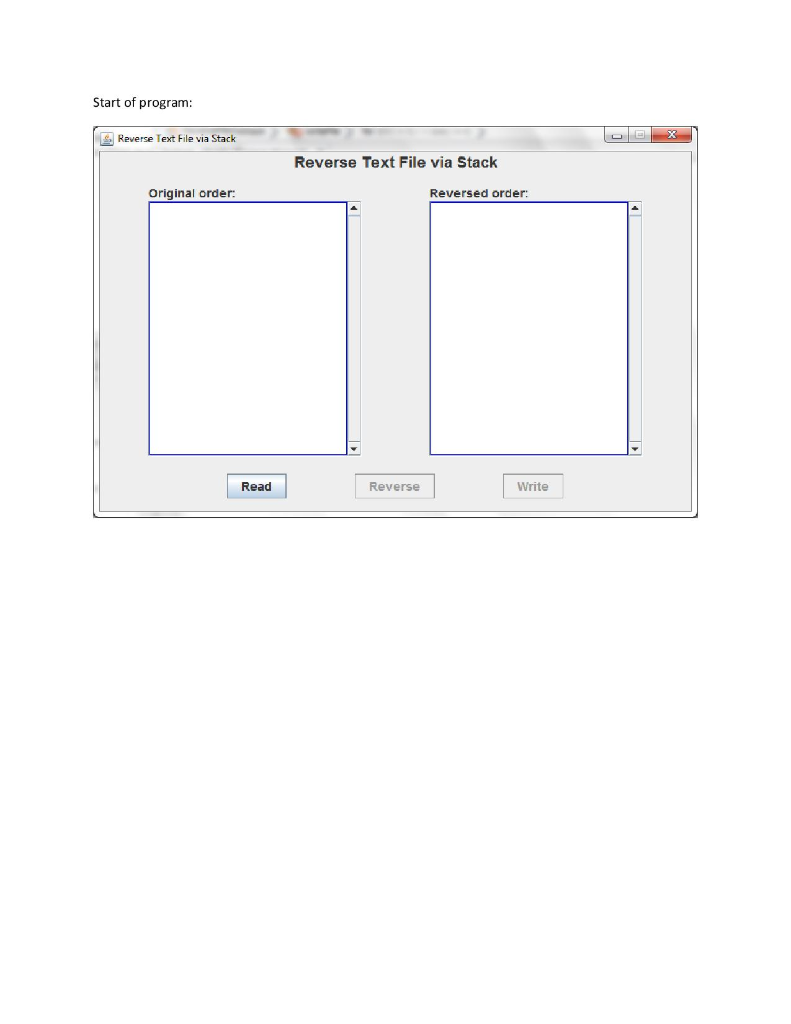
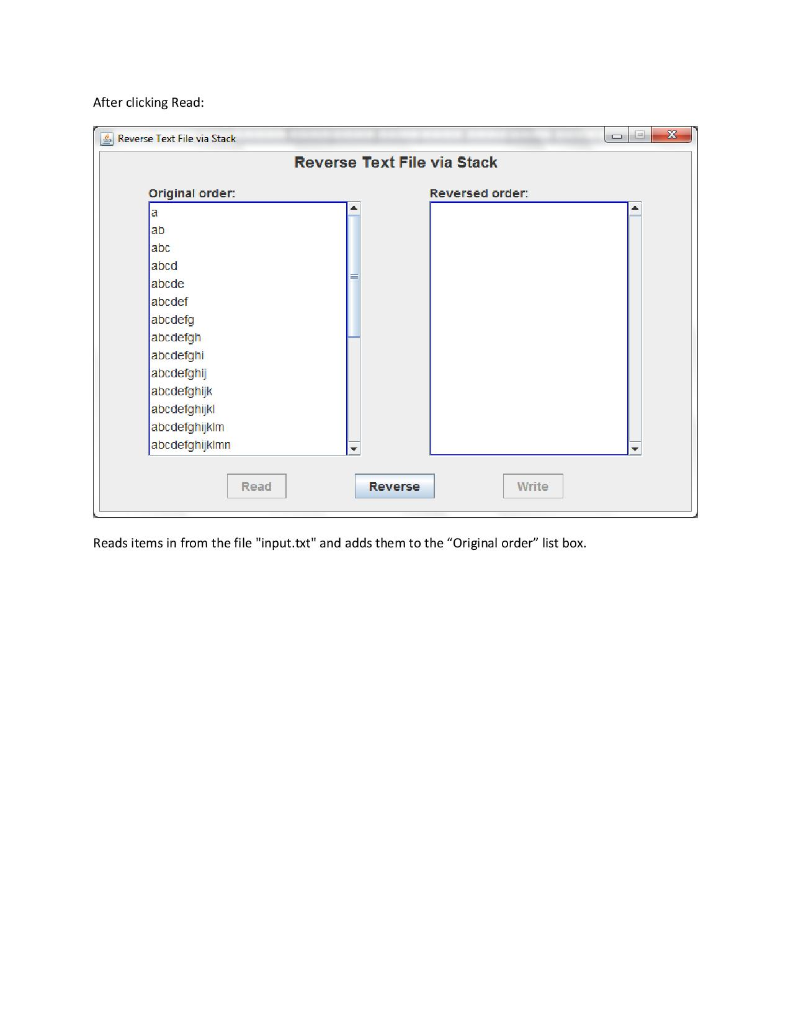
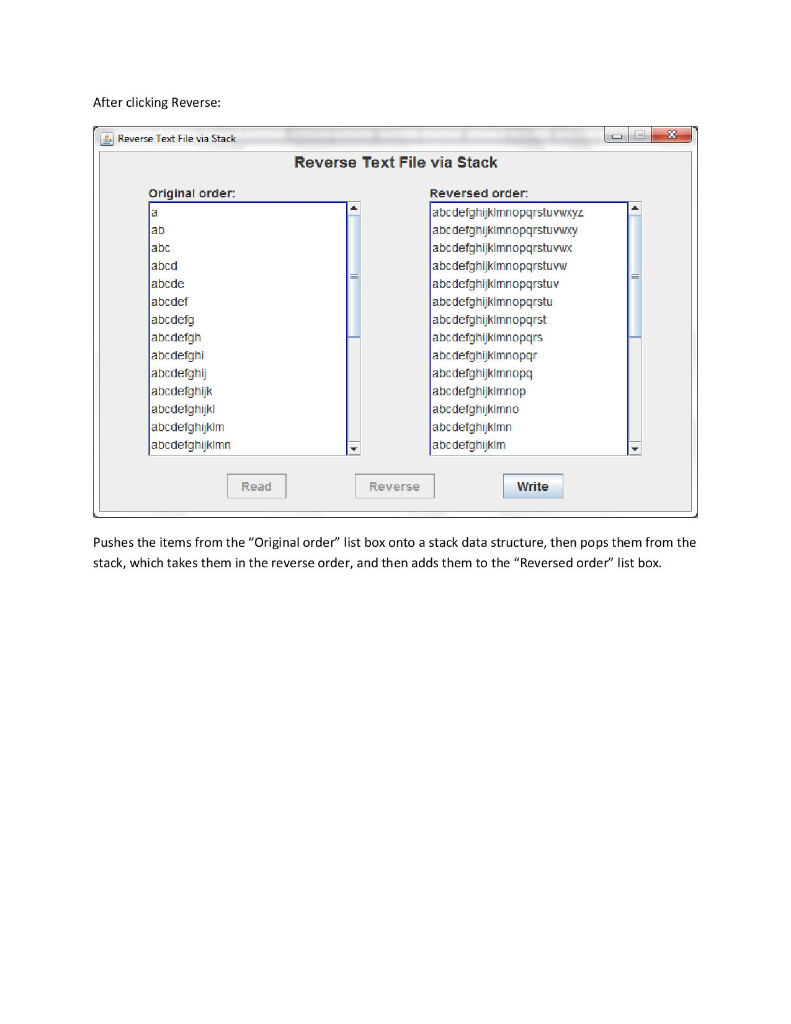
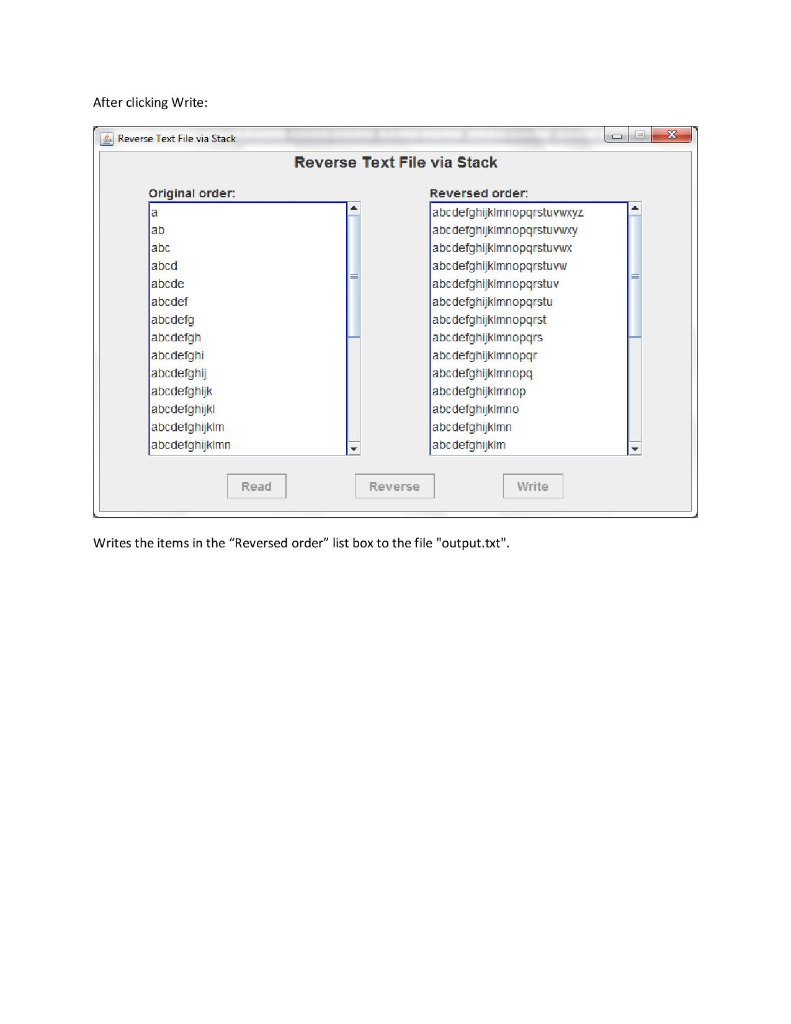
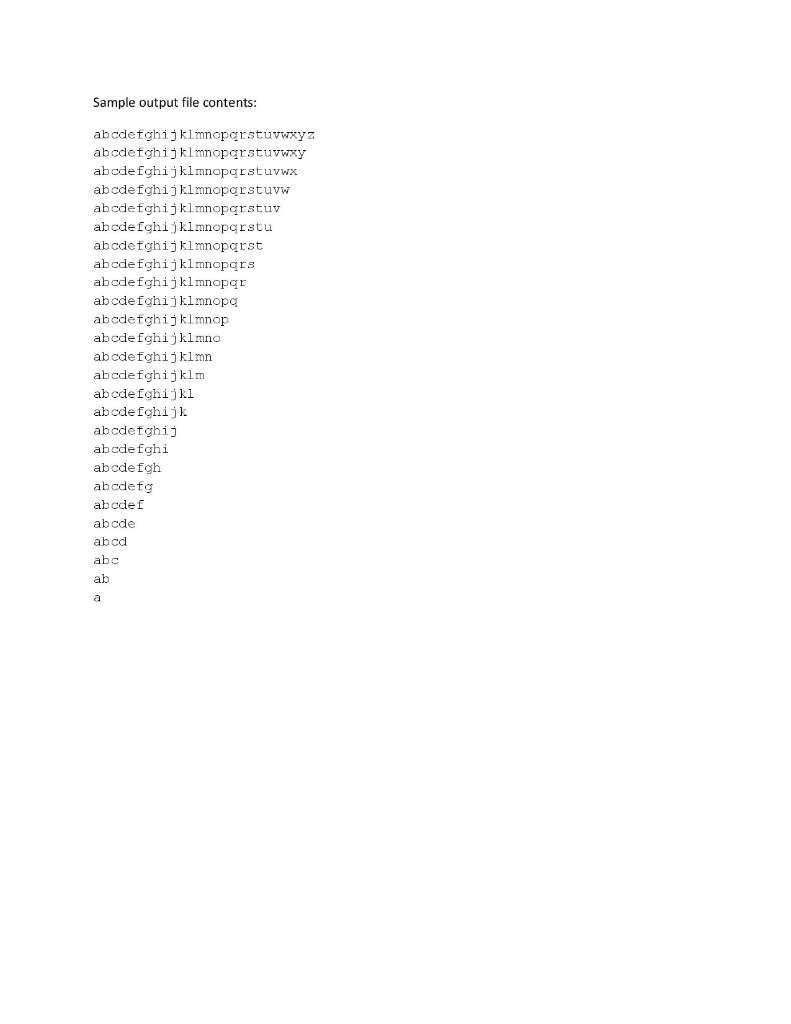
Final Project Output Sample input file contents ab abc abcd abcde abcdef abcdefg abcdefgh abcdefghi abcde fgh+) abcdefghijk abcdefghijkl abcdefghijklm abcdefghijklmn abcdetghijklmno abcdefghijklmnop abcdefghijklmnopc abcdefghijklmnopar abcdefghijklmnopgrs abcde fgh i j kl mnopq rst abcdefghijklmnoparstu abcdefghijklmnopqrstuv abcdefghijklmnoparstuvw abcdefghijklmnopqrstuvwx abcde fgh j kmnopars tuvwxy abcde fghi j klmncpqrst uvwxyz Start of program Reverse Text File via Stack Reverse Text File via Stack original order Revers ed order: Read Reverse Write After clicking Read Reverse Text File via Stack Reverse Text File via Stack Original order: Reversed order: ab abc abcd abcde abcdef abcdefg abcdefgh abcdefghi abcdetghij abcdefghijk abcdetghijkl abcdelghijkim abcdetghijklmn Read Reverse Write Reads items in from the file "input.txt" and adds them to the "Original order" list box. After clicking Reverse: Reverse Text File via Stack Reverse Text File via Stack original order ab abc abcd abcde abcdef abcdefg abcdefgh abcdefghi abcdetghi abcdefghijk abcdelghijhk abcdetghjklm abcdetghijklmn Reversed order abcdefghijklmniopqrstuvwxyz abcdetghijkimnopqrstuvwcy abcdefghijklmnopqrstuvwx abcdefghijklmnopqrstuvw abcdefghijklmnopqrstuv abcdefghijklmnopqrstu abcdefghijklmnopqrst abedefghijkimnopqrs abcdefghijkimnopqr abcdefghijklmnopq abcdefghijklmnop abcdetghijkimno abcdefghijklmn abcdefghijkim Read Reverse Write Pushes the items from the "Original order" list box onto a stack data structure, then pops them from the stack, which takes them in the reverse order, and then adds them to the "Reversed order" list box After clicking Write Reverse Text File via Stack Reverse Text File via Stack original order ab abc abcd abcde abcdef abcdefg abcdefgh abcdefghi abcdetghi abcdefghijk abcdelghijhk abcdetghjklm abcdetghijklmn Reversed order abcdefghijklmniopqrstuvwxyz abcdetghijkimnopqrstuvwcy abcdefghijklmnopqrstuvwx abcdefghijklmnopqrstuvw abcdefghijklmnopqrstuv abcdefghijklmnopqrstu abcdefghijklmnopqrst abedefghijkimnopqrs abcdefghijkimnopqr abcdefghijklmnopq abcdefghijklmnop abcdetghijkimno abcdefghijklmn abcdefghijkim Read Reverse Write Writes the items in the "Reversed order" list box to the file "output.txt Sample output file contents abcdetghijklmnopgrstuvwzyz abcdetghijklmnopcrstuvwxy abcdefghijklmnopqrstuvwx. abcdefghijklmnopgrstuvw abcdefghijklmnopgrstuv abcdeIghijklmnopqrstu abcdefghijklmnoparst abcdefghijklmnopgrs abcdefghijklmnopqr abcdefghijklmnopc abcdefghijklmnop abcdefghijklmno abcdefghijklmn abcdefghijklm abcdeIghijkl abcdefghijk abcdetghij abcdefghi abcdefgh abcdefg abcdef abcde abcd abc ab
Step by Step Solution
There are 3 Steps involved in it

Get step-by-step solutions from verified subject matter experts
 Study Help