







Question: COURSE PROJECT Introduction The student will be provided with a project scenario via an Excel spreadsheet that will require the use of several analytical tools
COURSE PROJECT
Introduction
The student will be provided with a project scenario via an Excel spreadsheet that will require the use of several analytical tools to arrange, display and analyze data.
Directions
Project
You are the Quality Manager for Widgets, Inc. You have just won a contract to produce a specialized widget that the customer requires a very tight specification limit This widget is to be in length, plus or minus This gives the total specification limit of to
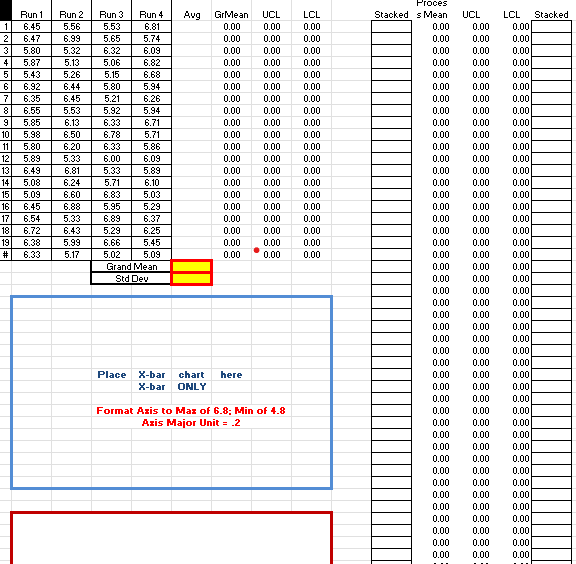
You have set up the production line to produce a test run of the widgets Data Set The sample size consists of a total of samples per run, with a total of four runs. A total of samples will be used to determine if the process is capable of producing the widgets within specification.
Due to the specifications of the customer, and the setup of the manufacturing processes, the systematic random sampling technique was used to ensure that samples from each run were collected at the same point in time on different days. This provides the basis for the Xbar chart to group the sample from each run into logical subgroups.
Requirements:
Calculate the subgroup mean for each numbered sample
Calculate the grand mean and standard deviation of the subgroup samples
Calculate the UCL and LCL of the grouped samples
Create the Xbar chart
Provide detailed analysis of the Xbar chart
To ensure that the process in actually producing individual widgets within specification limits you have decided to use an Individual Measurement chart that will plot each of the samples against a calculated UCL and LCL as well as plotting the data against the customer specification limits
Requirements:
Stack the sample data place the run data into a single column. Run first, Run second, etc
Using the Data Analysis Toolpak, create the Descriptive Statistics for the stacked data
Using the Descriptive Statistics output, calculate the UCL and LCL
Create the IM chart using the calculated UCL and LCL
Recopy the stacked data, and enter the customer specification limits
Create the IM chart of the sample data against the customer specifications
Provide a detailed analysis of both IM charts
Answer the questions on the Questions DS tab on the spreadsheet, and follow the instructions.
Repeat the steps for Data Set
Rubric points possible
The project will be graded with the following criteria:
Data properly displayed
a pts each Data Set; Total
Descriptive Statistics output displayed Data Sets &
a pts each Data Set; Total
Xbar charts correctly created and displayed Data Sets &
a pts each Data Set; Total
Xbar charts data correctly calculated Avg Grand Mean, UCL, LCLData Sets &
a pts each Data Set; Total
Xbar chart detailed analysis and worded to ensure understanding Data Sets &
a pts each Data Set; Total
Questions for Data Set answered correctly
a pts
IM charts correctly created and displayed Data Sets &
a pts each Data Set; Total
IM charts data correctly calculated Avg UCL, LCL; Specification Mean, USL, LSLData Sets &
a pts each Data Set; Total
IM chart analysis of both charts detailed and worded to ensure understanding Data Sets &
a pts each Data Set; Total
Questions for Data Set answered correctly
a pts
Step by Step Solution
There are 3 Steps involved in it
1 Expert Approved Answer
Step: 1 Unlock

Question Has Been Solved by an Expert!
Get step-by-step solutions from verified subject matter experts
Step: 2 Unlock
Step: 3 Unlock
 Study Help