







Question: { cout outer = outer endl; for (int inner =1; inner = size; inner++) { cout inner = inner endl; } return 0; Step 1:
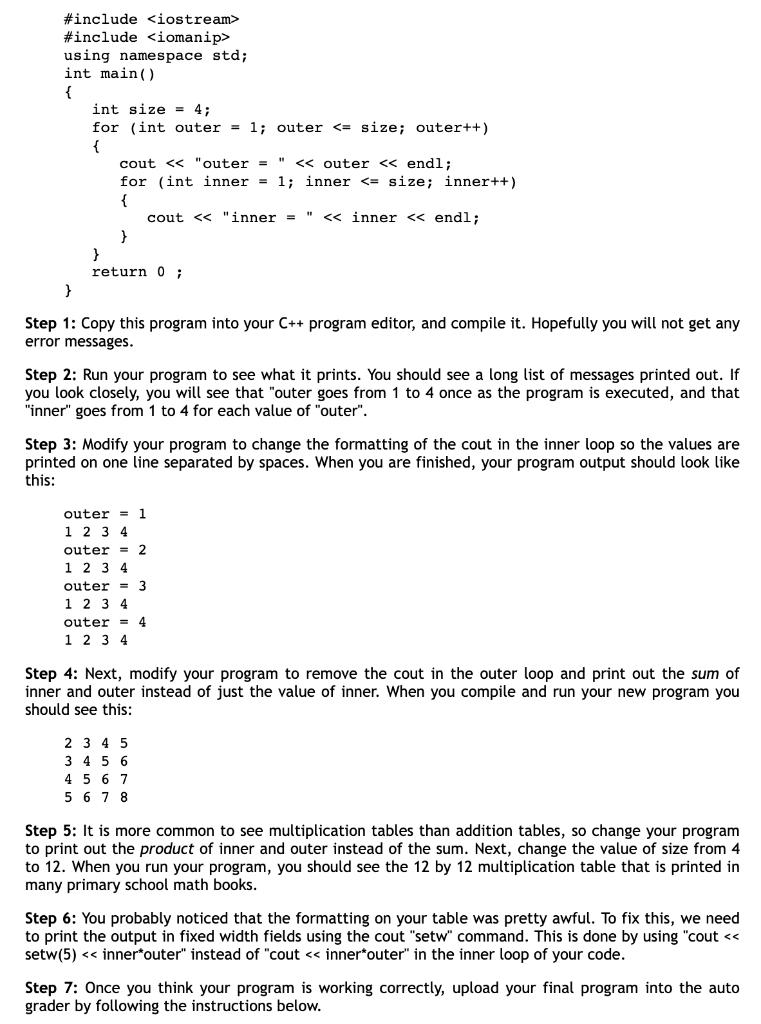
\{ cout "outer =" outer endl; for (int inner =1; inner = size; inner++) { cout "inner =" inner endl; } return 0; Step 1: Copy this program into your C++ program editor, and compile it. Hopefully you will not get any error messages. Step 2: Run your program to see what it prints. You should see a long list of messages printed out. If you look closely, you will see that "outer goes from 1 to 4 once as the program is executed, and that "inner" goes from 1 to 4 for each value of "outer". Step 3: Modify your program to change the formatting of the cout in the inner loop so the values are printed on one line separated by spaces. When you are finished, your program output should look like this: outer =1 1234 outer =2 1234 outer =3 1234 outer =4 1234 Step 4: Next, modify your program to remove the cout in the outer loop and print out the sum of inner and outer instead of just the value of inner. When you compile and run your new program you should see this: 2345345645675678 Step 5: It is more common to see multiplication tables than addition tables, so change your program to print out the product of inner and outer instead of the sum. Next, change the value of size from 4 to 12 . When you run your program, you should see the 12 by 12 multiplication table that is printed in many primary school math books. Step 6: You probably noticed that the formatting on your table was pretty awful. To fix this, we need to print the output in fixed width fields using the cout "setw" command. This is done by using "cout setw(5) inner*outer" instead of "cout inner*outer" in the inner loop of your code. Step 7: Once you think your program is working correctly, upload your final program into the auto grader by following the instructions below
Step by Step Solution
There are 3 Steps involved in it

Get step-by-step solutions from verified subject matter experts
 Study Help