







Question: CPRG-352 - Web Application Programming Week 2 Lab Topic: Simple Servlet Part 1 Create a Java web application called Week2Lab_Calculators, with a servlet called AgeCalculatorServlet.java
CPRG-352 - Web Application Programming
Week 2 Lab Topic: Simple Servlet
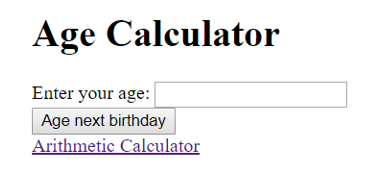
Part 1 Create a Java web application called "Week2Lab_Calculators", with a servlet called AgeCalculatorServlet.java and a JSP file called agecalculator.jsp. In web.xml, map URL /age to AgeCalculatorServlet. When executed, this application navigates to /age and should show the following HTML form:
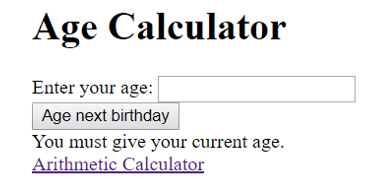
If the user clicks on the "Age next birthday" button without filling in a value in the text box then the user should see the message "You must give your current age" below this form, e.g.
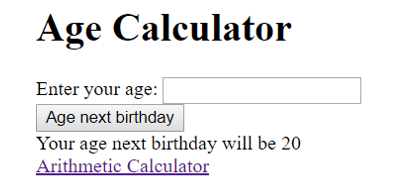
If the user enters an invalid entry (e.g. text), display an error message You must enter a number. If the user does fill in a value, e.g. 19, and submits then the application should show the following:
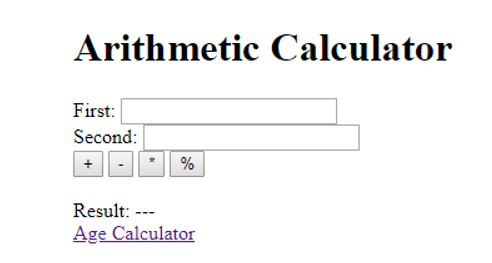
Part 2 Add a link with the text Arithmetic Calculator to agecalculator.jsp that navigates to arithmetic. Create another servlet (ArithmeticCalculatorServlet.java), another JSP (arithmeticcalculator.jsp). Map /arithmetic to AgeCalculatorServlet. Navigating to /arithmetic produces the following screen:
The user can enter two integer values in the text boxes provided, and then click on one of the buttons to tell the application which operation they want to perform on the values. If no calculation has been performed, then the result should show as "---". If a user enters an invalid input (blank textbox or text), then the result should show invalid. Ensure the textboxes stay populated with the values they had previous entered. Add a link to Age Calculator to allow the user to navigate back to the first calculator.
Example 1: adding 1 and 3
Example 2: Multiplying 3 and 7
Example 3: clicking on a button without providing either or both values or entering text
Example 4: entering invalid input
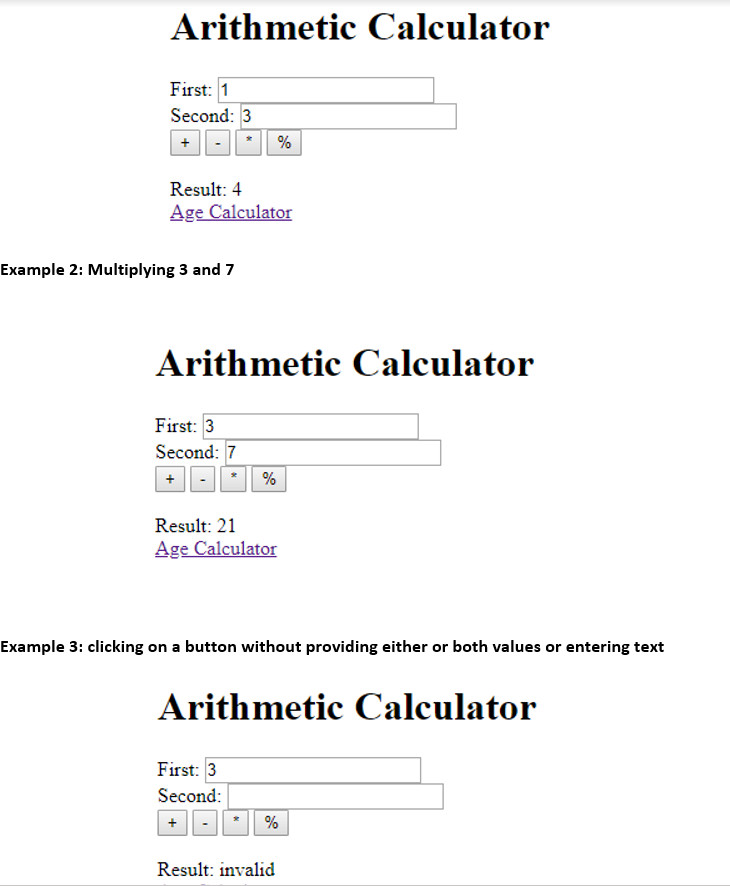
The Image order is from top to bottom. I am using Netbeans for my web application to do the lab. I wrote part of the code but I have issues with getting agecalculator.jsp or the servlet to work and I am not sure why.
Age Calculator Enter your age: Age next birthday Arithmetic Calculator Age Calculator Enter your age: Age next birthday You must give your current age. Arithmetic Calculator Age Calculator Enter your age: Age next birthday Your age next birthday will be 20 Arithmetic Calculator Arithmetic Calculator First: Second: + % Result: --- Age Calculator Arithmetic Calculator First: 1 Second: 3 + % Result: 4 Age Calculator Example 2: Multiplying 3 and 7 Arithmetic Calculator First: 3 Second: 7 Result: 21 Age Calculator Example 3: clicking on a button without providing either or both values or entering text Arithmetic Calculator First: 3 Second: Result: invalid
Step by Step Solution
There are 3 Steps involved in it

Get step-by-step solutions from verified subject matter experts
 Study Help