







Question: CPSC 1110 Spring 2018, Programming Assignment 3: Image File Transformation I need this to be programmed in C. Please comment if possible. CPSC 1110 Spring
CPSC 1110 Spring 2018, Programming Assignment 3: Image File Transformation
I need this to be programmed in C. Please comment if possible. 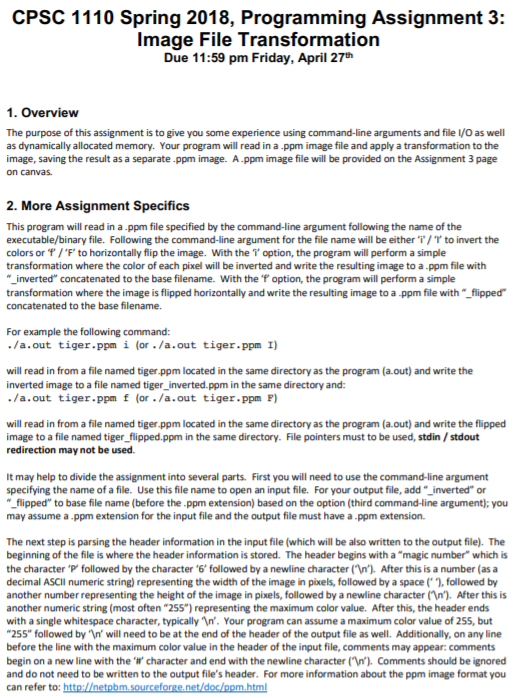
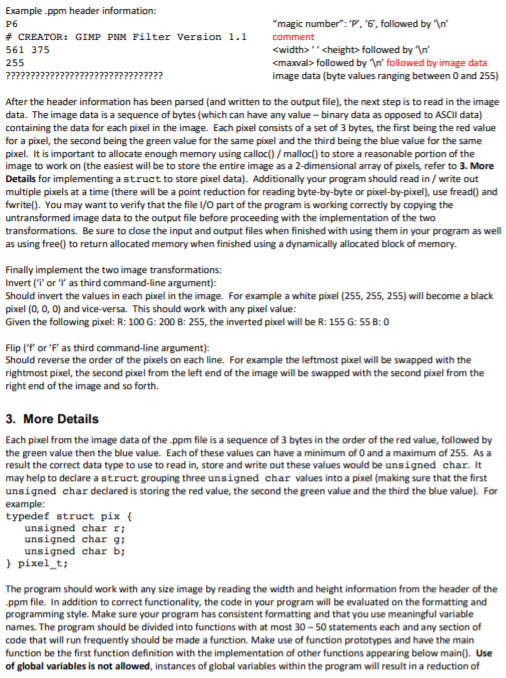
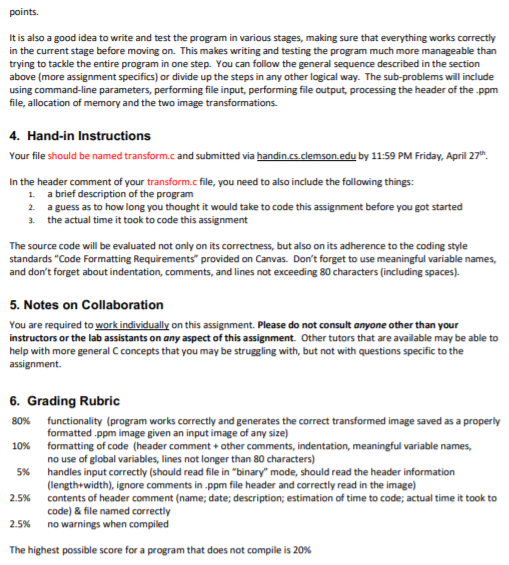
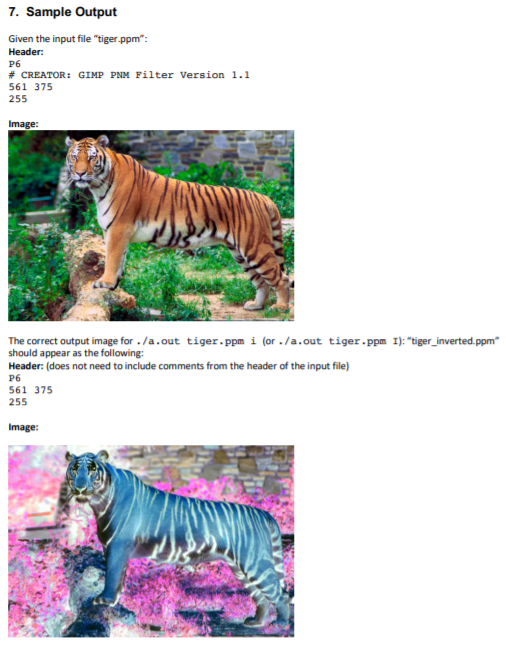
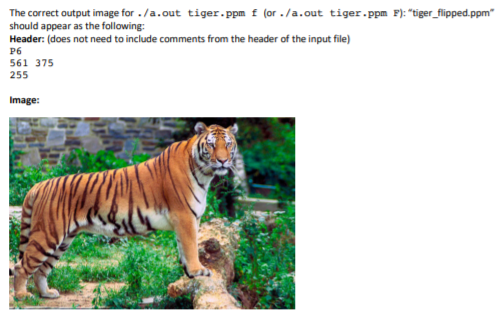
CPSC 1110 Spring 2018, Programming Assignment 3: Image File Transformation Due 11:59 pm Friday, April 27th 1. Overview The purpose of this assignment is to give you some experience using command-line arguments and file I/O as well as dynamically allocated memory. Your program will read in a ppm image file and apply a transformation to the image, saving the result as a separate.ppm image. A.ppm image file will be provided on the Assignment 3 page on canvas 2. More Assignment Specifics This program will read in a ppm file specified by the command-line argument following the name of the executable/binary file. Following the command-line argument for the file name will be either 'i'1'r to invert the colors or f/'F' to horizontally flip the image. With the T option, the program will perform a simple transformation where the color of each pixel will be inverted and write the resulting image to a ppm file with _inverted" concatenated to the base filename. With the "f option, the program will perform a simple transformation where the image is flipped horizontally and write the resulting image to a ppm file with "_flipped concatenated to the base filename. For example the following command: ./a.out tiger.ppm i (or /a.out tiger.ppm I) will read in from a file named tiger.ppm located in the same directory as the program (a.out) and write the inverted image to a file named tiger_inverted.ppm in the same directory and: ./a.out tiger.ppm f (or /a.out tiger.ppm ) will read in from a file named tiger ppm located in the same directory as the program (a.out) and write the flipped image to a file named tiger_flipped.ppm in the same directory. File pointers must to be used, stdin /stdout redirection may not be used. It may help to divide the assignment into several parts. First you will need to use the command-line argument specifying the name of a file. Use this file name to open an input file. For your output file, add "inverted" or "flipped" to base file name (before the .ppm extension) based on the option (third command-line argument); you may assume a ppm extension for the input file and the output file must have a.ppm extension. The next step is parsing the header information in the input file (which will be also written to the output file). The beginning of the file is where the header information is stored. The header begins with a "magic number which is the character .P' followed by the character .6, followed by a newline character ("v'). After thisis a number (as a decimal ASCII numeric string) representing the width of the image in pixels, followed by a space1, followed by another number representing the height of the image in pixels, followed by a newline character (n).After this is another numeric string (most often "255") representing the maximum color value. After this, the header ends with a single whitespace character, typically n. Your program can assume a maximum color value of 255, but "255" followed by 'n' will need to be at the end of the header of the output file as well. Additionally, on any line before the line with the maximum color value in the header of the input file, comments may appear: comments begin on a new line with the ' character and end with the newline character (n'). Comments should be ignored and do not need to be written to the output file's header. For more information about the ppm image format you CPSC 1110 Spring 2018, Programming Assignment 3: Image File Transformation Due 11:59 pm Friday, April 27th 1. Overview The purpose of this assignment is to give you some experience using command-line arguments and file I/O as well as dynamically allocated memory. Your program will read in a ppm image file and apply a transformation to the image, saving the result as a separate.ppm image. A.ppm image file will be provided on the Assignment 3 page on canvas 2. More Assignment Specifics This program will read in a ppm file specified by the command-line argument following the name of the executable/binary file. Following the command-line argument for the file name will be either 'i'1'r to invert the colors or f/'F' to horizontally flip the image. With the T option, the program will perform a simple transformation where the color of each pixel will be inverted and write the resulting image to a ppm file with _inverted" concatenated to the base filename. With the "f option, the program will perform a simple transformation where the image is flipped horizontally and write the resulting image to a ppm file with "_flipped concatenated to the base filename. For example the following command: ./a.out tiger.ppm i (or /a.out tiger.ppm I) will read in from a file named tiger.ppm located in the same directory as the program (a.out) and write the inverted image to a file named tiger_inverted.ppm in the same directory and: ./a.out tiger.ppm f (or /a.out tiger.ppm ) will read in from a file named tiger ppm located in the same directory as the program (a.out) and write the flipped image to a file named tiger_flipped.ppm in the same directory. File pointers must to be used, stdin /stdout redirection may not be used. It may help to divide the assignment into several parts. First you will need to use the command-line argument specifying the name of a file. Use this file name to open an input file. For your output file, add "inverted" or "flipped" to base file name (before the .ppm extension) based on the option (third command-line argument); you may assume a ppm extension for the input file and the output file must have a.ppm extension. The next step is parsing the header information in the input file (which will be also written to the output file). The beginning of the file is where the header information is stored. The header begins with a "magic number which is the character .P' followed by the character .6, followed by a newline character ("v'). After thisis a number (as a decimal ASCII numeric string) representing the width of the image in pixels, followed by a space1, followed by another number representing the height of the image in pixels, followed by a newline character (n).After this is another numeric string (most often "255") representing the maximum color value. After this, the header ends with a single whitespace character, typically n. Your program can assume a maximum color value of 255, but "255" followed by 'n' will need to be at the end of the header of the output file as well. Additionally, on any line before the line with the maximum color value in the header of the input file, comments may appear: comments begin on a new line with the ' character and end with the newline character (n'). Comments should be ignored and do not need to be written to the output file's header. For more information about the ppm image format you
Step by Step Solution
There are 3 Steps involved in it

Get step-by-step solutions from verified subject matter experts
 Study Help