







Question: cqn tou help me wirh this exercice please This assignment assumes that you have read and studied Chapter 2, sections 2.12.6 in the class textbook
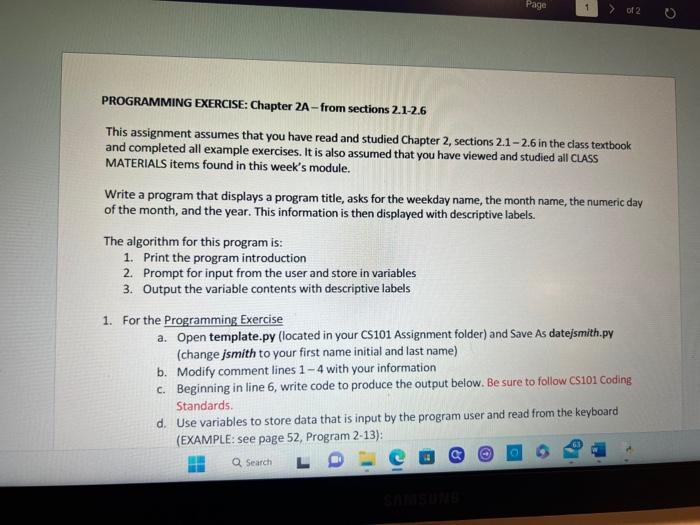
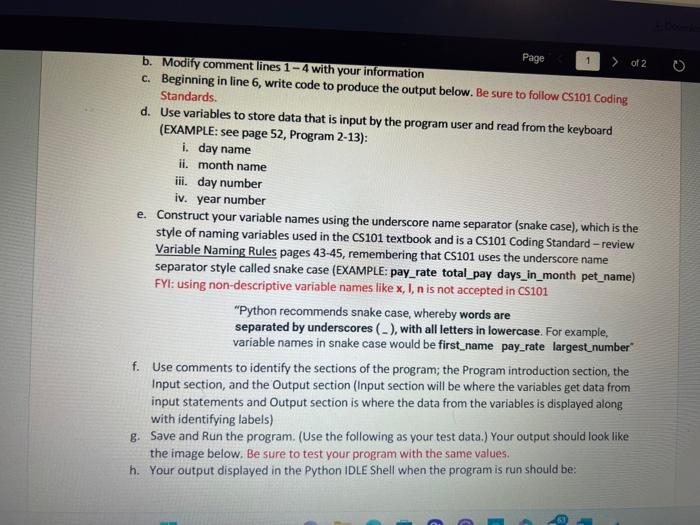
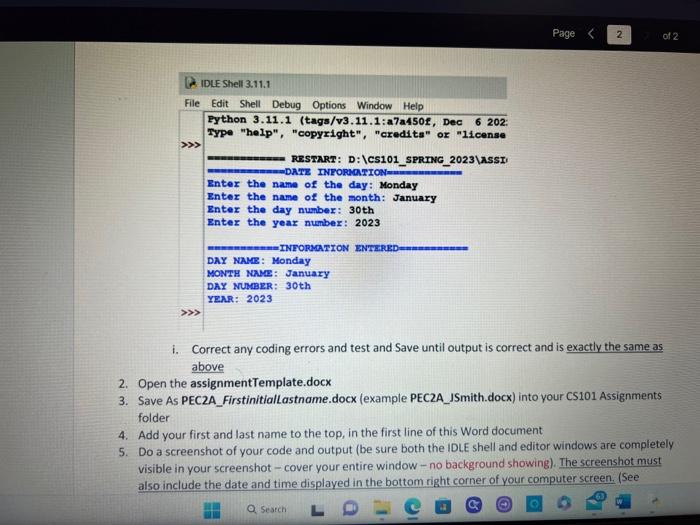
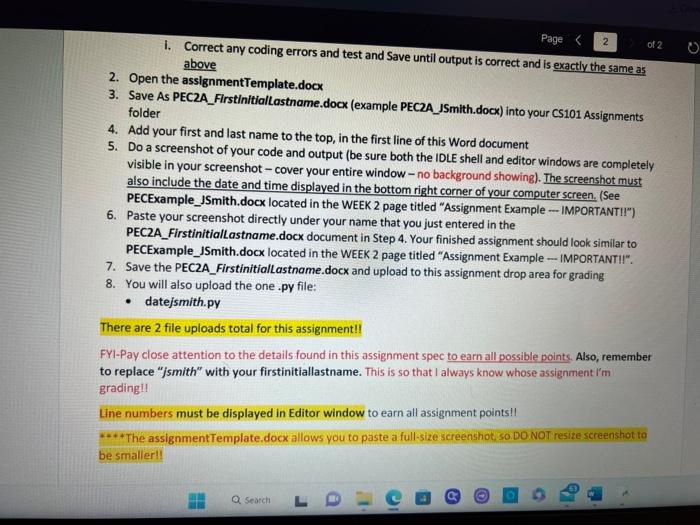
This assignment assumes that you have read and studied Chapter 2, sections 2.12.6 in the class textbook and completed all example exercises. It is also assumed that you have viewed and studied all CLASS MATERIALS items found in this week's module. Write a program that displays a program title, asks for the weekday name, the month name, the numeric day of the month, and the year. This information is then displayed with descriptive labels. The algorithm for this program is: 1. Print the program introduction 2. Prompt for input from the user and store in variables 3. Output the variable contents with descriptive labels 1. For the Programming Exercise a. Open template.py (located in your CS101 Assignment folder) and Save As date/smith.py (change jsmith to your first name initial and last name) b. Modify comment lines 14 with your information c. Beginning in line 6 , write code to produce the output below. Be sure to follow CS101 Coding Standards. d. Use variables to store data that is input by the program user and read from the keyboard (EXAMPLE: see page 52, Program 2-13): D. Modify comment lines 14 with your information c. Beginning in line 6 , write code to produce the output below. Be sure to follow cs101 Coding Standards. d. Use variables to store data that is input by the program user and read from the keyboard (EXAMPLE: see page 52, Program 2-13): i. day name ii. month name iii. day number iv. year number e. Construct your variable names using the underscore name separator (snake case), which is the style of naming variables used in the CS101 textbook and is a CS101 Coding Standard - review Variable Naming Rules pages 43-45, remembering that CS101 uses the underscore name separator style called snake case (EXAMPLE: pay_rate total_pay days_in_month pet_name) FYI: using non-descriptive variable names like x,I,n is not accepted in CS101 "Python recommends snake case, whereby words are separated by underscores (_), with all letters in lowercase. For example, variable names in snake case would be first_name pay_rate largest_number " f. Use comments to identify the sections of the program; the Program introduction section, the Input section, and the Output section (Input section will be where the variables get data from input statements and Output section is where the data from the variables is displayed along with identifying labels) g. Save and Run the program. (Use the following as your test data.) Your output should look like the image below. Be sure to test your program with the same values. h. Your output displayed in the Python IDLE Shell when the program is run should be: i. Correct any coding errors and test and Save until output is correct and is exactly the same as above 2. Open the assignmentTemplate.docx 3. Save As PEC2A_FirstinitialLastname.docx (example PEC2A_JSmith.docx) into your CS101 Assignments folder 4. Add your first and last name to the top, in the first line of this Word document 5. Do a screenshot of your code and output (be sure both the IDLE shell and editor windows are completely visible in your screenshot - cover your entire window - no background showing). The screenshot must also include the date and time displayed in the bottom right corner of your computer screen. (See PECExample_JSmith.docx located in the WEEK 2 page titled "Assignment Example - IMPORTANTII") 6. Paste your screenshot directly under your name that you just entered in the PEC2A_FirstinitialLastname.docx document in Step 4. Your finished assignment should look similar to PECEXample_JSmith.docx located in the WEEK 2 page titled "Assignment Example - IMPORTANTII". 7. Save the PEC2A_Firstinitiallastname.docx and upload to this assignment drop area for grading 8. You will also upload the one .py file: - datejsmith.py There are 2 file uploads total for this assignment!! FYI-Pay close attention to the details found in this assignment spec to earn all possible points. Also, remember to replace " ismith" with your firstinitiallastname. This is so that I always know whose assignment i'm gradingll Line numbers must be displayed in Editor window to earn all assignment points!! *.** The assignmentTemplate.docx allows you to paste a full-size screenshot, so.DO NOT resize screenshot to be smallerI
Step by Step Solution
There are 3 Steps involved in it

Get step-by-step solutions from verified subject matter experts
 Study Help