







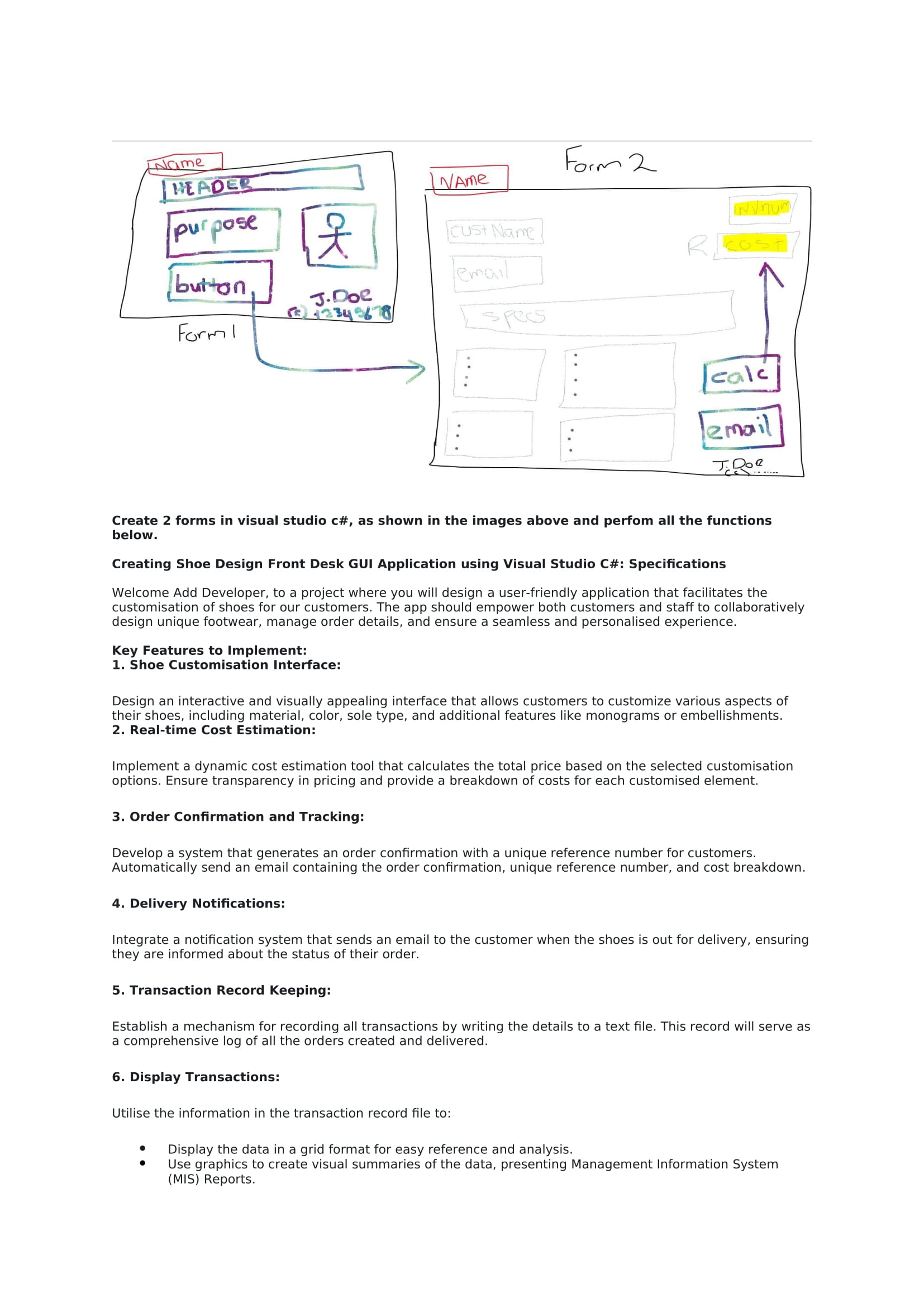
Question: Create 2 forms in visual studio c# , as shown in the images above and perfom all the functions below. Creating Shoe Design Front Desk
Create forms in visual studio c# as shown in the images above and perfom all the functions below.
Creating Shoe Design Front Desk GUI Application using Visual Studio C#: Specifications
Welcome Add Developer, to a project where you will design a userfriendly application that facilitates the customisation of shoes for our customers. The app should empower both customers and staff to collaboratively design unique footwear, manage order details, and ensure a seamless and personalised experience.
Key Features to Implement:
Shoe Customisation Interface:
Design an interactive and visually appealing interface that allows customers to customize various aspects of their shoes, including material, color, sole type, and additional features like monograms or embellishments.
Realtime Cost Estimation:
Implement a dynamic cost estimation tool that calculates the total price based on the selected customisation options. Ensure transparency in pricing and provide a breakdown of costs for each customised element.
Order Confirmation and Tracking:
Develop a system that generates an order confirmation with a unique reference number for customers. Automatically send an email containing the order confirmation, unique reference number, and cost breakdown.
Delivery Notifications:
Integrate a notification system that sends an email to the customer when the shoes is out for delivery, ensuring they are informed about the status of their order.
Transaction Record Keeping:
Establish a mechanism for recording all transactions by writing the details to a text file. This record will serve as a comprehensive log of all the orders created and delivered.
Display Transactions:
Utilise the information in the transaction record file to:
Display the data in a grid format for easy reference and analysis.
Use graphics to create visual summaries of the data, presenting Management Information System MIS Reports.
Step by Step Solution
There are 3 Steps involved in it
1 Expert Approved Answer
Step: 1 Unlock

Question Has Been Solved by an Expert!
Get step-by-step solutions from verified subject matter experts
Step: 2 Unlock
Step: 3 Unlock
 Study Help